
007 First Light is one of the most demanding PC games released this year, and IO Interactive ships it without graphics presets, which means you are staring at a wall of individual sliders the moment you boot it up. The good news: after testing across multiple GPU tiers, the sweet spot for every rig is findable. Whether you are running an RTX 5070 at 4K or squeezing performance out of an older mid-range card, this guide covers the exact settings that get you there in 007 First Light.
Why doesn't 007 First Light have graphics presets?
Unlike most modern releases, 007 First Light has no Low, Medium, High, or Ultra preset buttons. There is a "set to default" option in the settings menu, but this button simply drops everything to minimum values. That is not a starting point anyone wants.
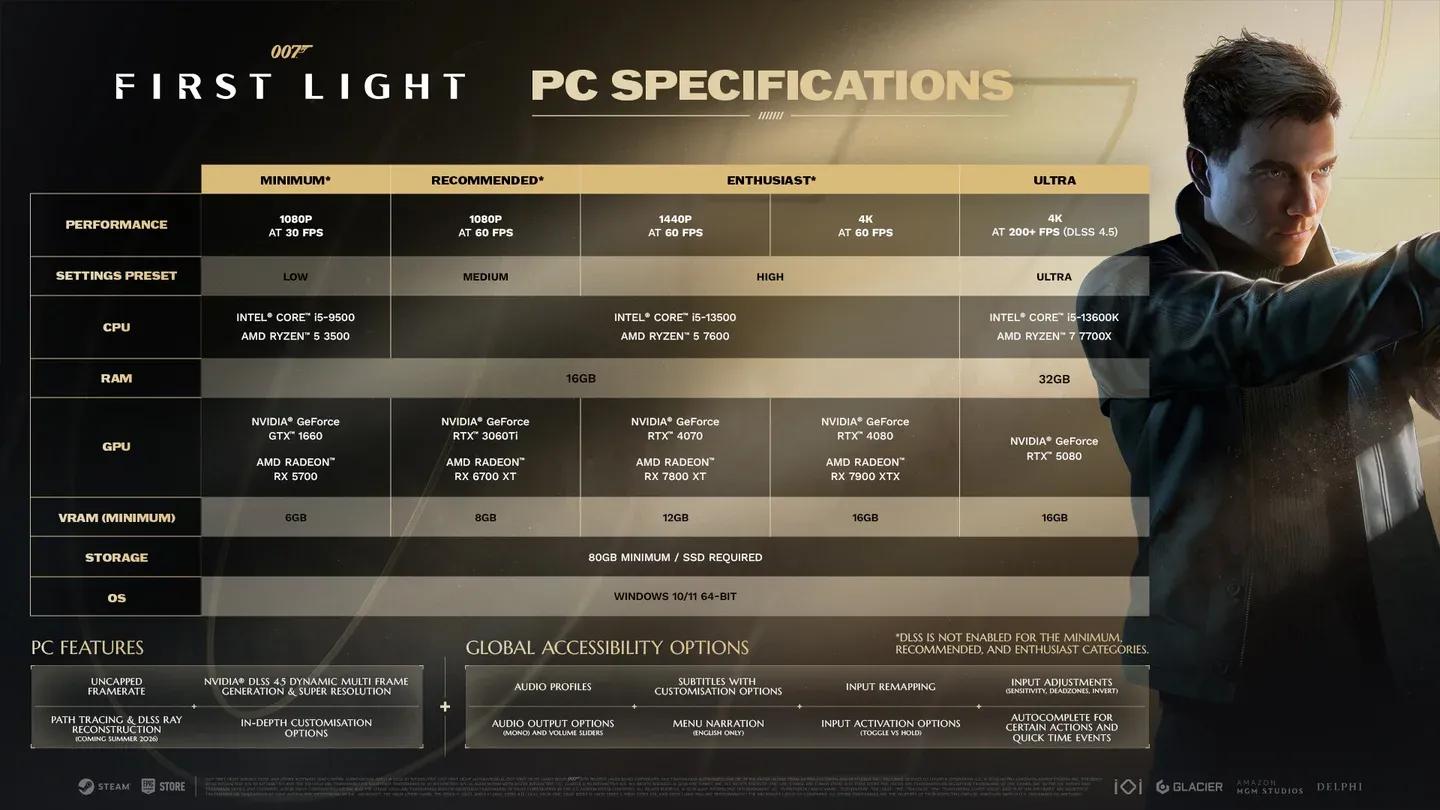
The upside is that the settings list is not especially long, and most players who meet the recommended specs (an RTX 3060 Ti or AMD RX 6700 XT) will land on a workable configuration quickly. The core decision for most people comes down to one question: do you prioritize frame rate or base resolution?
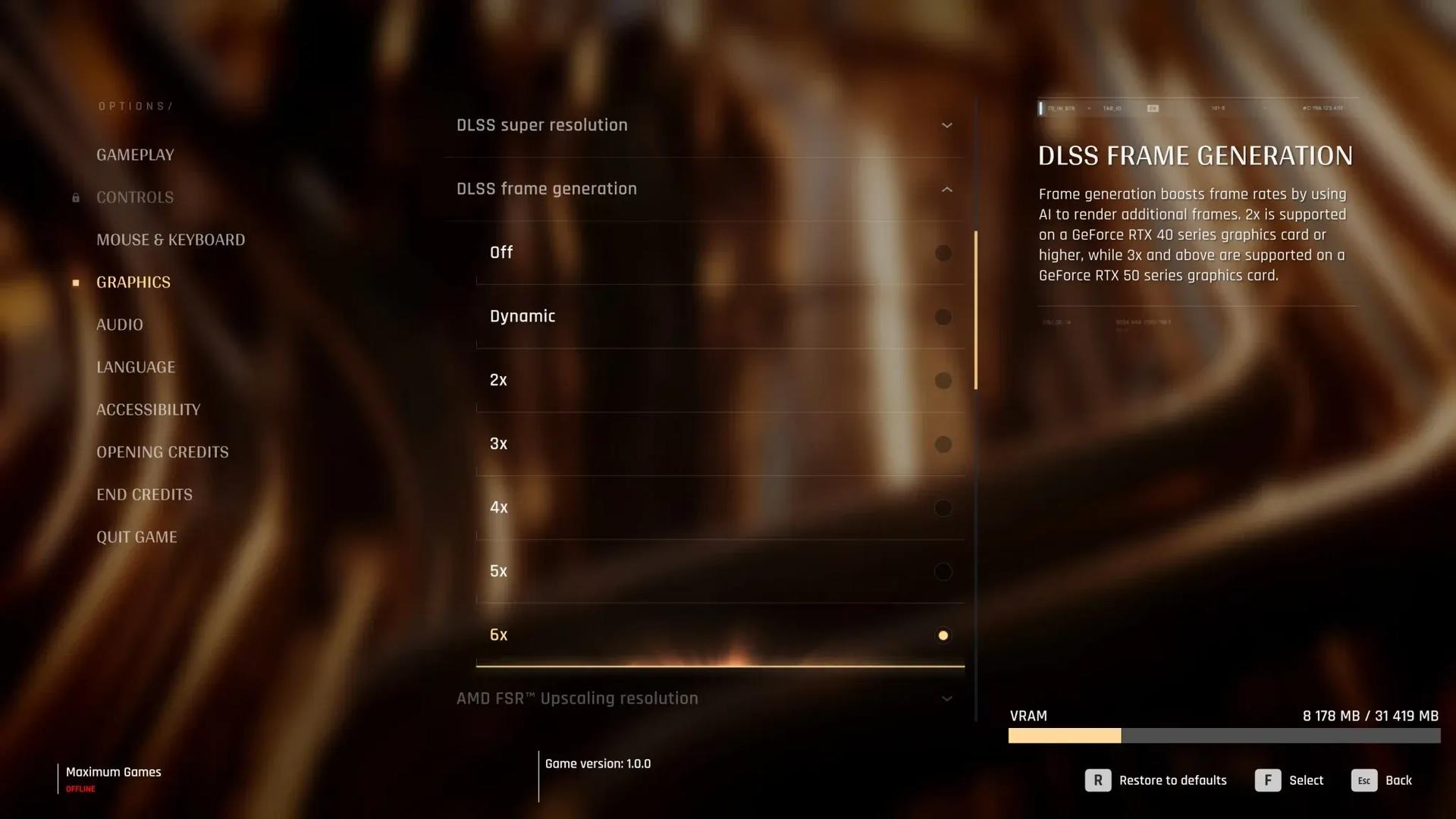
Full graphics settings panel

What are the best 007 First Light settings for a mid-range PC?
Running native 4K without upscaling is effectively impossible on an RTX 5070, even with all settings on low. You will see 40-45 fps at best. Enable upscaling and apply the settings below, and that same RTX 5070 jumps to 63-70 fps on average. An RTX 5080 paired with an AMD Ryzen 7800X3D at 4K using 2x frame generation delivers 92 fps average with a 59 fps 1% low.
For mid-range hardware like the RTX 3060 Ti, 1080p with DLSS set to Quality runs smoothly. Pushing to 1440p is possible but requires dialing some settings back.
Recommended settings for mid-range PCs (RTX 3060 Ti / RX 6700 XT class)
| Setting | Recommended Value | Notes |
|---|---|---|
| Display mode | Fullscreen | Best performance |
| V-Sync | On | Reduces screen tearing |
| V-Sync interval | 1 | Default |
| Transfer function | 2.2 | Better blacks for stealth scenes |
| Gamma | 1 / 100 | Default unless screen is low quality |
| Resolution scaling | DLSS (Nvidia) / FSR (AMD) | Required for 4K; strongly recommended elsewhere |
| DLSS/FSR quality | Quality at 1080p, Balanced at 1440p, Performance at 4K | Adjust based on headroom |
| DLSS frame generation | Dynamic / 2x | Only on RTX 5000 series for Dynamic |
| Texture quality | Ultra (mid-range), Medium (budget/handheld) | Biggest VRAM consumer |
| Texture filter | 16x (mid-range), 4x (handheld) | Minimal performance cost |
| Level of detail | Ultra (mid-range), Medium (handheld) | Barely affects performance in testing |
| Terrain quality | Ultra (mid-range), Low (handheld) | Low GPU/VRAM impact |
| Shadow quality | High (mid-range), Low (handheld) | Ray traced; high performance cost |
| Volumetric fog quality | High (mid-range), Low (handheld) | Cut first if below 60 fps |
| Volumetric effects quality | High (mid-range), Low (handheld) | Affects lighting and smoke |
| Global illumination quality | High | Balanced quality/performance |
| Reflection quality | High or Ultra (mid-range), Low (handheld) | Visually impactful; moderate cost |
| Motion blur | On | Suits controller play style |
| Fullscreen blur | On | Helps signal low health state |
| Radial blur | On | IO Interactive warns turning this off makes gameplay states harder to read |
| Film grain | On (optional) | No performance impact |
| Chromatic aberration | On (optional) | No performance impact |
How does upscaling work in 007 First Light?
007 First Light supports two upscaling methods at launch: Nvidia DLSS and AMD FSR. Nvidia users should use DLSS; everyone else should use FSR. IO Interactive has not added Intel XeSS as of the current build, though this would be a welcome addition for Arc GPU owners.
For the upscaling factor, the general rule across testing is: Performance mode at 4K, Balanced at 1440p, and Quality at 1080p. If you have extra GPU headroom, bumping up one tier (for example, from Performance to Balanced at 4K) will noticeably improve image sharpness.
DLSS Frame Generation is also supported, and 007 First Light ships with Nvidia's Dynamic Multi Frame Generation (DMFG) right out of the box. DMFG automatically applies upscaling only when needed to hit a target frame rate, making it a genuine "set and forget" option for RTX 5000 series owners. For older RTX cards, standard 2x frame generation still delivers a meaningful fps boost, though it adds some latency and occasional minor visual artifacts.
Which settings hurt performance the most?
The lighting engine is where 007 First Light's performance budget gets spent. Shadows are ray traced, and both Shadow Quality and Reflection Quality carry the highest performance and VRAM costs in the game. If you are falling short of 60 fps, cut these two first, then move to Volumetric Fog and Volumetric Effects.
Level of Detail is the pleasant surprise: going from Low to Ultra makes only a 2 fps difference on the RTX 5070 and barely moves the VRAM meter. Leave it at Ultra unless you are in a genuine emergency.
Terrain Quality is similarly forgiving on performance while making a visible difference in the game's driving sequences, so keep it high unless you are really struggling.
Does 007 First Light run on Steam Deck?
Technically yes, but it is not a great experience. Expect around 30 fps most of the time, with severe stuttering on battery power. More powerful handhelds like the Xbox Ally X fare better, but this game is built for a full gaming PC. Steam Deck testing was still ongoing at the time of writing, so more specific recommendations may follow.
For handheld play, drop Texture Quality to Medium, Shadow Quality to Low, Volumetric settings to Low, and enable FSR on Performance mode. Testing on an AMD Radeon RX 9060 XT 16 GB with an AMD Ryzen 5700X confirms this configuration as a workable starting point.
Do you need an SSD for 007 First Light?
An SSD is not a hard requirement, but it is strongly recommended. Running the game off a traditional hard drive will cause noticeably long load times. A mid-range NVMe drive is more than sufficient; you do not need anything flagship to avoid most loading issues.
How to monitor your frame rate in 007 First Light
Tracking your performance while you tweak settings is straightforward:
- Nvidia users: Open the Nvidia App, enable the in-game overlay, then press Alt + R in-game to bring up the performance monitor.
- AMD users: Enable the Radeon overlay with Ctrl + Shift + O.
- Any GPU: Free tools like CapFrameX or Nvidia FrameView work regardless of hardware.
- Handhelds: Most handheld gaming PCs have a dedicated quick-menu button that surfaces real-time performance monitoring.
The settings menu itself also shows a VRAM usage bar in the bottom-right corner, which is the fastest way to catch texture memory overflow before it causes stuttering.
Getting the most out of 007 First Light on PC
007 First Light is one of the best adventure games to land this year, and it genuinely rewards pushing the visual settings up. The ray-traced reflections and volumetric lighting in particular look spectacular when your hardware can handle them. The lack of presets is a minor annoyance, but once you dial in the values above, the game runs reliably and looks excellent.
For everything else you need before and during your playthrough, check out the full 007 First Light guides collection, which covers topics from unlocking every suit in the game to mastering the pickpocket system without firing a single shot.