


Apex Legends में अपनी inventory को manage करना बहुत ज़रूरी है क्योंकि backpack space सीमित होती है। क्या carry करना है और क्या drop करना है, यह जानने से आप यह सुनिश्चित कर सकते हैं कि लड़ाई शुरू होने पर आपके पास हमेशा पर्याप्त ammo, healing items और grenades हों।
अपने Primary Weapon के लिए ज़्यादा Ammo रखें
Apex Legends Inventory Management Guide: How to Manage Your Backpack content image
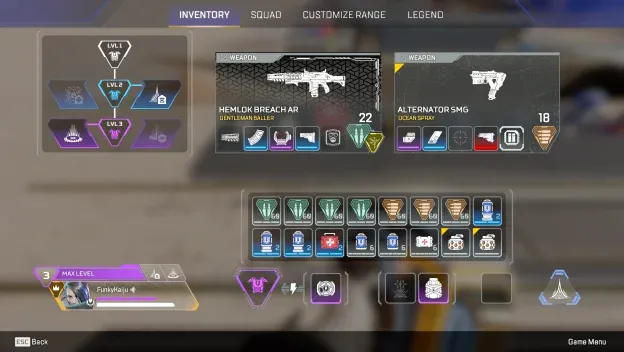
अपने primary weapon के लिए ज़्यादा ammo रखें, क्योंकि यही वह weapon है जिसे आप सबसे ज़्यादा इस्तेमाल करेंगे। कई fights mid-to-long range पर शुरू होती हैं, जहाँ दूरी कम करने से पहले ही players कई magazines खाली कर देते हैं।
सुनिश्चित करें कि आपके secondary weapon के लिए भी पर्याप्त ammo हो, लेकिन उस gun को प्राथमिकता दें जिस पर आप सबसे ज़्यादा भरोसा करते हैं।
अपना Backpack चेक करें
चेक करें कि आपके पास कौन सा backpack है और उपलब्ध space के आधार पर तय करें कि आपको क्या चाहिए।
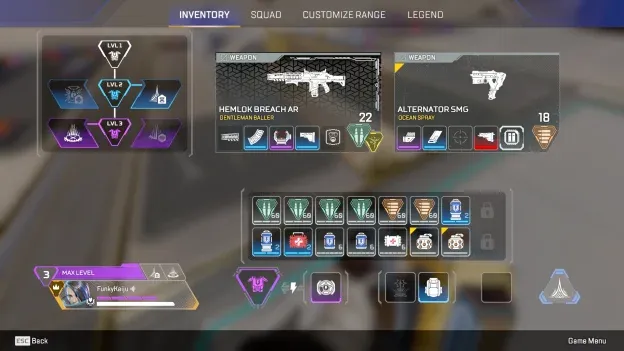
एक बड़ा backpack आपको ज़्यादा ammo, healing items और grenades ले जाने की सुविधा देता है। सीमित space होने पर, उन items को प्राथमिकता दें जिनका आप सबसे ज़्यादा इस्तेमाल करने वाले हैं।
हमेशा एक Grenade साथ रखें
Apex Legends Inventory Management Guide: How to Manage Your Backpack content image
कोशिश करें कि अपनी inventory में कम से कम एक grenade ज़रूर रखें। Grenades अलग-अलग scenarios में काम आते हैं, जैसे दुश्मनों को cover से बाहर निकालने के लिए या उन्हें किसी मज़बूत position पर टिकने से रोकने के लिए।
बहुत ज़्यादा Syringes न रखें
आपको अपनी inventory को syringes से भरने की ज़रूरत नहीं है। कई स्थितियों में, Med Kit का इस्तेमाल करना आपकी health को पूरा restore कर सकता है, जो backpack space सीमित होने पर ज़्यादा efficient रहता है।
Shield Items को प्राथमिकता दें
Apex Legends Inventory Management Guide: How to Manage Your Backpack content image
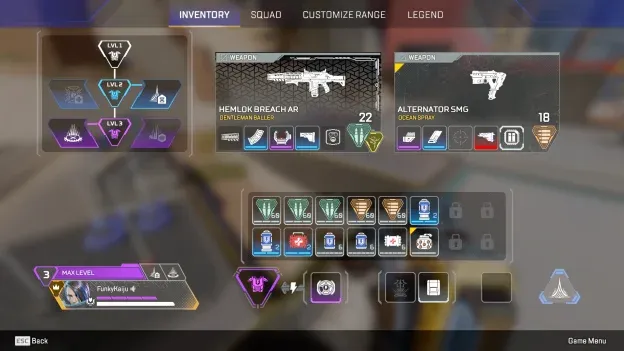
अपनी inventory manage करते समय health items के बजाय shield items को प्राथमिकता दें। Shields आने वाले damage के खिलाफ आपकी पहली रक्षा पंक्ति (defense) हैं, इसलिए fights के दौरान उन्हें चार्ज रखना ज़रूरी है।
Engagements के बीच अपनी shields को restore करने के लिए पर्याप्त Shield Cells और Shield Batteries रखें।
इस्तेमाल न होने वाले Attachments को Drop करें
उन weapons के attachments न रखें जिनका आप इस्तेमाल नहीं कर रहे हैं। वे कीमती backpack space घेरते हैं, जिसका इस्तेमाल ammo, grenades, या healing items के लिए किया जा सकता है।
जब भी आप weapons बदलें, अपनी inventory चेक करें और उन सभी attachments को drop कर दें जो अब काम के नहीं हैं।
Final Tip
सबसे अच्छी Apex Legends inventory वह नहीं है जो सबसे ज़्यादा items से भरी हो। अपने primary weapon के लिए ammo, shields, grenades और ज़रूरी healing items को प्राथमिकता दें, और जो चीज़ें आपको नहीं चाहिए उन्हें drop कर दें।