

Battlefield RedSec के लिए अपने PS5 और XBOX को सही से सेट करना, frustrating defeats और satisfying victories के बीच का अंतर हो सकता है। जब गोलियां चलनी शुरू हों, तो आपको हर संभव advantage चाहिए होगा, और इसका मतलब है peak performance के लिए अपने console settings को optimize करना। यह गाइड आपके PS5 को एक competitive powerhouse में बदल देता है, जिसमें smooth framerates, crystal-clear enemy visibility, और lightning-fast controller response को प्राथमिकता दी जाती है।
PS5 और XBOX पर आपको कौन सा Graphics Mode चुनना चाहिए?
आपका पहला महत्वपूर्ण निर्णय graphics menu में होता है। competitive play के लिए Performance mode, Fidelity mode से हर बार बेहतर होता है। जबकि Fidelity mode screenshots में अधिक सुंदर दिख सकता है, Performance mode smooth framerates प्रदान करता है जो वास्तव में gunfights जीतते हैं।
PS5 settings in Battlefield 6 Redsec ...
यहां आपकी optimal graphics configuration है:
Camera Settings
आपकी camera configuration सीधे तौर पर प्रभावित करती है कि आपको कितनी battlefield awareness मिलती है। यहां Field of View (FOV) आपका secret weapon बन जाता है।
infantry combat के लिए अपना FOV 105-110 पर सेट करें। यह sweet spot आपको peripheral vision देता है, बिना दूर के दुश्मनों को impossibly small बनाए। vehicle combat के लिए, proper spatial awareness बनाए रखने के लिए अपना Vehicle 3rd Person FOV 82-83 पर सेट करें।

Best Battlefield 6 Redsec controller ...
Essential Visual Clarity Tweaks
ये settings distracting visual noise को खत्म करती हैं:
- Weapon Motion Blur: Off
- World Motion Blur: Off
- Camera Shake Amount: 50 (या कम)
- Chromatic Aberration: Off
- Film Grain: Off
- Vignette: Off
Controller Settings
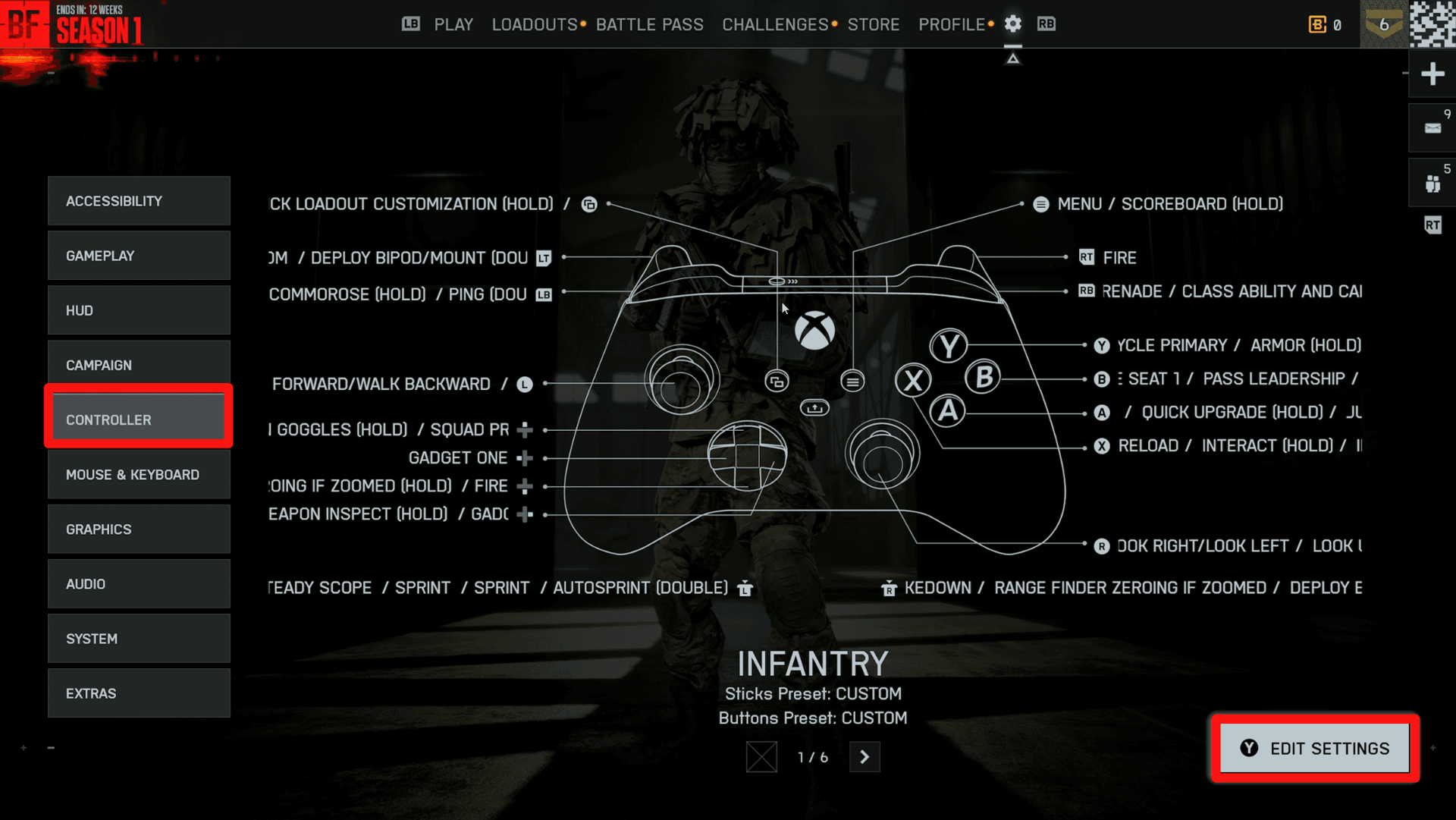
आपकी controller configuration आपके aim को बना या बिगाड़ सकती है। इन foundational adjustments से शुरू करें:

Battlefield REDSEC Best Controller ...
Uniform Infantry Aiming पर विशेष ध्यान दें। hip-fire और aimed shots के बीच consistent sensitivity बनाए रखने के लिए इस setting को enable करें, जिससे reliable muscle memory बनती है।
Audio Settings
Battlefield RedSec में sound design महत्वपूर्ण tactical information प्रदान करता है। enemy footsteps, vehicle approaches, और directional gunfire को स्पष्ट रूप से सुनने के लिए अपनी audio configure करें।
भले ही आप speakers का उपयोग कर रहे हों, अपनी audio output के रूप में Headphones चुनें। यह setting directional audio cues को बढ़ाती है जो आपको विरोधियों को स्क्रीन पर आने से पहले ट्रैक करने में मदद करती है।
Audio Priority Configuration
- Music Volume: 20-30% (या पूरी तरह से muted)
- Sound Effects: 100%
- Voice/Dialogue: 80-90%
music volume कम करने से critical audio cues mix से बाहर निकल आते हैं। आप उस enemy Recon को अपनी position को flank करते हुए या एक approaching tank की दूर की rumble सुनेंगे।
HUD और Interface Optimization
आपका HUD setup निर्धारित करता है कि आप combat के दौरान कितनी information process करते हैं। Minimap Size को Small या Medium पर सेट किया जाना चाहिए ताकि आपकी peripheral vision को block न करे, जबकि फिर भी essential intel प्रदान करे।
[IMAGE: HUD customization settings interface]
Advanced HUD Recommendations
Vehicle-Specific Settings
Vehicle combat के लिए infantry play की तुलना में अलग sensitivity settings की आवश्यकता होती है। Vehicle Aim Sensitivity 30-70 के बीच होनी चाहिए, जो default 20 से काफी अधिक है।
विशेष रूप से aircraft के लिए, Invert Vertical Flight को enable करें और Aircraft Control Sensitivity को 100 पर सेट करें। ये settings traditional flight control schemes के अनुरूप हैं जिन्हें अधिकांश खिलाड़ी सहज पाते हैं।

Battlefield REDSEC Best Controller ...
Ground Vehicle Optimization
- Decouple Aiming from Turning: On
- Vehicle 3rd Person FOV: 82-83
- Gunner Aim Sensitivity: 65-100
यह configuration आपके turret control को vehicle movement से अलग करती है, जिससे maneuvering करते समय precise targeting संभव होता है।
आपका Battlefield RedSec console setup अब सबसे महत्वपूर्ण चीज़ों को प्राथमिकता देता है: smooth performance, clear visuals, और responsive controls। ये settings आपके और battlefield dominance के बीच की technical barriers को खत्म करती हैं। आत्मविश्वास के साथ अपने अगले match में कूदें, यह जानते हुए कि आपका console competitive success के लिए optimized है।