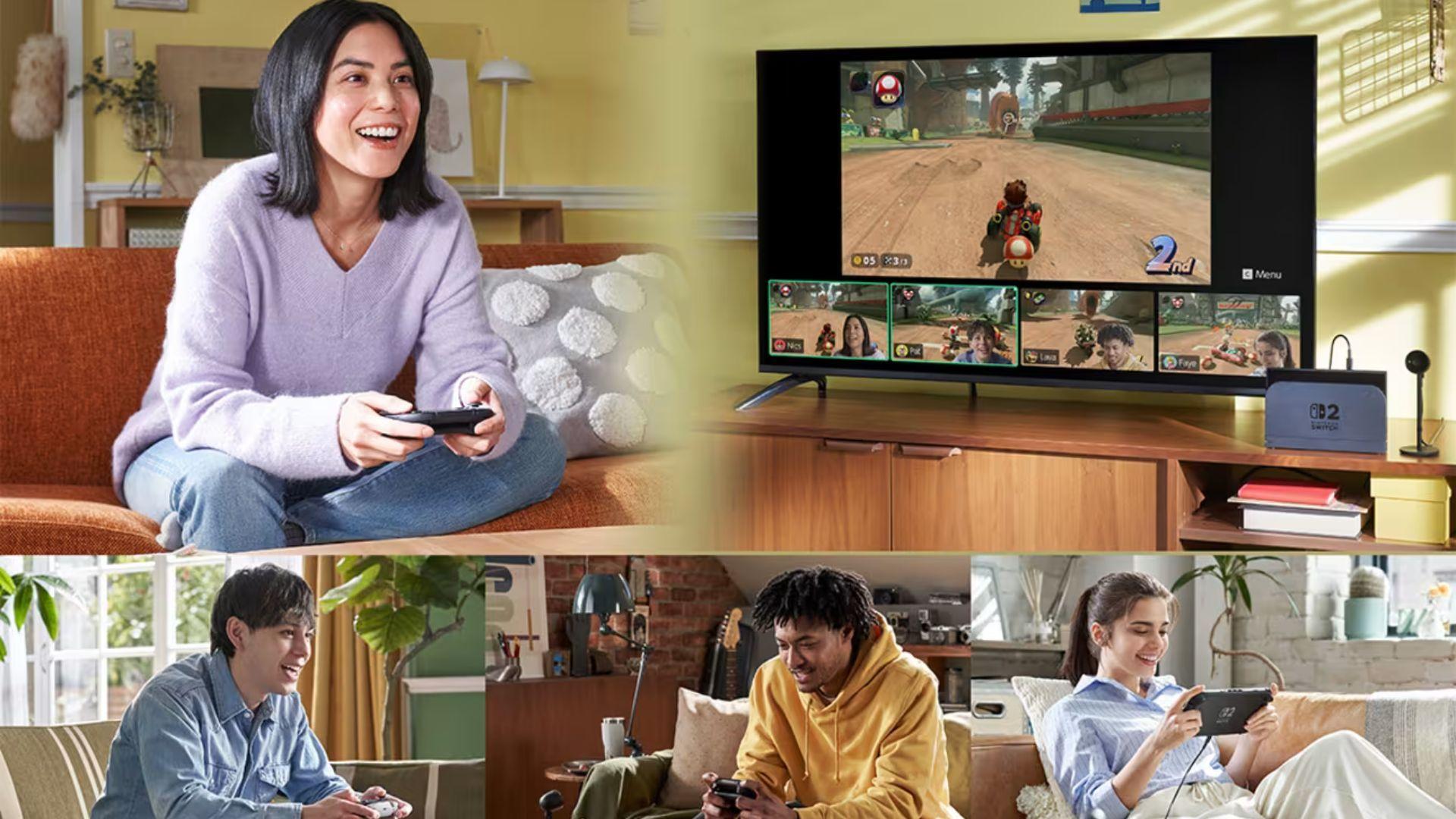

Nintendo Switch 2, GameChat introduce karta hai, jo ek built-in communication system hai aur online play ko local multiplayer jaisa feel karane ke liye design kiya gaya hai. External apps ya accessories par depend karne ke bajaye, GameChat voice chat, screen sharing, aur optional camera video ko directly system mein integrate karta hai. Yeh feature social play ko distances par support karne ke liye banaya gaya hai, chahe friends ek hi city mein hon ya alag regions mein.
Jaise online gaming community-driven platforms aur web3-style interaction spaces ke saath evolve ho raha hai, GameChat ke saath Nintendo ka approach simplicity aur accessibility par focus karta hai. Iska aim players ko game experience se door kiye bina connected rakhna hai.
Connecting Players Beyond Local Multiplayer
GameChat sirf Nintendo Switch 2 ke liye exclusive hai aur right Joy-Con 2 controller par C Button use karke access kiya ja sakta hai. Activate hone ke baad, yeh players ko chat groups banane aur different ya shared games khelte hue interact karne deta hai. System console ke built-in microphone ka use karke twelve participants tak ke liye voice chat support karta hai, jisse most situations mein headset ki need khatam ho jati hai.
Voice ke alawa, GameChat ek time mein up to four players ke beech screen sharing ko bhi support karta hai. Yeh shared screens display ke bottom mein video feeds ke tarah dikhte hain aur inka size badhaya ya kam kiya ja sakta hai, yeh depend karta hai ki players communication ke liye kitni space dedicate karna chahte hain gameplay ke mukable mein. Yeh setup friends ko play karte hue dekhna, advice dena, ya bas hang out karna aasan banata hai jab sab log separate games run kar rahe hon.
Un players ke liye jo ek zyada personal interaction layer chahte hain, GameChat compatible USB camera (alag se becha jata hai) use karte hue camera feeds ko bhi support karta hai. Screen par up to four log dikh sakte hain, aur system game ko background ke tarah use karne ki bhi permission deta hai, jisse ek lightweight livestream-style setup banta hai jo sirf friends tak limited hai.
Getting Started With GameChat on Nintendo Switch 2
GameChat use karne se pehle, har participant ko Nintendo Switch 2 system par hona chahiye aur apne Nintendo Account ke saath registered phone number se tied ek one-time setup process complete karna hoga. Players apni Friend List par un friends ko bhi control kar sakte hain jinhe unke saath GameChat use karne ki permission hai.
GameChat currently open-access period ke dauran membership ke bina available hai, lekin March 31 ke baad iske liye Nintendo Switch Online subscription ki zarurat hogi. Internet access aur Nintendo Account bhi required hain. 16 saal se kam umar ke users ke liye, parental ya guardian involvement zaruri hai yeh ensure karne ke liye ki communication settings safely configure ki gayi hain.
Ek baar sab kuch set ho jaye, session start karna straightforward hai. C Button press karne se GameChat menu khulta hai, jahan friends ko group mein invite kiya ja sakta hai. Invitations system notifications ke tarah appear hote hain, aur Nintendo Switch app ke through linked smart device par bhi appear ho sakte hain.
Managing Voice, Video, and Screen Sharing
GameChat session mein hote hue, C Button dobara press karne se control menu khulta hai. Yahan se, players microphones ko mute ya unmute kar sakte hain, cameras toggle kar sakte hain, screen sharing start ya stop kar sakte hain, aur deeper settings open kar sakte hain. Chat mein ek specific friend ko select karne se additional options milte hain, jaise unki shared screen ko enlarge karna for closer viewing.
Yeh structure players ko kisi bhi time screen par kitni information hai, us par control rakhne deta hai. Gameplay par focus karne wala koi bhi feeds ko minimize kar sakta hai, jabki koi friend jo ek level mein help kar raha hai, woh shared view ko expand kar sakta hai aur real-time mein problem discuss kar sakta hai.
System itna flexible hai ki group mein sab log alag-alag games khel sakte hain aur phir bhi GameChat ko social hub ke tarah use kar sakte hain, na ki same software session mein lock hone ke bajaye.
Adjusting Layout, Audio, and Accessibility
GameChat mein experience ko fine-tune karne ke liye kai configuration tools shamil hain. Screen layout settings players ko main gameplay view expand karne ya video feeds ko entirely hide karne deti hain jabki voice chat active rehti hai. Yeh players ke liye clutter kam karne mein madad karta hai jo more demanding game sections ke dauran cleaner interface chahte hain.
Audio options users ko chat volume ko in-game sound ke saath balance karne deti hain, jisse teammates ko sunna aasan ho jata hai bina important audio cues ko drown out kiye. Camera settings zoom, face focus, aur background removal ko control karti hain, jo video feeds ko clean rakhne mein madad karta hai aur unintended surroundings dikhane se bachata hai.
Accessibility features bhi ek role play karti hain. Voice audio ko on-screen text ke tarah display kiya ja sakta hai, aur text messages ko spoken audio mein convert kiya ja sakta hai. Yeh tools GameChat ko different communication needs wale players ke liye zyada usable banate hain.
Using GameChat for More Than Just Talking
Jabki voice chat core feature hai, GameChat ki screen sharing players ke interact karne ke tarike ko badalti hai. Friends mechanics demonstrate kar sakte hain, kisi ko difficult puzzle mein guide kar sakte hain, ya bas chat karte hue watch along kar sakte hain. Yeh social tarike se naye games explore karne ka bhi ek tarika ban jata hai. Agar kisi player ko shared feed mein kuch interesting dikhta hai, toh menu se “View Software Information” select karne se us title ke liye Nintendo eShop page khulta hai.
Nintendo Switch 2 par built-in microphone ko background noise reduce karne aur voices par focus karne ke liye tune kiya gaya hai, jo additional hardware ki requirement ke bina clarity maintain karne mein madad karta hai. Yeh communication ko simple aur system mein integrated rakhta hai na ki devices par split hone ke bajaye.
Online Requirements and Availability
Open-access window khatam hone ke baad, GameChat ke liye Nintendo Switch Online membership ki zarurat hogi. Video features ke liye compatible USB camera required hai, aur availability region ke hisab se vary kar sakti hai. Internet access aur Nintendo Account online functionality ke liye required hain, aur sabhi standard terms apply hote hain.
Make sure to check out our articles about top games to play in 2026:
Best Nintendo Switch Games for 2026
Best First-Person Shooters for 2026
Best PlayStation Indie Games for 2026
Best Multiplayer Games for 2026
Most Anticipated Games of 2026
Top Game Releases for January 2026
Frequently Asked Questions (FAQs)
What is GameChat on Nintendo Switch 2?
GameChat Nintendo Switch 2 par ek integrated communication feature hai jo voice chat, screen sharing, camera video, aur friends ke saath online game sharing ko support karta hai.
How many players can use GameChat at once?
Up to twelve players voice chat group mein join kar sakte hain, jabki up to four players ek saath screen ya camera video share kar sakte hain.
Do players need extra hardware for GameChat?
Voice chat Nintendo Switch 2 ke built-in microphone ke saath kaam karta hai. Camera video ke liye compatible USB camera alag se becha jata hai.
Is GameChat free to use?
GameChat open-access period ke dauran free hai. March 31 ke baad, Nintendo Switch Online membership required hogi.
Can players use GameChat while playing different games?
Yes. Players alag-alag games ek saath run kar sakte hain aur phir bhi voice, video, aur screen sharing ke liye GameChat ke through connected reh sakte hain.
Does GameChat support accessibility features?
Yes. GameChat voice audio ko text ke tarah display kar sakta hai aur text messages ko spoken audio mein convert kar sakta hai, layout aur audio customization tools ke saath.
Is GameChat available worldwide?
Availability country ke hisab se vary kar sakti hai. Online features use karne ke liye Internet access, Nintendo Account, aur applicable regional terms required hain.