

Once Human अब PC, PS5, Xbox Series X|S, और mobile पर full cross-progression को support करता है, जिसका मतलब है कि Steam पर आपने जो character बनाने में घंटों मेहनत की है, वह अब आपके couch तक भी आ सकता है। यह process एक NetEase account के जरिए होती है और इसमें बस कुछ ही minutes लगते हैं, लेकिन आप इसे किस order में करते हैं, यह बहुत important है। अगर गलत किया, तो आप अपना progress overwrite होने का risk लेते हैं जिसे recover नहीं किया जा सकता। अगर सही से किया, तो आपके characters, inventory, और cosmetics आपके साथ हर जगह travel करेंगे जहाँ आप play करते हैं।
Cross-progression असल में क्या cover करता है?
Settings को touch करने से पहले, यह जानना helpful है कि आप असल में क्या sync कर रहे हैं। Cross-play और cross-progression अलग-अलग features हैं। Cross-play से PC, mobile, PS5, और Xbox players एक ही session share कर सकते हैं। Cross-progression आपके account data को उन platforms के बीच link करने के बाद sync करता है।
Linking से दो अलग accounts merge नहीं होते। अगर आपके पास अलग-अलग NetEase accounts पर एक PC character और एक console character है, तो आप उन्हें एक roster में combine नहीं कर सकते। System आपसे पूछता है कि आप किस account का data रखना चाहते हैं, और दूसरे को discard किया जा सकता है। इसे undo करने का कोई option नहीं है।
Cross-region progression भी supported नहीं है। Once Human अलग-अलग regions को अलग data centers पर चलाता है, इसलिए अलग regional servers पर मौजूद दो players platform चाहे जो भी हो, progress share नहीं कर सकते।
Once Human में cross-progression कैसे enable करें
नीचे दिए गए steps दोनों directions में काम करते हैं: PC से console, या console से PC। सबसे important बात यह है कि हमेशा उस account से start करें जिसमें वह character है जिसे आप रखना चाहते हैं।
Step 1: start करने से पहले सही account पहचानें
उस platform पर Once Human open करें जहाँ आपका main character है। Login method, NetEase account identifier, server name, और character name को confirm करें। इन्हें कहीं लिख लें। Progress खोने का सबसे common कारण console version में पहले login करना, गलती से एक नया character बना लेना, और फिर गलत account को link करना है।
यह भी confirm करें कि आप कौन सा PlayStation Network या Xbox account use करने वाले हैं। किसी shared family profile से link करने से बचें, जब तक कि वह वाकई में आपका long-term profile न हो।
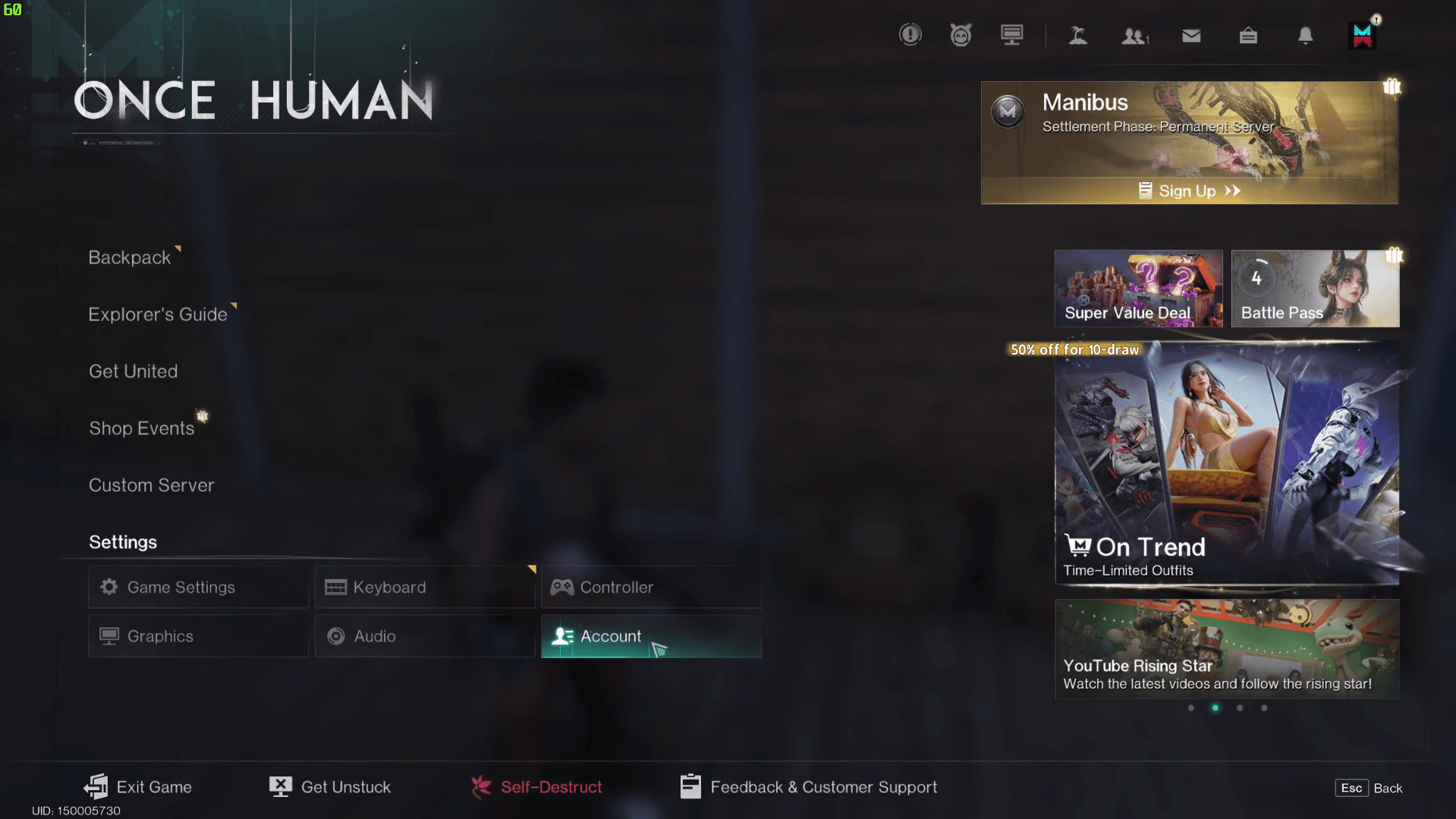
Step 2: Settings open करें और Account tab पर जाएं
Game launch करें और Settings menu open करें। Account tab पर navigate करें। आप इस screen तक login screen के upper-right corner से भी पहुँच सकते हैं, जो तब useful होता है जब आप इसे fresh console install पर setup कर रहे हों।
Once Human Cross-Progression Guide: PC और Console अकाउंट लिंक कैसे करें
Step 3: अपने NetEase account से sign in करें
अपने NetEase account credentials डालें। यह वह account है जिसमें वह character data है जिसे आप preserve करना चाहते हैं। अगर आपके पास कई NetEase accounts हैं, तो proceed करने से पहले double-check कर लें कि आप सही account में sign in कर रहे हैं।
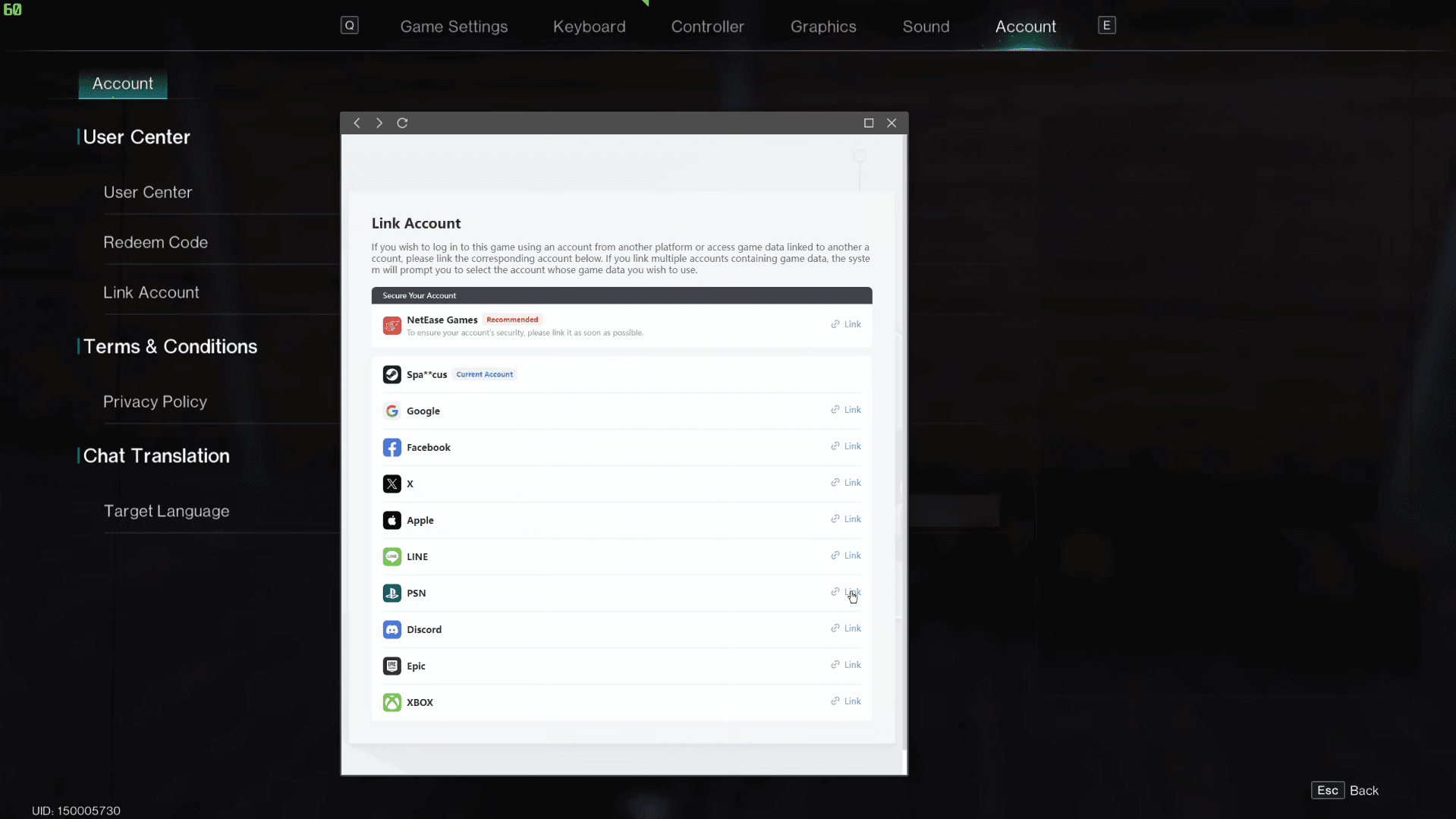
Step 4: अपना console account link करें
NetEase account screen से, connect करने के लिए अपना Console Account select करें। यह process दोनों दिशाओं में काम करती है: आप PC या mobile से console account को link कर सकते हैं, या console से PC Steam account को। दोनों रास्तों का result एक ही होता है।
Once Human Cross-Progression Guide: PC और Console अकाउंट लिंक कैसे करें
Step 5: confirmation screen को ध्यान से पढ़ें
अगर screen पर account creation और existing-account connection दोनों के options दिख रहे हैं, तो कुछ भी select करने से पहले पूरी sequence पढ़ें। वह रास्ता चुनें जो आपके progress को preserve करे, फिर confirm करें। एक बार confirm होने के बाद, link active हो जाता है।
Link काम कर रहा है या नहीं, यह कैसे verify करें
Linking के बाद, अपने console पर दिखाए गए account identifier की तुलना उस identifier से करें जिसे आपने PC या mobile पर record किया था। फिर game में enter करें और character name, current scenario, inventory, cosmetics, और currency balances check करें। अगर गलत profile दिख रहा है, तो नया progress बनाने या कोई purchase करने से पहले तुरंत रुक जाएं।
Cross-play test करने के लिए, in-game friend या team system का use करके एक friend को invite करें और confirm करें कि आप दोनों compatible server पर हैं। एक failed invite का मतलब यह नहीं है कि cross-play broken है; समस्या मानने से पहले server name, game version, और privacy settings check करें।
Servers, scenarios, और cross-progression क्या ठीक नहीं कर सकता
Accounts को link करने से Once Human का server और scenario structure override नहीं होता। आपके character का scenario schedule, settlement state, और participation records specific servers से जुड़े होते हैं। Cross-progression आपके progress को नए platform पर ले जाता है, लेकिन यह किसी expired scenario को reopen नहीं करता या scenario timing को change नहीं करता।
Console पर friends के साथ join करने से पहले, confirm करें कि सब एक ही server या scenario पर हैं। अगर game invitation या team code देता है, तो server names को manually type करने के बजाय उसका use करें। Returning players को यह भी verify करना चाहिए कि उनका पिछला scenario अभी भी active है या settled phase में चला गया है।
Scenarios और server structures में latest update के बाद क्या-क्या change हुआ है, इसके full breakdown के लिए, Once Human Deviant Update rundown में patch 2.3.26 में हुए सभी बदलावों को cover किया गया है, जिसमें नई Starchrom economy भी शामिल है।
Subscriptions और premium content का क्या?
Base game free to play है। Console पर Once Human access करने के लिए आपको PlayStation Plus या Xbox Game Pass की जरूरत नहीं है। हालाँकि, Deluxe Season Pass, deviation skins, और character cosmetics सहित premium content उन players के लिए unlocked है जिनके पास active Game Pass या PS Plus subscription है।
Cross-progression game progress को cover करता है, payment processing को नहीं। Store purchases, wallet balances, और transactions platform-specific rules को follow करते हैं। कुछ भी खरीदने के बाद, यह verify करें कि क्या currency या item आपके दूसरे linked platform पर सही से दिख रहा है, इससे पहले कि आप यह मान लें कि purchase transfer हो गया है।
Console release में existing third-person camera के साथ-साथ first-person perspective option भी introduce किया गया है, साथ ही 4K at 60 FPS को target करने वाला Quality Mode और 120 FPS तक target करने वाला Performance Mode भी है। इसका linking कैसे काम करती है, इस पर कोई असर नहीं पड़ता, लेकिन यह बताता है कि console version सिर्फ PC build का सीधा port क्यों नहीं है।
अपने linked account का पूरा फायदा कैसे उठाएं
Cross-progression active होने के साथ, PC पर लगाया गया आपका समय console पर भी मायने रखता है। अगर आप अभी भी level cap तक पहुँचने की कोशिश कर रहे हैं, तो Once Human leveling guide में seasonal reset से पहले level 50 तक पहुँचने के लिए सबसे fast XP routes और Memetic priorities को cover किया गया है। बाकी सब चीजों के लिए, पूरी Once Human guides collection में आपको builds, calibration, tech trees, और बहुत कुछ मिलेगा।