


वो Mods जो असल में The Sims 4 के गेमप्ले को बदल देते हैं
बेस गेम ठीक है, लेकिन Mods इसे पूरी तरह से कुछ और ही बना देते हैं। Sims 4 की modding कम्युनिटी सालों से गेम को बना रही है, बेहतर कर रही है और विस्तार दे रही है। इसके नतीजे छोटे-मोटे quality-of-life सुधारों से लेकर पूरे पॉलिटिकल सिमुलेशन सिस्टम तक हो सकते हैं, जो आपके सेव में पावर के काम करने के तरीके को ही बदल देते हैं। चाहे आप Royalty & Legacy एक्सपेंशन के जरिए कोई डायनेस्टी चला रहे हों या बस अपने Sims के दरवाजों में फंसने से परेशान हों, हर समस्या का समाधान करने के लिए एक mod मौजूद है।
यह गाइड सबसे असरदार Mods, उन्हें सुरक्षित तरीके से इंस्टॉल करने और भरोसेमंद सोर्स ढूंढने के बारे में है।
The Sims 4 में Mods कैसे इंस्टॉल करें?
इंस्टॉलेशन बहुत सीधा है। ज्यादातर Mods .package या .ts4script फाइल्स के रूप में आते हैं। इन्हें अपने Sims 4 डॉक्यूमेंट्स डायरेक्टरी में मौजूद Mods फोल्डर में डालें — PC पर यह आमतौर पर Documents/Electronic Arts/The Sims 4/Mods होता है। फाइल्स डालने के बाद, गेम लॉन्च करें, Game Options में जाएं, Other टैब खोलें और सुनिश्चित करें कि Enable Custom Content and Mods और Enable Script Mods दोनों चेक किए हुए हों।
कुछ नियम जो आपको सिरदर्द से बचाएंगे:
- Mods फोल्डर के अंदर सब-फोल्डर की गहराई को अधिकतम 1 लेवल तक रखें। इससे ज्यादा गहराई में दबी फाइल्स अक्सर लोड नहीं हो पातीं।
- किसी भी बड़े गेम पैच के बाद, सभी Mods को डिसेबल कर दें और एक-एक करके उन्हें फिर से इनेबल करें ताकि पता चल सके कि क्या खराब हुआ है।
- मौजूदा गेम में नए Mods जोड़ने से पहले हमेशा अपनी सेव फाइल्स का बैकअप लें।
Mods कहां से डाउनलोड करने चाहिए?
यह बात ज्यादातर गाइड्स के मुकाबले कहीं ज्यादा मायने रखती है। EA फोरम कम्युनिटी ने कुछ पुरानी साइट्स के साथ सुरक्षा संबंधी चिंताएं जताई हैं, इसलिए अच्छी तरह से मेंटेन की गई साइट्स का इस्तेमाल करना ही बेहतर है।
Sims 4 Mods डाउनलोड करने के लिए भरोसेमंद जगहें:
- CurseForge — यहाँ वर्जन ट्रैकिंग और क्रिएटर पेजों के साथ एक बड़ी लाइब्रेरी है।
- Patreon — LittleMsSam और Dambele जैसे कई टॉप modders अपना काम यहाँ रिलीज करते हैं, कभी-कभी अर्ली एक्सेस टियर्स के साथ।
- ModTheSims — यह एक लंबे समय से चल रही कम्युनिटी साइट है जिसमें क्वालिटी कंट्रोल के लिए मॉडरेशन लेयर है।
- LittleMsSam's site — यहाँ लगातार अपडेट होने वाले यूटिलिटी Mods मिलते हैं, जो अच्छी तरह से डॉक्यूमेंटेड होते हैं।
अभी क्या डाउनलोड करना चाहिए, इसकी नियमित रूप से क्यूरेट की गई लिस्ट के लिए, Sims Community पर 20 Essential The Sims 4 Mods to Transform Your Gameplay: 2026 Edition सबसे बेहतर मेंटेन किए गए राउंडअप्स में से एक है।
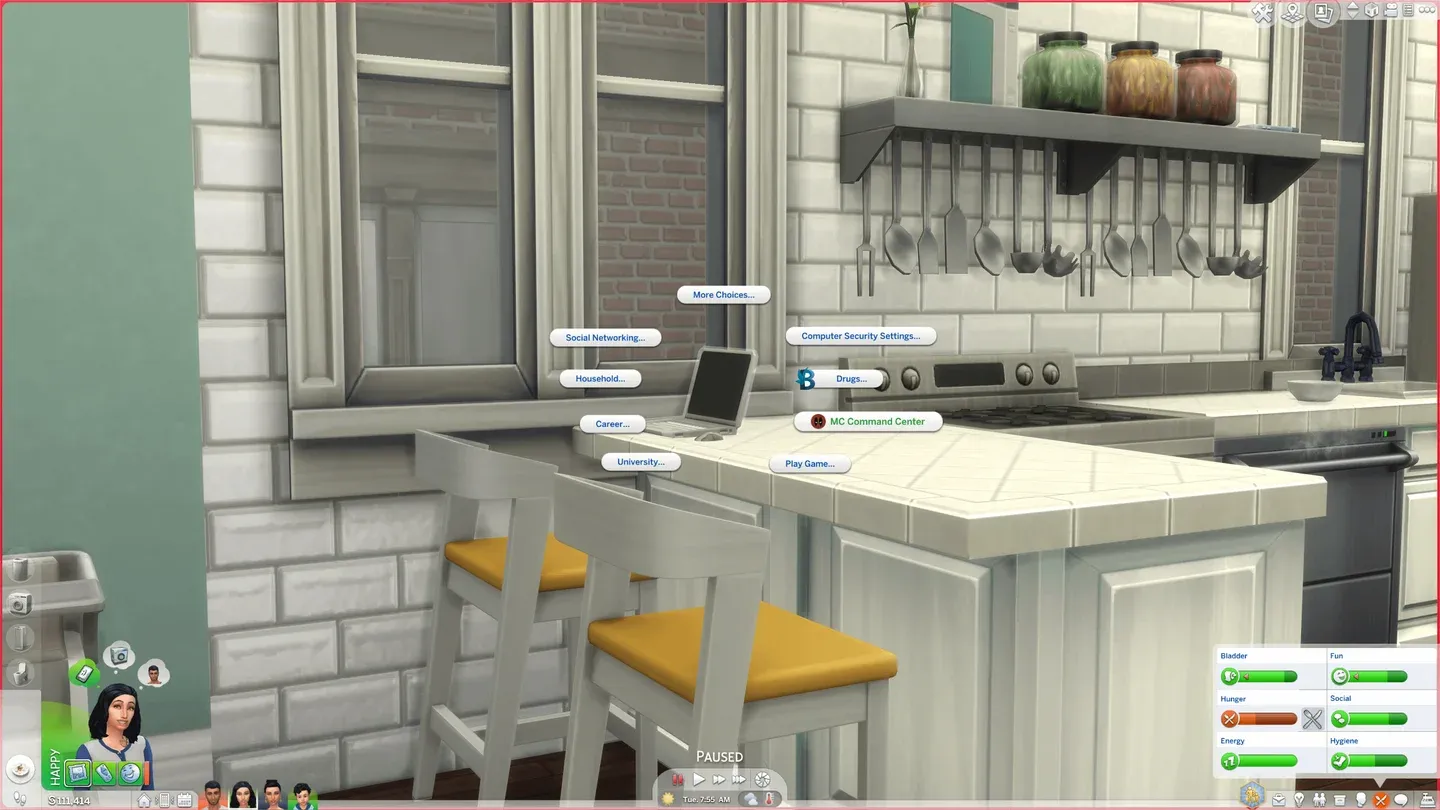
MC Command Center सेटिंग्स पैनल
सबसे बेहतरीन गेमप्ले ओवरहाल Mods कौन से हैं?
ये Mods गेम के काम करने के तरीके को पूरी तरह बदल देते हैं, न कि सिर्फ उसके लुक को।
MC Command Center
MC Command Center (MCCC) The Sims 4 के लिए एक कम्पलीट बैकएंड कंट्रोल पैनल जैसा है। यह स्टोरी प्रोग्रेशन, पॉपुलेशन कंट्रोल, रिलेशनशिप ट्यूनिंग, करियर मैनेजमेंट और गेमप्ले सेटिंग्स की एक लंबी लिस्ट को संभालता है जिन्हें बेस गेम या तो छिपा देता है या नजरअंदाज कर देता है। इसके बिना एक लंबा लेगेसी सेव चलाने का मतलब है कि आपकी दुनिया ठहर जाएगी — NPCs तब तक बड़े नहीं होंगे, शादी नहीं करेंगे या बच्चे पैदा नहीं करेंगे जब तक आप उन्हें मैन्युअली मैनेज न करें। MCCC इसे ठीक कर देता है।
इस mod को Deaderpool द्वारा मेंटेन किया जाता है और पैच के बाद यह लगातार अपडेट होता है। अच्छे कारणों से यह सालों से कम्युनिटी का एक मुख्य हिस्सा बना हुआ है।
Royalty Mod (Royalty & Legacy ओनर्स के लिए)
अगर आपके पास Royalty & Legacy एक्सपेंशन है, तो Royalty Mod सबसे महत्वाकांक्षी साथी है। यह पूरी तरह से फंक्शनल पॉलिटिकल सिस्टम पेश करता है — खिलाड़ी चुनाव लड़ सकते हैं, जनमत संग्रह (referendums) के जरिए कानून बदल सकते हैं, खजाना मैनेज कर सकते हैं और अगर कोई Sim काफी पावर हासिल कर ले तो तानाशाही भी स्थापित कर सकते हैं। Kings, Queens, Dukes और Barons जैसे नोबल टाइटल्स के साथ असल मैकेनिकल वजन आता है: आप सलाहकारों को नियुक्त कर सकते हैं, मिलिट्री अभियानों को फंड कर सकते हैं और ऐसे कोरोनेशन (राज्याभिषेक) आयोजित कर सकते हैं जो पब्लिक फेवर को प्रभावित करते हैं।
Royalty & Legacy के डायनेस्टी सिस्टम के साथ फुल इंटीग्रेशन पर अभी भी काम चल रहा है, और एक्सपेंशन के सिस्टम पूरी तरह लागू होने के बाद एक कम्पैटिबिलिटी अपडेट की योजना है।
Regency Romance
यह भी Royalty & Legacy के इर्द-गिर्द बना है। Dambele का Regency Romance mod उस Bridgerton-स्टाइल की कहानी पर जोर देता है जिसकी तरफ एक्सपेंशन इशारा तो करता है लेकिन पूरी तरह डिलीवर नहीं करता। यह एक Etiquette skill जोड़ता है, Sims को बड़ी संपत्तियां विरासत में लेने या खरीदने देता है, और एक गॉसिप पेपर मैकेनिक पेश करता है — Lady Whistledown की रिपोर्ट्स — जो आपके पूरे सेव से स्कैंडल्स, रोमांस और ड्रामेटिक घटनाओं को सामने लाता है। सोशल स्टेटस एक वास्तविक वेरिएबल बन जाता है: अमीरी और खानदान तय करते हैं कि आपका Sim कुलीन पदानुक्रम (aristocratic hierarchy) में कहां बैठता है।
कौन से Mods सब कुछ बदले बिना क्वालिटी ऑफ लाइफ में सुधार करते हैं?
हर mod को गेम को फिर से लिखने की जरूरत नहीं होती। ये छोटे बदलाव विशिष्ट परेशानियों को ठीक करते हैं या गायब लॉजिक जोड़ते हैं।
Enact Noble Decree Tweaks mod उस तरह के बैलेंसिंग काम का एक अच्छा उदाहरण है जो किसी पैक को और बेहतर बनाता है। यह कानून बदलने पर §10,000 की लागत जोड़ता है और कूलडाउन को 48 घंटे तक बढ़ा देता है, ताकि राजनीतिक फैसलों का असल वजन हो। उच्च Royal Favor वाले Sims कम भुगतान करते हैं, जो रणनीति की एक ऐसी परत जोड़ता है जिसे बेस एक्सपेंशन छोड़ देता है।

Noble Decree mod इंटरैक्शन
Mod कॉन्फ्लिक्ट्स और क्रैश से कैसे बचें?
कॉन्फ्लिक्ट्स तब होते हैं जब दो Mods एक ही गेम फाइल या व्यवहार को बदलते हैं। 50/50 तरीका इसका स्टैंडर्ड फिक्स है: अपने आधे Mods को फोल्डर से बाहर निकालें, गेम टेस्ट करें, फिर देखें कि किस आधे हिस्से में समस्या है। जब तक आप दोषी को न ढूंढ लें, तब तक इसे दोहराते रहें।
कुछ आदतें जो ज्यादातर समस्याओं को रोकती हैं:
- Mods धीरे-धीरे इंस्टॉल करें। एक साथ 40 Mods जोड़ने से ट्रबलशूटिंग लगभग नामुमकिन हो जाती है।
- अपने मेन गेम में लाने से पहले नए Mods को एक फ्रेश सेव में टेस्ट करें।
- हर EA पैच के बाद अपडेट्स चेक करें। अपडेट के बाद क्या खराब हुआ है, यह ट्रैक करने के लिए EA फोरम का Mods & Custom Content बोर्ड उपयोगी है।
- Script mods को कम से कम रखें। वे गेम कोड के साथ गहराई से इंटरैक्ट करते हैं और स्टैंडर्ड .package फाइल्स की तुलना में समस्याओं का कारण बनने का जोखिम ज्यादा रखते हैं।
जो खिलाड़ी इन मुख्य पिक्स से आगे अपनी mod कलेक्शन बढ़ाना चाहते हैं, उनके लिए कम्युनिटी द्वारा मेंटेन की गई लिस्ट, जो CAS एडिशन्स, गेमप्ले सिस्टम और क्वालिटी-ऑफ-लाइफ सुधारों में 36+ लोकप्रिय Mods को ट्रैक करती है, एक व्यापक नजरिया देती है कि क्या स्टेबल है और टेस्ट करने लायक है।

Regency Romance Etiquette स्किल
Mods और Custom Content में क्या अंतर है?
यह नए खिलाड़ियों को अक्सर उलझा देता है। Mods गेम के काम करने के तरीके को बदलते हैं — वे मैकेनिक्स जोड़ते हैं, बग्स ठीक करते हैं या ट्यूनिंग वैल्यूज को एडजस्ट करते हैं। Custom Content (CC) विजुअल एसेट्स जोड़ता है: नए बाल, कपड़े, फर्नीचर या बिल्ड आइटम्स। CC गेम लॉजिक को नहीं छूता, जिससे इसका जोखिम कम होता है, लेकिन इसका मतलब यह भी है कि यह गेमप्ले की समस्याओं को ठीक नहीं करेगा।
आप दोनों को एक साथ चला सकते हैं। ज्यादातर अनुभवी खिलाड़ी ऐसा ही करते हैं। मुख्य बात यह है कि CC पैच के बाद script mods की तुलना में बेहतर तरीके से बच जाता है, क्योंकि यह गेम कोड के साथ उस तरह से इंटरैक्ट नहीं करता।
जो खिलाड़ी Mods के साथ अपनी CC लाइब्रेरी बना रहे हैं, वे games.gg/guides/ पर और अधिक गाइड्स देख सकते हैं, जिनमें गेम से जुड़ी अन्य कंटेंट के बारे में जानकारी दी गई है।
शुरुआत कैसे करें: अपनी mod लिस्ट बनाने का सही तरीका
सबसे आम गलती एक साथ सब कुछ इंस्टॉल करना है। एक बेहतर तरीका:
- सिर्फ MC Command Center से शुरुआत करें और स्टेबिलिटी कन्फर्म करने के लिए कुछ सेशन खेलें।
- 1-2 गेमप्ले Mods जोड़ें और फिर टेस्ट करें।
- गेमप्ले फाउंडेशन स्टेबल होने के बाद CC जोड़ें।
- बेस लेयर के काम करने की पुष्टि होने के बाद, एक्सपेंशन-स्पेसिफिक Mods को सबसे अंत में जोड़ें।
इस क्रम का मतलब है कि अगर कुछ खराब होता है, तो आपको पता होगा कि यह कब हुआ और किस mod ने इसे किया। इसमें शुरुआत में ज्यादा समय लगता है, लेकिन बाद में ट्रबलशूटिंग के घंटों बच जाते हैं।