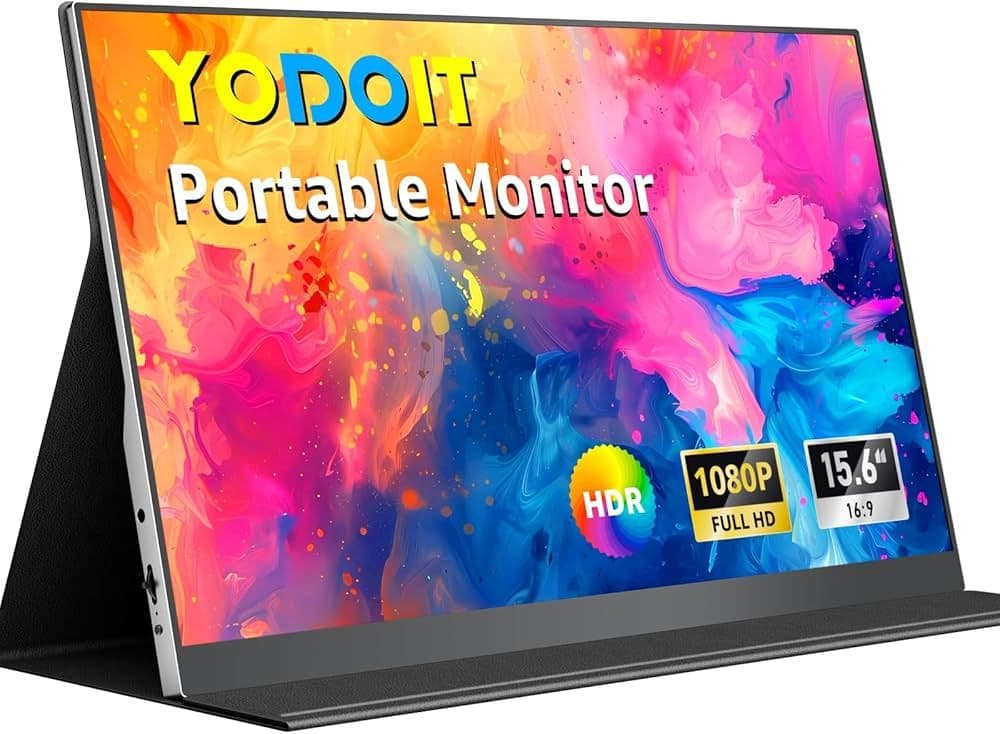


A 15.6-inch portable monitor from MNN is currently available on Amazon at a reduced price of around $50, reflecting a 44% discount from its typical listing. For gamers looking to expand their setup without committing to a full external monitor, this type of device presents a straightforward way to add a second screen for multitasking, streaming, or monitoring in-game information.
The form factor matches a standard laptop display, making it simple to slot into existing desk arrangements. Laptop gamers can use it as an extended workspace or a dedicated secondary display for Discord, walkthroughs, or system monitoring tools.

Display Performance for Games and Media
The monitor runs at 1920 x 1080 Full HD resolution, matching what many entry-level and mid-range gaming displays deliver. It won't compete with high-refresh-rate gaming monitors, but the IPS panel provides consistent color reproduction and viewing angles up to 178 degrees. That's useful for co-op sessions or local multiplayer where multiple people need to see the screen from different spots.
For solo play, the panel's clarity handles general gameplay well, especially in titles that don't demand ultra-high refresh rates. HDR support adds some visual tuning flexibility, though its impact varies by game and source device. Blue light reduction features are included, which may cut down on eye strain during longer sessions.
Practical Use Cases for Gaming and Streaming
This portable monitor isn't built to replace a primary high-performance display. It's designed to complement one. Streamers can use it as a secondary screen to keep chat windows, recording software, or performance metrics visible while gaming on the main display.
Console players using PlayStation, Xbox, or Nintendo Switch can connect the monitor directly via compatible USB-C connections. That makes it flexible for players who travel or want a temporary display without setting up a full television or desktop monitor.
Switching between display modes like extended, mirrored, and portrait orientation adds more utility. Extended mode works well for PC gaming setups, letting users distribute applications across two screens. Portrait mode can be handy for browsing guides, patch notes, or vertical content alongside gameplay.
Connectivity and Setup Considerations
The monitor is designed with plug-and-play functionality, requiring minimal configuration in most cases. A single USB Type-C connection can handle both power and video input when paired with compatible devices. This cuts down on cable clutter and simplifies setup, especially for portable or temporary gaming stations.
For devices that support it, this allows quick transitions between different environments, like moving from a desk setup to a couch or travel configuration. Compatibility depends on the output capabilities of the connected device, so users may need to verify support for USB-C video output or use adapters where necessary.
Portability and Build for On-the-Go Gaming
Portability is a key aspect of this monitor's design. It includes a smart cover made from PU leather that protects the screen during transport and doubles as a stand when in use. This allows the display to be positioned at different angles without requiring additional accessories.
For gamers who attend LAN events, travel frequently, or prefer flexible setups, the lightweight and compact design makes it easier to carry alongside a laptop or console. It's not meant to replace a fixed monitor, but rather to supplement gaming setups that require mobility.
Value for Gamers on a Budget
At approximately $50 during the discounted period on Amazon, the monitor sits in a lower price range compared to most external displays. For gamers experimenting with dual-screen workflows or looking to expand their setup without a significant investment, it represents a cost-conscious option.
The combination of Full HD resolution, IPS panel technology, and multiple connectivity options positions it as a functional secondary display rather than a primary competitive gaming monitor. Its value is most apparent in scenarios where additional screen real estate improves usability rather than raw performance. Make sure to check out more:
Frequently Asked Questions (FAQs)
Is this portable monitor suitable for gaming?
It can be used for gaming as a secondary display. While it supports Full HD visuals and IPS color quality, it's better suited for companion tasks like chat, guides, or streaming tools rather than high-performance competitive gaming.
Can it be used with gaming consoles?
Yes, the monitor can connect to consoles like PlayStation, Xbox, and Nintendo Switch, provided the appropriate USB-C or compatible connection is available.
Does it require additional software or drivers?
In most cases, no additional drivers are required. The monitor supports plug-and-play functionality when connected to compatible devices.
Is the display good for long gaming sessions?
The inclusion of blue light reduction features may help reduce eye strain during extended use, though comfort will also depend on brightness settings and overall setup.
Can it replace a main gaming monitor?
It's not intended to replace a primary gaming monitor, particularly for users who require high refresh rates or advanced gaming performance. It's best used as a secondary or portable display.