
Plug a controller into your Android phone, load up a game, and immediately hit the wrong button because the layout doesn't match what your hands expect. Every mobile gamer knows that feeling. Android 17 is putting an end to it.
Google has confirmed that Android 17 introduces system-level controller remapping through a new Game Controller settings menu. The key here is "system-level" , your remapped layout applies across every game on the device, not just one app. No more digging through individual game settings, and no more re-doing your setup every time you switch titles.
What the old situation actually looked like
Before Android 17, controller support on Android was a patchwork. Games that bothered to include remapping options buried them inside their own settings menus, and plenty of titles offered nothing at all. If a game mapped jump to a button your thumb doesn't naturally rest on, you either adapted or dealt with it.
For players who switch between a console, PC, and mobile regularly, this was a constant friction point. Muscle memory built on one platform would fight against whatever layout a mobile game decided to use. Accessibility was an even bigger issue. Players with limited hand mobility often had no way to move inputs to positions that actually worked for them.
What Android 17 changes
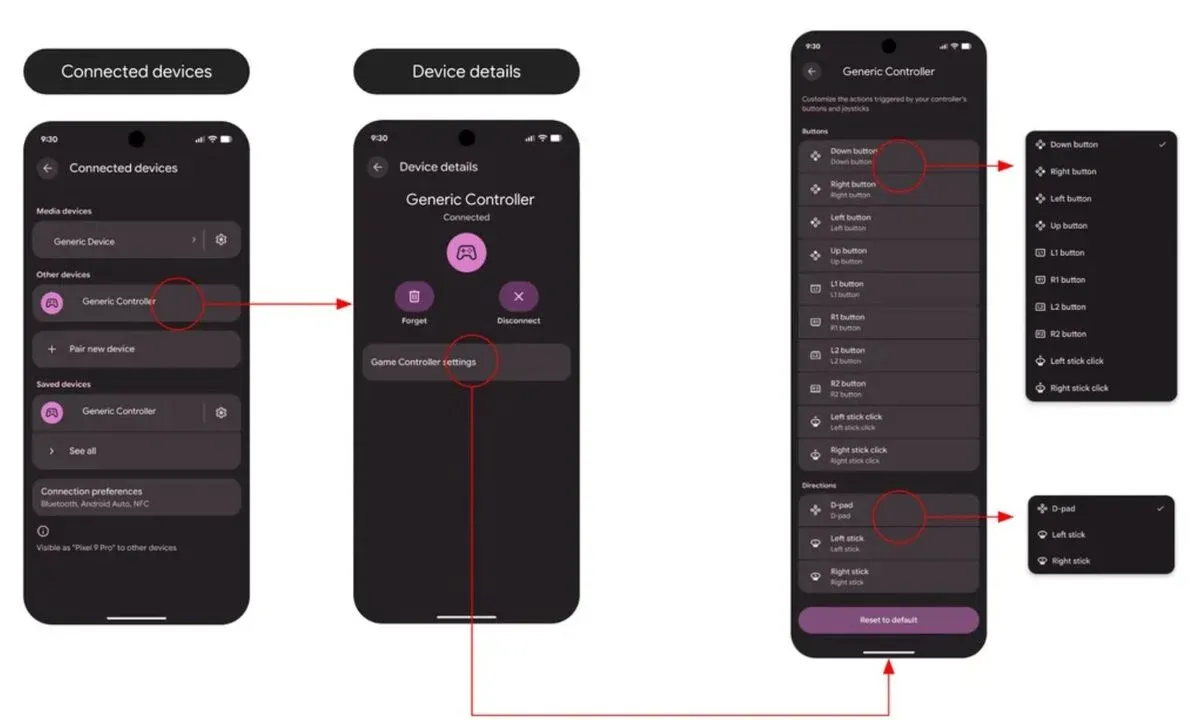
The new Game Controller settings menu lets you reassign face buttons, triggers, and thumbsticks at the OS level. Hate clicking in on the left thumbstick? Move that function to a face button. Want to swap your jump and dodge inputs across every game at once? Done.
Settings are saved to the device, so your preferences persist whether you're loading a platformer, an action RPG, or a fighting game. That kind of consistency hasn't existed on Android before now.
The menu is split into two sections:
- Button inputs: face buttons, triggers, bumpers
- Directional controls: analog sticks, D-pad
Accessing it depends on how your controller connects:
- Wired:Settings > System > Game Controller, then select the connected device
- Bluetooth:Settings > Connected devices, tap the menu next to your controller, then open Game Controller settings
danger
This feature is only available in Android 17 Beta 2 and later. You'll need a supported device enrolled in the beta program to access it before the stable release.
The accessibility angle that deserves more attention
The remapping news is getting attention as a convenience feature, but the accessibility implications are just as significant. Not every player interacts with a controller the same way. For someone with limited hand strength or reduced mobility in specific fingers, the difference between a fixed layout and a remappable one can determine whether a game is actually playable.
System-level remapping means those accommodations follow the player everywhere, rather than depending on whether each individual developer thought to include the option. That's a meaningful shift for a platform with over 3 billion active devices.
Beta rough edges and what's still coming
Since this is still Beta 2, a few things aren't fully polished. The on-screen button glyphs (the icons that show which button does what) don't always match the physical controller being used. The remapping itself works correctly regardless, but the visual feedback can be misleading. Google will likely address this before the stable release.
What most players miss in beta coverage is that these kinds of UI inconsistencies rarely survive to the final build. The underlying functionality is what matters at this stage, and by all accounts that part works as intended.
For anyone gaming on Android with a controller, this is worth tracking. The stable release of Android 17 will bring this to all supported devices, and for a platform that's been leaning harder into mobile gaming over the past few years, it's a long-overdue addition. You'll want to check out gaming news for more coverage as Android 17 approaches its full rollout, and latest reviews if you're looking at which controllers pair best with Android devices right now. Make sure to check out more: