
Portable monitors are no longer just for office work - they’ve become a key part of mobile gaming setups and streaming stations. The JSAUX FlipGo Portable Dual Monitor stands out in this space with a vertical stacked design that gives gamers and creators more usable screen space without adding clutter. By combining portability with dual-screen functionality, FlipGo is designed to enhance productivity and gameplay management, whether you’re tracking maps, chats, or streaming dashboards.

Use code TRYHARD33 at checkout to redeem this offer before code expires again.
Get 33% Off GAMES+ Subscription
Vertical Design Suited for Gaming Setups
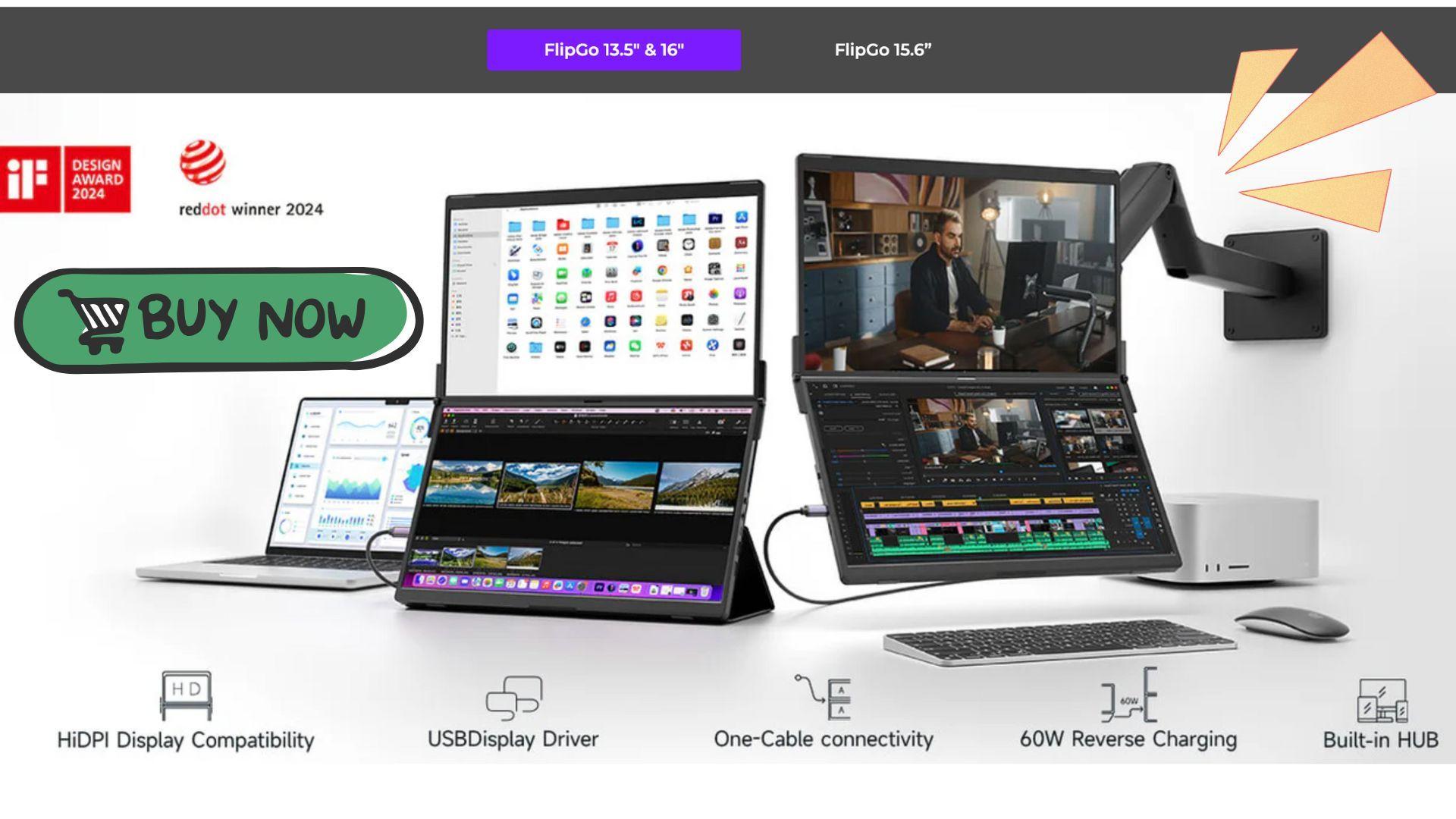
What sets the FlipGo apart from standard portable monitors is its stacked, vertical layout. Instead of stretching horizontally, the two screens are aligned on top of each other, giving a tall, nearly uninterrupted workspace. For gamers, this means you can keep essential information in view - like Discord chats, maps, in-game stats, or OBS controls - without overlapping your main display.
The build is sturdy, with aluminum alloy and reinforced plastic that feels premium. The included magnetic Flex Folio acts as both a protective case and a stand, making it easy to set up a dual-screen gaming station anywhere. While heavier than a single portable monitor, the FlipGo remains manageable for travel, making it a practical option for LAN events or mobile streaming setups.
Display Performance and Gaming Clarity
FlipGo’s IPS panels deliver crisp visuals and accurate colors, making them suitable for both gaming and content creation. The 13.5-inch Pro model features a 2256×1504 resolution with a 3:2 aspect ratio, while the larger 16-inch Pro and Touch versions use 2560×1600 with a 16:10 aspect ratio, giving ample vertical space to manage multiple windows or applications simultaneously.
Brightness levels of up to 500 nits on the larger models ensure visibility even in bright environments, and viewing angles remain wide and consistent. While the monitors are capped at 60Hz, they are ideal for strategy games, simulation titles, RPGs, and MMO setups where multitasking and interface management are key. Competitive FPS players may still rely on a high-refresh monitor for their main gameplay, but FlipGo excels as a companion display for tools, dashboards, and streaming controls.
Simple Setup and Connectivity
One of FlipGo’s strongest features is its single-cable connection. A USB-C cable powers both screens, and if connected to external power, it can also charge your laptop. This reduces desk clutter and simplifies the mobile setup, which is especially helpful for gamers who frequently move between setups or stream on the go.
FlipGo supports multiple display modes, including treating the two screens as independent displays or combining them into a single tall workspace. Windows and Linux users have the most flexibility, but macOS support is still solid, with only minor limitations depending on your system. Switching between modes is fast and reliable, letting gamers easily organize streaming software, performance monitors, and chats without interrupting gameplay.
Gaming Workflow Advantages
For gamers, FlipGo is more than a secondary monitor - it’s a portable workflow enhancer. Its stacked screens allow you to keep maps, inventories, chat, or streaming tools visible while keeping your main game display uncluttered. For streamers, it’s especially useful as a command center for OBS, alerts, and other streaming apps.
The Touch 16-inch model adds interactive controls, letting you scroll timelines, move windows, or interact with apps directly. While not necessary for traditional gaming, this touch capability adds convenience when managing multiple programs at once, especially during live streams.
Portability and Travel Considerations
The FlipGo is designed for gamers and content creators on the move. It folds compactly and the folio protects the screens in transit. Although it weighs more than a single portable monitor, it is still far easier to carry than two separate displays. This makes it suitable for LAN parties, hotel setups, and mobile streaming stations, allowing users to replicate a desktop workflow anywhere.
The included 65W USB-C charger on Pro models ensures long gaming and streaming sessions without worrying about power sources. Overall, FlipGo combines portability with dual-screen utility, making it a practical choice for gamers who value flexibility.
Final Verdict
The JSAUX FlipGo Portable Dual Monitor is a standout solution for gamers and streamers seeking a portable dual-screen setup. While it doesn’t replace high-refresh gaming monitors, it adds significant value as a secondary display for managing chats, maps, dashboards, and streaming tools. Its stacked layout, sturdy build, and simple connectivity make it a practical, gamer-friendly upgrade for laptop-based setups.
For gaming workflows that require multitasking, streaming, or content creation on the go, FlipGo provides a clear advantage over standard portable monitors.
Rating: 4.8 / 5
Overall, it is a reliable and versatile option for gamers who need additional screen real estate without compromising portability. When you purchase through links on our site, we may earn an affiliate commission. You can learn more here: https://jsaux.com/products/flipgo-portable-dual-monitor
Make sure to check out our articles on gaming gadgets:
Best Apple Products for Gaming
Best Nintendo Switch Accessories
Best Gaming Androids (phones)
Frequently Asked Questions (FAQs)
Is the FlipGo good for gaming?
Yes, it works best as a secondary display for maps, dashboards, streaming controls, and other supporting tools. It is not designed for high-refresh competitive gaming.
Can FlipGo replace a main gaming monitor?
No, the 60Hz refresh rate means it is intended as a companion display rather than a primary gaming monitor.
Does FlipGo support macOS and Windows?
Yes, it supports Windows, Linux, and macOS, though macOS may have minor display limitations depending on your system.
What makes FlipGo unique for gamers?
Its vertical stacked design allows more usable screen space for multitasking, making it ideal for streamers and gamers managing multiple apps simultaneously.
Is the FlipGo portable for travel?
Yes. It folds compactly, the folio protects the screens, and the dual-screen setup is easier to carry than two separate monitors.
Does the FlipGo require external power?
It can run from a laptop via USB-C, but using external power allows it to charge the laptop and power longer sessions.