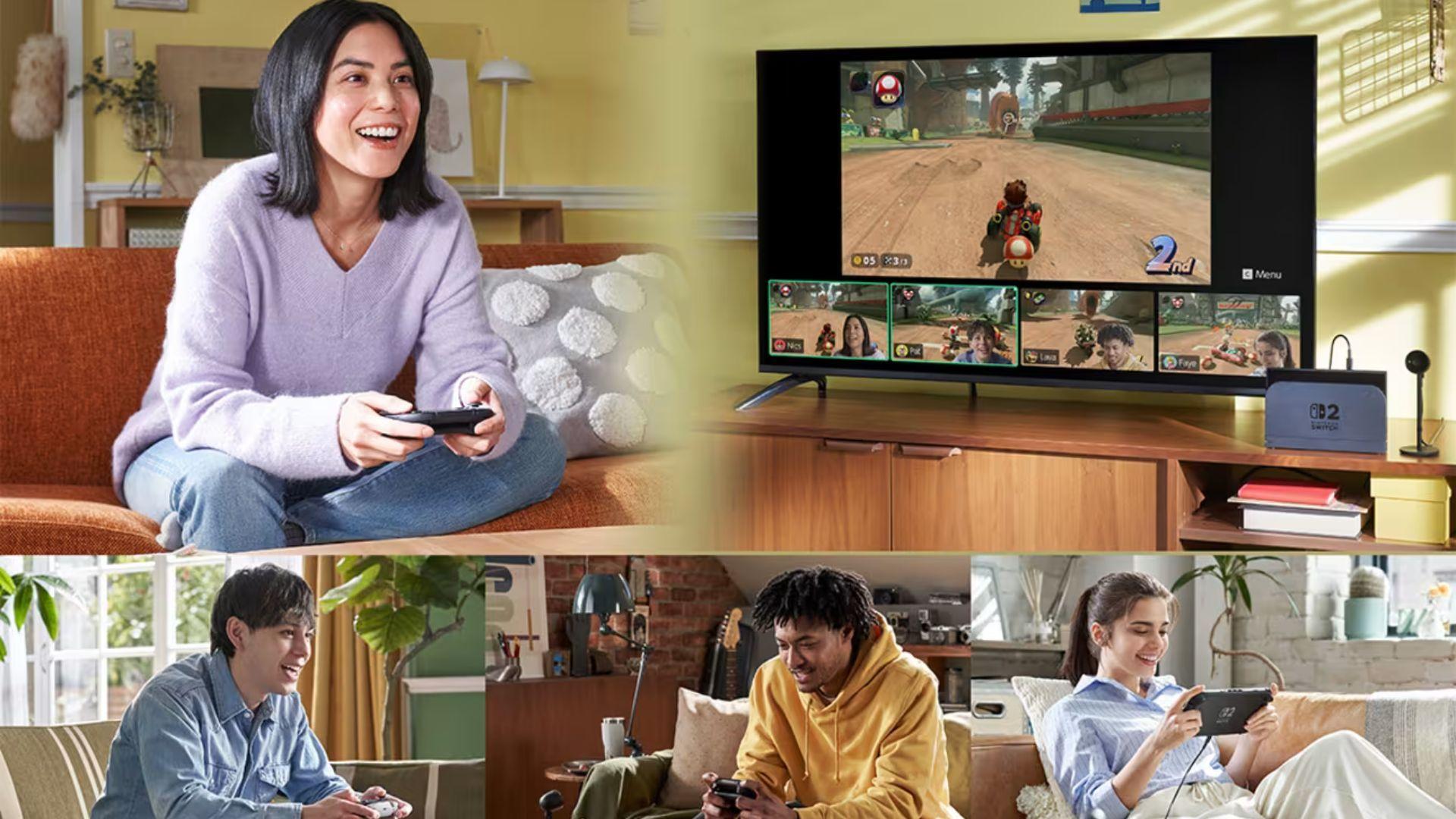

Nintendo Switch 2 introduces GameChat, a built-in communication system designed to make online play feel closer to local multiplayer. Instead of relying on external apps or accessories, GameChat integrates voice chat, screen sharing, and optional camera video directly into the system. The feature is built to support social play across distances, whether friends are in the same city or spread across regions.
As online gaming continues to evolve alongside community-driven platforms and web3-style interaction spaces, Nintendo’s approach with GameChat focuses on simplicity and accessibility. It aims to keep players connected without pulling them away from the game experience.

Connecting Players Beyond Local Multiplayer
GameChat is exclusive to Nintendo Switch 2 and is accessed using the C Button on the right Joy-Con 2 controller. Once activated, it allows players to form chat groups and interact while playing different or shared games. The system supports voice chat for up to twelve participants using the console’s built-in microphone, removing the need for a headset in most situations.
In addition to voice, GameChat supports screen sharing between up to four players at a time. These shared screens appear as video feeds at the bottom of the display and can be resized or minimized depending on how much space players want to dedicate to communication versus gameplay. This setup makes it easier to watch friends play, give advice, or simply hang out while everyone runs separate games.
For players who want a more personal layer of interaction, GameChat also supports camera feeds when using a compatible USB camera, sold separately. Up to four people can appear on screen, and the system even allows the game itself to be used as a background, creating a lightweight livestream-style setup limited to friends.
Getting Started With GameChat on Nintendo Switch 2
Before using GameChat, each participant must be on a Nintendo Switch 2 system and complete a one-time setup process tied to the phone number registered with their Nintendo Account. Players can also control which friends on their Friend List are allowed to use GameChat with them.
GameChat is currently available without a membership during its open-access period, but after March 31 it will require a Nintendo Switch Online subscription. Internet access and a Nintendo Account are also required. For users under 16, parental or guardian involvement is required to ensure communication settings are configured safely.
Once everything is set up, starting a session is straightforward. Pressing the C Button brings up the GameChat menu, where friends can be invited into a group. Invitations appear as system notifications, and may also appear on a linked smart device through the Nintendo Switch app.
Managing Voice, Video, and Screen Sharing
While in a GameChat session, pressing the C Button again opens the control menu. From here, players can mute or unmute microphones, toggle cameras, start or stop screen sharing, and open deeper settings. Selecting a specific friend in the chat provides additional options, such as enlarging their shared screen for closer viewing.
This structure allows players to stay in control of how much information is on screen at any time. Someone focused on gameplay can minimize feeds, while another player helping a friend through a level can expand a shared view and talk through the problem in real time.
The system is flexible enough that everyone in a group can play different games and still use GameChat as a social hub, rather than being locked into the same software session.
Adjusting Layout, Audio, and Accessibility
GameChat includes several configuration tools to fine-tune the experience. Screen layout settings let players expand the main gameplay view or hide video feeds entirely while keeping voice chat active. This helps reduce clutter for players who want a cleaner interface during more demanding sections of a game.
Audio options allow users to balance chat volume with in-game sound, making it easier to hear teammates without drowning out important audio cues. Camera settings control zoom, face focus, and background removal, which helps keep video feeds clean and avoids showing unintended surroundings.
Accessibility features also play a role. Voice audio can be displayed as on-screen text, and text messages can be converted into spoken audio. These tools make GameChat more usable for players with different communication needs.
Using GameChat for More Than Just Talking
While voice chat is the core feature, GameChat’s screen sharing changes how players interact. Friends can demonstrate mechanics, guide someone through a difficult puzzle, or simply watch along while chatting. It also becomes a way to explore new games socially. If a player sees something interesting in a shared feed, selecting “View Software Information” from the menu opens the Nintendo eShop page for that title.
The built-in microphone on Nintendo Switch 2 is tuned to reduce background noise and focus on voices, which helps maintain clarity without requiring additional hardware. It keeps communication simple and integrated into the system rather than split across devices.
Online Requirements and Availability
After the open-access window ends, GameChat will require a Nintendo Switch Online membership. A compatible USB camera is needed for video features, and availability may vary by region. Internet access and a Nintendo Account are required for online functionality, and all standard terms apply.
Make sure to check out our articles about top games to play in 2026:
Best Nintendo Switch Games for 2026
Best First-Person Shooters for 2026
Best PlayStation Indie Games for 2026
Best Multiplayer Games for 2026
Most Anticipated Games of 2026
Top Game Releases for January 2026
Frequently Asked Questions (FAQs)
What is GameChat on Nintendo Switch 2?
GameChat is an integrated communication feature on Nintendo Switch 2 that supports voice chat, screen sharing, camera video, and online game sharing with friends.
How many players can use GameChat at once?
Up to twelve players can join a voice chat group, while up to four players can share screens or camera video simultaneously.
Do players need extra hardware for GameChat?
Voice chat works with the built-in microphone on Nintendo Switch 2. Camera video requires a compatible USB camera sold separately.
Is GameChat free to use?
GameChat is free during its open-access period. After March 31, a Nintendo Switch Online membership will be required.
Can players use GameChat while playing different games?
Yes. Players can run different games at the same time and still stay connected through GameChat for voice, video, and screen sharing.
Does GameChat support accessibility features?
Yes. GameChat can display voice audio as text and convert text messages into spoken audio, along with layout and audio customization tools.
Is GameChat available worldwide?
Availability may vary by country. Internet access, a Nintendo Account, and applicable regional terms are required to use online features.