
Crimson Desert players ko recent action RPG memory ke sabse demanding control schemes mein se ek mein launch karta hai. Saat alag-alag skill combos, context-sensitive interactions, aur ek movement system ke beech jo ek hi key par crouch, slide, mantle, aur climb ko layer karta hai, comfortable hone mein real effort lagta hai. Yeh guide keyboard aur mouse, PS5, aur Xbox ke liye har default binding ko break karta hai, phir un remapping options se guzarta hai jo sach mein fark laate hain.
Full keyboard and mouse controls
Default PC layout chaar major categories ko cover karta hai. Skill inputs consistent rehte hain chahe aapne koi bhi weapon equip kiya ho, lekin actual ability aapke loadout ke hisaab se change hoti hai.
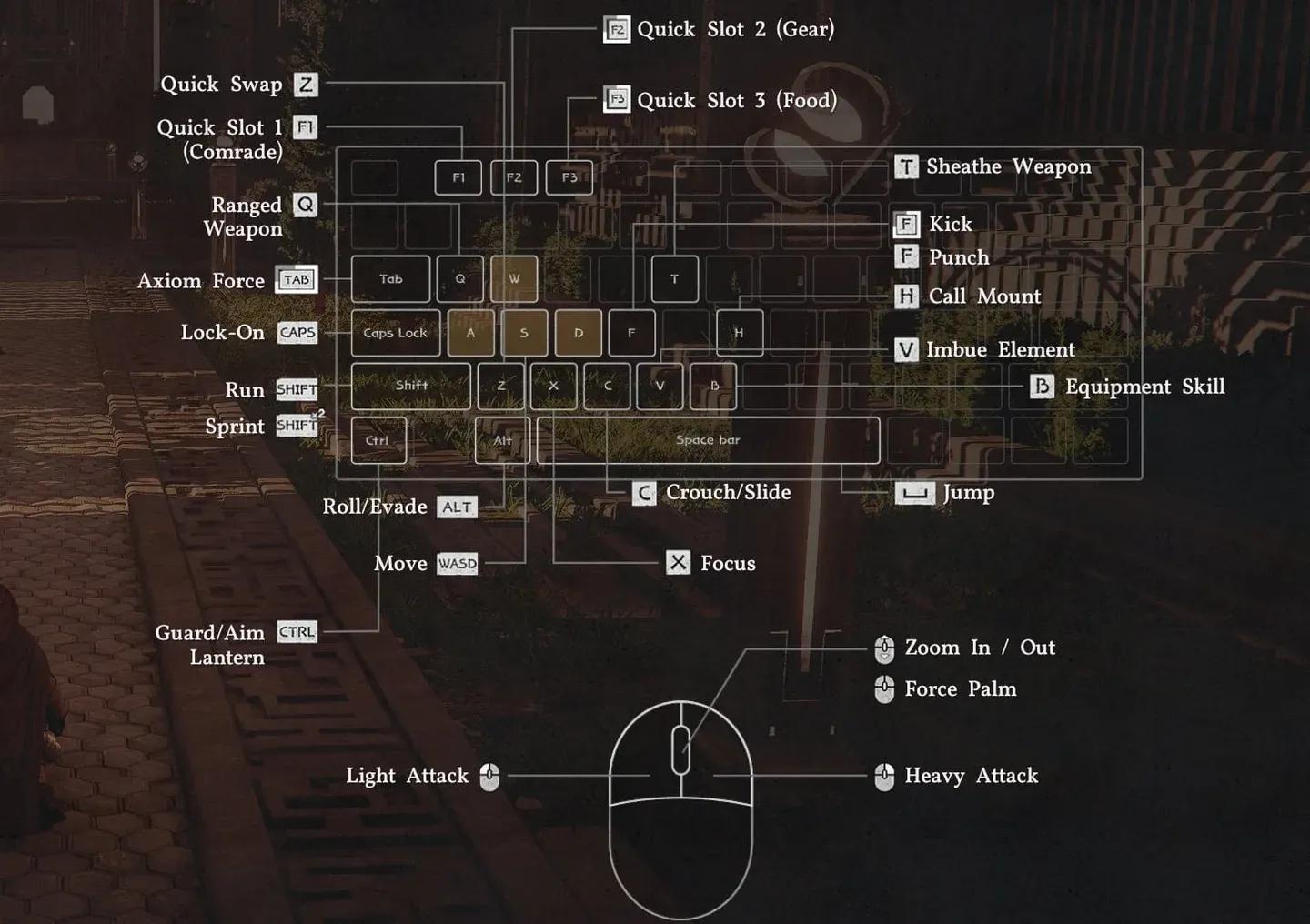
Key remapping control panel

Movement and camera
| Action | Key | Input Type |
|---|---|---|
| Move | WASD | Hold |
| Move Camera | Mouse | Motion |
| Camera Zoom In/Out | Mouse Wheel | Scroll |
| Lock-on | Caps Lock | Press |
| Run | Shift | Double Press (Toggle) |
| Crouch | C | Hold |
| Slide | C | Hold (While Running) |
| Jump | Space | Press |
| Precision Jump | Ctrl + Space | Hold Ctrl, then Press |
| Double Jump (Unlocked) | Space | Press (Mid-air) |
| Mantle | Space | Press (Near Ledge) |
| Climb | Space + WASD | Jump Towards Wall |
| Roll | Alt | Press |
| Evade | Alt | Double Press |
| Evade (Alt Bind) | Mouse 5 | Press |
Basic controls
| Action | Key | Input Type |
|---|---|---|
| Quick Menu (Last) | Esc | Press |
| Scroll Menu | Esc | Hold |
| Inventory | I | Press |
| Skills | K | Press |
| Journal | J | Press |
| Map | M | Press |
| Use Gear | B | Press/Hold |
| Force Palm | Middle Mouse Button | Press |
| Call Mount | H | Press |
| Dismount / Put Down Item | R | Press |
| Comrade Quick Slot | F1 | Hold |
| Gear Quick Slot | F2 | Hold |
| Food Quick Slot | F3 | Hold |
| Stow Weapon | T | Press |
Interaction
| Action | Key | Input Type |
|---|---|---|
| Loot Item / Enemy | E | Hold |
| Interact | Ctrl | Hold |
| Interaction 1 | E | Press (While Interacting) |
| Interaction 2 | R | Press (While Interacting) |
| Interaction 3 | T | Press (While Interacting) |
| Interaction 4 | G | Press (While Interacting) |
| Previous | Q | Press |
| Next | E | Press |
| Lift Object | E | Press (While Interacting) |
| Place Object | R | Press (While Interacting) |
| Push | Left Mouse Button | Hold |
| Pull | Right Mouse Button | Hold |
Combat
| Action | Key | Input Type |
|---|---|---|
| Light Attack | LMB | Press/Hold to Combo |
| Heavy Attack | RMB | Press/Hold to Combo |
| Punch/Kick | F | Press |
| Aim | Q or M4 | Press |
| Fire | LMB | Press (While Aiming) |
| Focus | X | Press |
| Axiom Force | Tab | Press |
| Aim / Guard / Focus Light | Ctrl or M4 | Press |
| Skill 1 | RMB + LMB | Combo Press |
| Skill 2 | RMB + Ctrl | Combo Press |
| Skill 3 | RMB + Shift | Combo Press |
| Skill 4 | LMB + Alt | Combo Press |
| Skill 5 | LMB + Shift | Combo Press |
| Skill 6 | LMB + Space | Combo Press |
| Skill 7 | LMB + Ctrl | Combo Press |
| Weapon Swap | Z | Press |
| Grappling: Throw | F + LMB | Combo Press |
| Grappling: Lariat | F + RMB | Combo Press |
| Enemy Vault | Space + LMB | Combo Press |
| Imbue Element | V | Hold |
| Skill: Flame | 1 | Press |
| Skill: Frost | 2 | Press |
| Skill: Lightning | 3 | Press |
| Skill: Wind | 4 | Press |
Full PS5 and Xbox controller controls
Console bindings PC ke same structural logic ko follow karte hain, jismein skill combos trigger-plus-bumper combinations use karte hain mouse-plus-key presses ke bajaye.
Movement and camera (console)
| Action | PS5 | Xbox |
|---|---|---|
| Move | LS | LS |
| Move Camera | RS | RS |
| Camera Zoom | Trackpad | View Button |
| Lock-on | D-Pad Down | D-Pad Down |
| Run | X (Hold) | A (Hold) |
| Sprint (Toggle) | X (Double Press) | A (Double Press) |
| Crouch / Slide | L3 | RS Click |
| Jump | Square | X |
| Precision Jump | L1 + Square | LB + X |
| Roll | Circle | B |
| Evade | Circle (Double Press) | B (Double Press) |
Basic controls (console)
| Action | PS5 | Xbox |
|---|---|---|
| Quick Menu | Options | Menu |
| Scroll Menu | Options (Hold) | Menu (Hold) |
| Use Gear | L1 | LB |
| Force Palm | R3 | RS Click |
| Call Mount | D-Pad Up | D-Pad Up |
| Dismount / Put Down Item | Triangle | Y |
| Comrade Quick Slot | D-Pad Up (Hold) | D-Pad Up (Hold) |
| Gear Quick Slot | D-Pad Left (Hold) | D-Pad Left (Hold) |
| Food Quick Slot | D-Pad Right (Hold) | D-Pad Right (Hold) |
| Stow Weapon | D-Pad Left | D-Pad Left |
Combat (console)
| Action | PS5 | Xbox |
|---|---|---|
| Light Attack | R1 | RB |
| Heavy Attack | R2 | RT |
| Punch/Kick | Triangle | Y |
| Aim (Ranged) | L2 (Hold) | LT (Hold) |
| Fire | L2 (Release) | LT (Release) |
| Focus | X | A |
| Axiom Force | L3 (Hold) | LS (Hold) |
| Block/Parry | L1 | LB |
| Skill 1 | R2 + R1 | RT + RB |
| Skill 2 | R2 + L1 | RT + LB |
| Skill 3 | R2 + X | RT + A |
| Skill 4 | R1 + Circle | RB + B |
| Skill 5 | R1 + X | RB + A |
| Skill 6 | R1 + Square | RB + X |
| Skill 7 | R1 + L1 | RB + LB |
| Grappling: Throw | Triangle + R1 | Y + RB |
| Grappling: Lariat | Triangle + R2 | Y + RT |
| Enemy Vault | Square + R1 | X + RB |
How do you remap controls in Crimson Desert?
Remapping platform ke hisaab se alag tarah se kaam karta hai. PC par, pause menu ke through full key rebinding available hai. Settings open karein, Inputs sub-menu mein navigate karein, aur koi bhi binding change karein jo aap chahte hain. Agar koi naya binding existing wale se conflict karta hai, toh game poochhega ki kya aap use overwrite karna chahte hain. Yahan careful rahein: kuch default bindings pehle se keys share karte hain, aur unhe bina planning ke overwrite karne se defaults par full reset ki zaroorat pad sakti hai.
Apne changes ko save karne ke liye, apply karne ke liye Space press karein.
Consoles par, native remapping currently in-game menus ke through available nahi hai. Pearl Abyss ne confirm kiya hai ki control accessibility improvements future patch mein aayenge, haalanki full remapping ko officially us update ka part confirm nahi kiya gaya hai. Filhaal, DualSense Edge wale PS5 players aur Elite Controller wale Xbox players apne respective controller software ke through inputs remap kar sakte hain.
Steam par players Steam Input ke through controller inputs bhi remap kar sakte hain, haalanki in-game tutorials aur menus aapne jo bhi remap kiya ho, uske bawajood original default bindings dikhate rahenge.
What are the best control remaps for PC?
Default PC layout mein kuch genuinely awkward placements hain jo combat serious hote hi turant obvious ho jaati hain. Extended play sessions mein control scheme ko test karne ke baad, teen bindings sabse zyada change karne layak hain.
Lock-on default mein Caps Lock par hai, jo action cluster se door hai aur accidentally toggle karna aasan hai. Isse Tab par move karne se yeh zyada accessible ho jaata hai.
Axiom Force default mein Tab par hai, lekin yeh bahut saare attacks aur skill combos mein feed karta hai, isliye isse ek close home ki zaroorat hai. Isse R par remap karna achha kaam karta hai kyunki Dismount aur Interaction 2 (dono originally R par) low-urgency actions hain jinhe bina kisi combat impact ke kahin aur move kiya ja sakta hai.
Evade originally Alt par tha, jo rapid double-tapping ke liye uncomfortable hai. Update 1.00.003 ne Evade ke liye Mouse 5 ko ek second default ke taur par add kiya hai, jo ise kam urgent banata hai, lekin evade attack binding ko side button par hone se fayda hota hai.
Yahan VULKK controls guide se full recommended remap chain hai:
| Action | Default Key | Recommended Remap |
|---|---|---|
| Lock-on | Caps Lock | Tab |
| Evade | Alt | Mouse 5 |
| Guard / Aim (Alt) | Mouse 4 | Unbound |
| Axiom Force | Tab | R |
| Dismount | R | Y |
| Interaction 2 | R | 5 |
| Skill 4 | LMB + Alt | LMB + Mouse 5 |
| Blinding Flash | Ctrl + LMB | Mouse 4 |
Iska logic ek cascade hai: Lock-on ke liye Tab ko free karne ke liye Axiom Force ko move karna padta hai, jiske liye Dismount aur Interaction 2 ko aise keys par relocate karna padta hai jo combat mein matter nahi karte. Blinding Flash combat aur treasure hunting dono ke dauran quick access ke liye Mouse 4 par aata hai, haalanki dhyan dein ki yeh secondary Guard/Aim mapping ko unbind kar dega agar yeh kahin aur assign nahi kiya gaya hai.
Console recommendations
Standard PS5 ya Xbox controllers ke liye, default layout playable hai lekin ideal nahi. Sabse badi pain points stick-click functions hain: crouch ke liye L3 aur Force Palm ke liye R3 dono mein aapke thumbsticks ko neeche press karna padta hai, jo imprecise hai aur time ke saath hardware par mushkil hai.
Agar aapke paas DualSense Edge ya Xbox Elite Controller hai, toh recommended change hai Run aur Jump ko face buttons se hatana aur L3 aur R3 ko rear paddles par assign karna. Yeh aapke thumbs ko sticks par rakhta hai movement-heavy sequences ke dauran jab crouch aur Force Palm sabse zyada use hote hain.
Crimson Desert systems, weapons, aur world exploration ko cover karne wale aur guides ke liye, GAMES.GG par full guides section browse karein.