
Bridger Western में Gangs उन फीचर्स में से हैं जो ऊपर से देखने में सिंपल लगते हैं, लेकिन काफी सारे प्लेयर्स इसमें अटक जाते हैं। यह पूरा प्रोसेस इन-गेम कुछ भी होने से पहले Roblox के अपने Group सिस्टम के जरिए काम करता है, और इसमें एक ऐसी जरूरी चीज है जिसे अक्सर लोग मिस कर देते हैं और अगर आप उसे छोड़ देंगे तो पूरा सेटअप काम नहीं करेगा। यह गाइड आपको हर स्टेप के बारे में बताएगी, आपके Roblox Group को बनाने से लेकर सर्वर में अपना Gang नाम दिखाने तक।
Bridger Western में Gangs असल में क्या करते हैं?
Roblox Group पर 100 Robux खर्च करने से पहले, यह जान लेना जरूरी है कि आपको क्या मिल रहा है। फिलहाल Gangs पूरी तरह से कॉस्मेटिक हैं। इसमें Gang-स्पेसिफिक कोई quests नहीं हैं, कोई gang-versus-gang बैटल नहीं हैं, मेंबर्स के बीच कोई shared करेंसी या आइटम ट्रेडिंग नहीं है, और न ही इंडिविजुअल कॉन्ट्रिब्यूशन से जुड़ा कोई रैंकिंग सिस्टम है।
इसका असली फायदा पहचान (identification) है। सर्वर में जब अफरा-तफरी का माहौल होता है, खासकर जब कोई Corpse Part स्पॉन होता है और हर कोई उसे बचाने के लिए दौड़ता है, तो यह जानना कि कौन से प्लेयर्स आपके साथी (allies) हैं, आपको friendly fire से बचा सकता है जो आपके Stand के मौके को खराब कर सकता है। आपका Gang नाम गेम की दुनिया में एक विजिबल लेबल के रूप में दिखाई देता है, इसलिए टीम के साथियों को एक नजर में पहचानना आसान होता है।
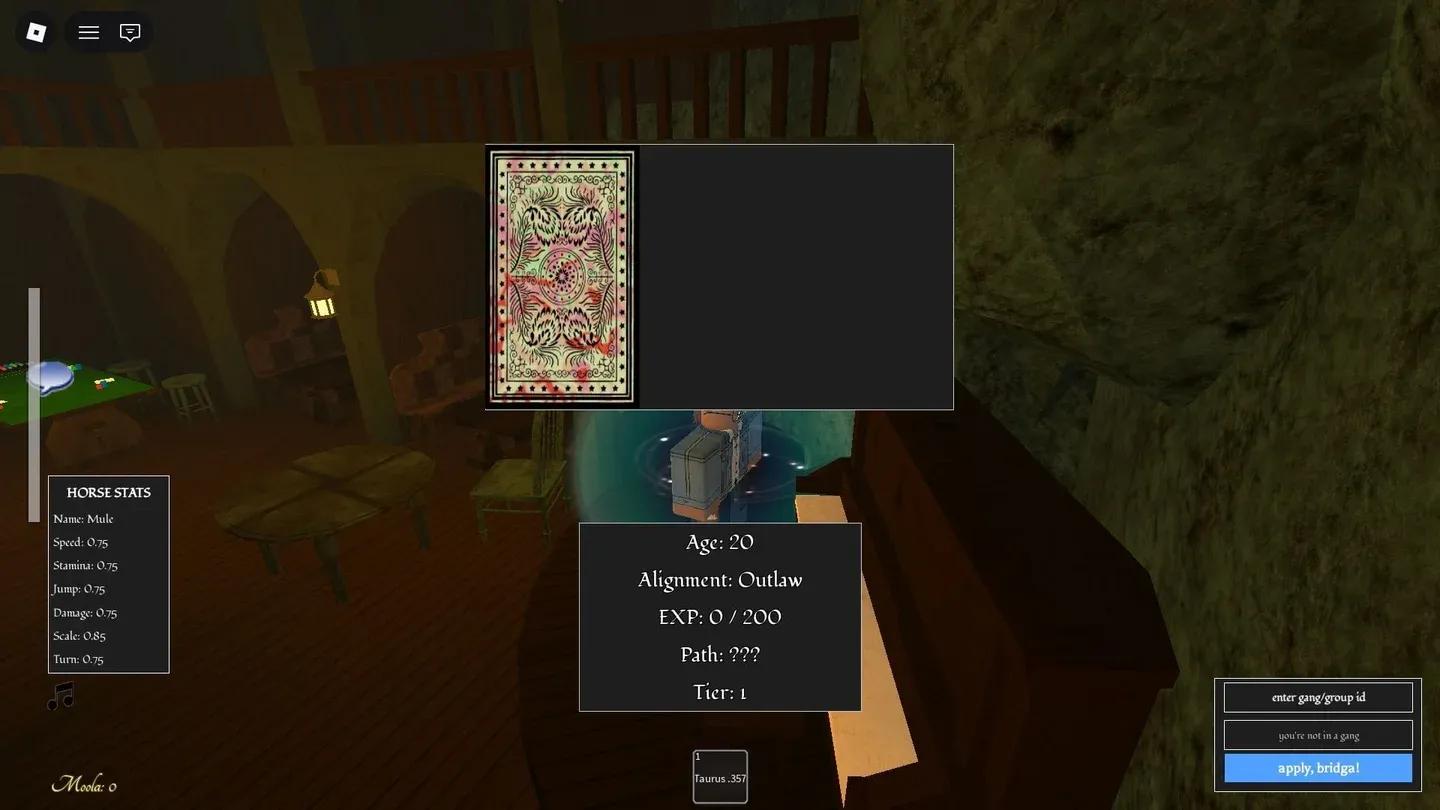
Gang ID entry in M menu

Gang बनाने से पहले आपको क्या चाहिए?
Bridger Western में Gang सिस्टम Roblox के अपने Group (जिसे अब Community कहा जाता है) इंफ्रास्ट्रक्चर पर बना है। आप पहले Roblox Group का मेंबर बने बिना Gang बना या जॉइन नहीं कर सकते। इसका मतलब है कि सेटअप दो स्टेज में होता है: पहले Roblox साइड पर, फिर इन-गेम साइड पर।
Bridger Western में कुछ भी करने से पहले आपको ये चीजें चाहिए:
- एक Roblox अकाउंट
- एक Roblox Group की मेंबरशिप (चाहे आपने बनाया हो या किसी और का जॉइन किया हो)
- Group के डिस्क्रिप्शन में बिल्कुल यही टेक्स्ट होना चाहिए: bridgerwesterngang (एक शब्द, कोई स्पेस नहीं, कोई कैपिटल लेटर की जरूरत नहीं)
- Group का नाम 50 कैरेक्टर्स या उससे कम का होना चाहिए
- नया Group बनाने में 100 Robux लगते हैं; पहले से बने Group को जॉइन करना फ्री है
डिस्क्रिप्शन में bridgerwesterngang कीवर्ड का न होना ही Gang क्रिएशन फेल होने का सबसे आम कारण है। गेम इसे चुपचाप चेक करता है, इसलिए अगर यह मिसिंग है, तो आपकी रिक्वेस्ट बिना किसी एरर मैसेज के प्रोसेस नहीं होगी।
अपने Gang के लिए Roblox Group कैसे बनाएं
अगर आप पहले से किसी क्वालिफाइंग Group का हिस्सा नहीं हैं, तो Roblox साइड पर इसे सेटअप करने का तरीका यहां दिया गया है।
- अपने Roblox अकाउंट में लॉग इन करें और Communities पेज पर जाएं। वेबसाइट पर, यह आपको बाएं नेविगेशन पैनल में मिलेगा। Roblox ऐप पर, स्क्रीन के नीचे या बाएं मेनू में More पर टैप करें।
- Create पर क्लिक करें और Name, Description, और Emblem फील्ड्स भरें।
- Description फील्ड में, टेक्स्ट में कहीं भी bridgerwesterngang कीवर्ड शामिल करें। गेम द्वारा आपके Group को पहचानने के लिए यह जरूरी है।
- एंट्री सेटिंग्स के लिए, Manual Approval आपको इस पर सबसे ज्यादा कंट्रोल देता है कि कौन जॉइन करेगा।
- फाइनलाइज करने के लिए परचेज बटन पर क्लिक करें। Group बनाने में 100 Robux लगते हैं और यह तुरंत लाइव हो जाता है।
Roblox साइड पर Group नाम की 50-कैरेक्टर की लिमिट है, लेकिन इन-गेम Gang नाम की कोई कैरेक्टर लिमिट नहीं है।
अपनी Roblox Group ID कैसे ढूंढें
जब आप ब्राउज़र में Group के पेज पर जाते हैं, तो URL में मौजूद नंबरों की स्ट्रिंग ही आपकी Group ID होती है। उदाहरण के लिए, अगर URL roblox.com/groups/12345678/YourGroupName जैसा है, तो ID 12345678 है। सिर्फ उस न्यूमेरिकल हिस्से को कॉपी करें।
Bridger Western में Gang कैसे बनाएं या जॉइन करें
एक बार जब आपका Roblox Group सेटअप हो जाए और आपके पास Group ID तैयार हो, तो इन-गेम स्टेप्स बहुत आसान हैं।
- Bridger Western लॉन्च करें और गेम वर्ल्ड में पूरी तरह लोड होने का इंतजार करें।
- इन-गेम मेनू खोलने के लिए M दबाएं।
- स्क्रीन के नीचे-दाएं कोने में, "enter gang/group id." लेबल वाली टेक्स्ट फील्ड ढूंढें।
- अपनी Roblox Group ID को उस फील्ड में पेस्ट करें।
- कंफर्म करने के लिए "apply, bridga!" पर क्लिक करें।
अगर उस Group के लिए अभी तक कोई Gang मौजूद नहीं है, तो एक नया Gang बन जाएगा। अगर उस Group के लिए पहले से ही Gang है, तो एक जॉइन रिक्वेस्ट भेजी जाएगी। इसमें कोई अलग से इनवाइट सिस्टम नहीं है; Gang मेंबरशिप सीधे Roblox Group रोस्टर से आती है। बस Group का मेंबर होना और उसकी ID डालना ही काफी है।
हर बड़े गेम के लिए और अधिक Roblox गाइड्स और टिप्स के लिए, GAMES.GG पर लेटेस्ट गाइड्स ब्राउज़ करें ताकि आप अपडेटेड रहें कि आपका समय किसमें लगाना सही है।