

Compact keyboards have had a moment lately. The 75% layout sits in a sweet spot that full-size devotees and 60% minimalists can both appreciate: you keep your function row and arrow keys, lose the numpad, and suddenly your mouse has breathing room. The MelGeek REAL81 lands squarely in that category, and it arrives at a time when the mid-range gaming-keyboard space is more competitive than it has ever been.
Here’s the thing: a keyboard at this price tier does not just need to feel decent. It needs to justify itself against boards that have spent years earning their reputation. The REAL81 knows this, and for the most part, it makes a convincing argument.

Use code TRYHARD33 at checkout to redeem this offer before code expires again.
Get 33% Off GAMES+ Subscription
Build quality that punches above its weight class
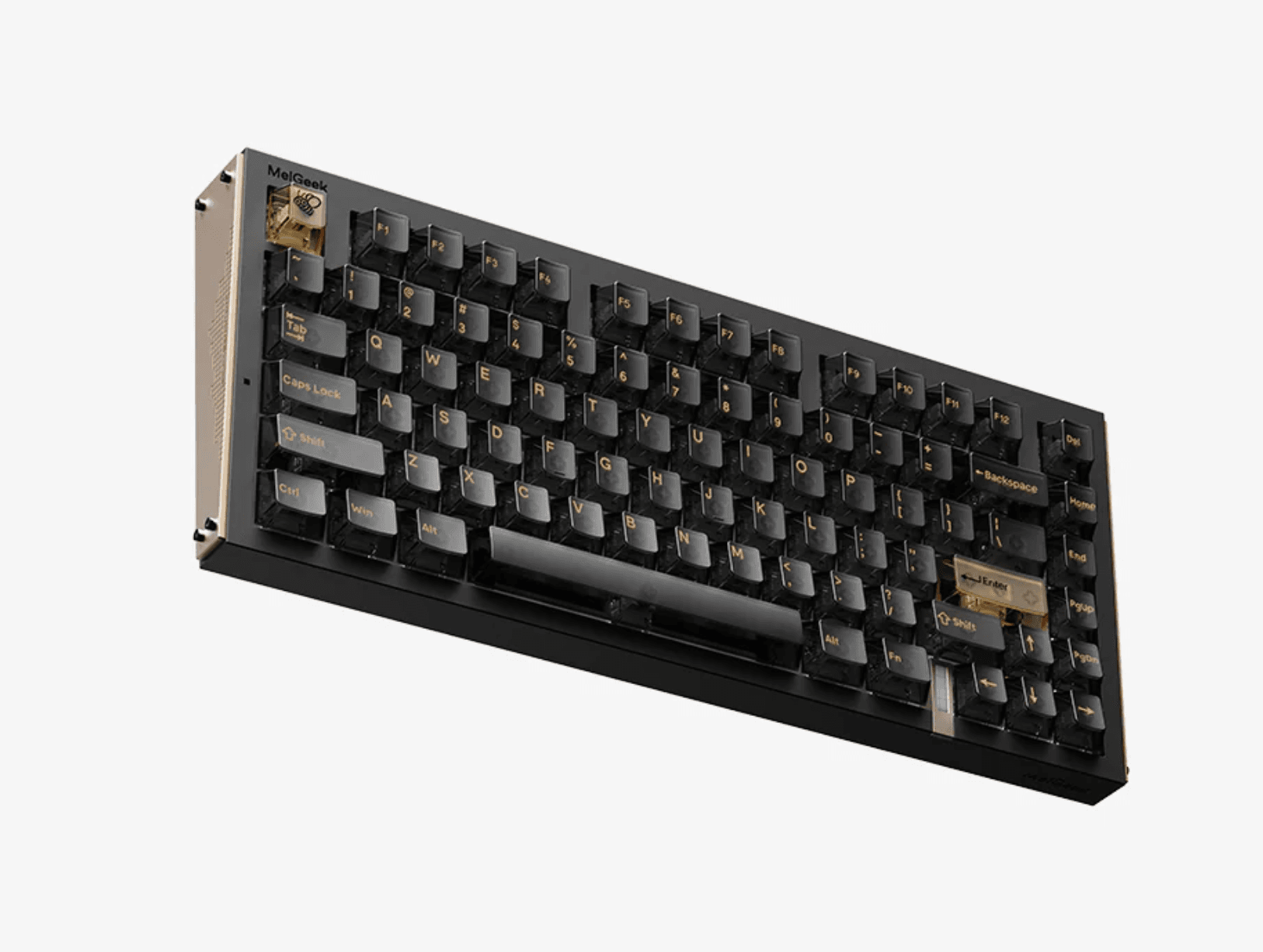
Pick up the REAL81 and the first thing you notice is the heft. It does not feel hollow or plasticky, even though the main case uses ABS + PC rather than an aluminum-alloy top cover. The aluminum-alloy side panels, gasket-mount structure, and internal dampening give it a solid, low-pitched feel that is closer to a premium gaming board than a typical entry-level keyboard.
The typing angle sits at a fixed position without adjustable feet, which is a minor frustration for anyone particular about their wrist posture. What most players miss with gasket-mount boards is how much the mounting style affects sound, not just feel. The REAL81 produces a satisfying low-pitched sound on each keystroke rather than the hollow clack you get from tray-mount designs. It is the kind of sound that makes you want to keep typing.
The RGB lighting punches through the transparent keycaps cleanly, and the per-key illumination supports the usual suite of effects through the companion software. Nothing revolutionary here, but it works reliably and looks sharp in a dim room.
Magnetic switches and what they mean for your playstyle
The REAL81 uses transparent PC keycaps with screen-printed legends and comes with magnetic switches. Because it is a magnetic/Hall Effect keyboard, its main advantage is gaming performance features such as Rapid Trigger, adjustable actuation, and fast reset behavior, rather than the traditional mechanical-switch customization path.
That distinction matters. Instead of choosing between conventional linear, tactile, or clicky mechanical switches, the REAL81 is designed around magnetic switch performance and fine-grained actuation control. For competitive games, being able to adjust when a key actuates and how quickly it resets can make movement inputs feel more immediate and responsive.
This also means the board should not be viewed as a conventional hot-swap mechanical keyboard for experimenting with standard switch types. Its appeal is less about swapping in different mechanical switch styles and more about tuning the magnetic switches and using Hall Effect features to suit your preferred games and input habits.
The stabilizers on the larger keys deserve a mention too. Spacebar rattle is the enemy of any good typing experience, and the REAL81’s stabilizers arrive reasonably tight. There is a faint hint of wobble on the spacebar under aggressive use, but nothing that rises to the level of a genuine complaint.
How it holds up against the competition
The 75% gaming-keyboard space in this price range is crowded. Boards from Keychron, NuPhy, and several other brands have established strong reputations, and the REAL81 is walking into a room full of confident competitors.
What separates the REAL81 is primarily its combination of magnetic-switch gaming features, substantial feel, and gasket-mounted construction. The ABS + PC main case does not carry the same premium-material appeal as a full aluminum chassis, but the aluminum-alloy side panels and internal construction help it avoid feeling like a lightweight entry-level board.
Where it gives ground is software: the configuration utility works, but it lacks the polish of more established ecosystems. Remapping keys and adjusting gaming-focused settings gets the job done, but the interface feels like an afterthought compared to the hardware.
Battery life is not a concern here since the REAL81 is a wired board, which some gamers will see as a limitation and others will see as a feature. No charging cables to manage, no latency concerns, no battery percentage to watch. For competitive play where consistency matters, wired is still the gold standard.
The transparent PC keycaps are screen-printed rather than double-shot. They allow the RGB lighting to come through clearly and fit the board’s gaming-oriented presentation, though they should not be positioned as the same kind of long-term legend-durability upgrade that double-shot PBT keycaps provide.
The verdict on value
The MelGeek REAL81 makes a strong case for itself as a first serious gaming keyboard or an upgrade from a budget board. Its gasket mount, solid construction, magnetic switches, and Hall Effect performance features deliver an experience that feels more specialized than a typical mid-range mechanical keyboard.
The software holds it back from being an easy recommendation for power users who want deep customization. And the fixed typing angle will annoy anyone who has strong opinions about their ergonomic setup.
For players who care most about Rapid Trigger, adjustable actuation, and fast reset behavior, the REAL81’s magnetic-switch design gives it a clearer identity than another conventional 75% mechanical board. It is not trying to be the most customizable mechanical keyboard in its class; it is trying to offer competitive gaming features in a compact, substantial-feeling package.
For a broader look at hardware that actually improves your gaming sessions, our latest reviews cover everything from keyboards to mice to monitors. If you want to see how peripheral choices translate into real in-game performance, the Gecko Gods settings and performance guide is a solid example of how hardware and software decisions interact. For more peripheral and gaming content across all categories, the full gaming guides hub has you covered as the mid-range keyboard market continues to heat up through the rest of this year.