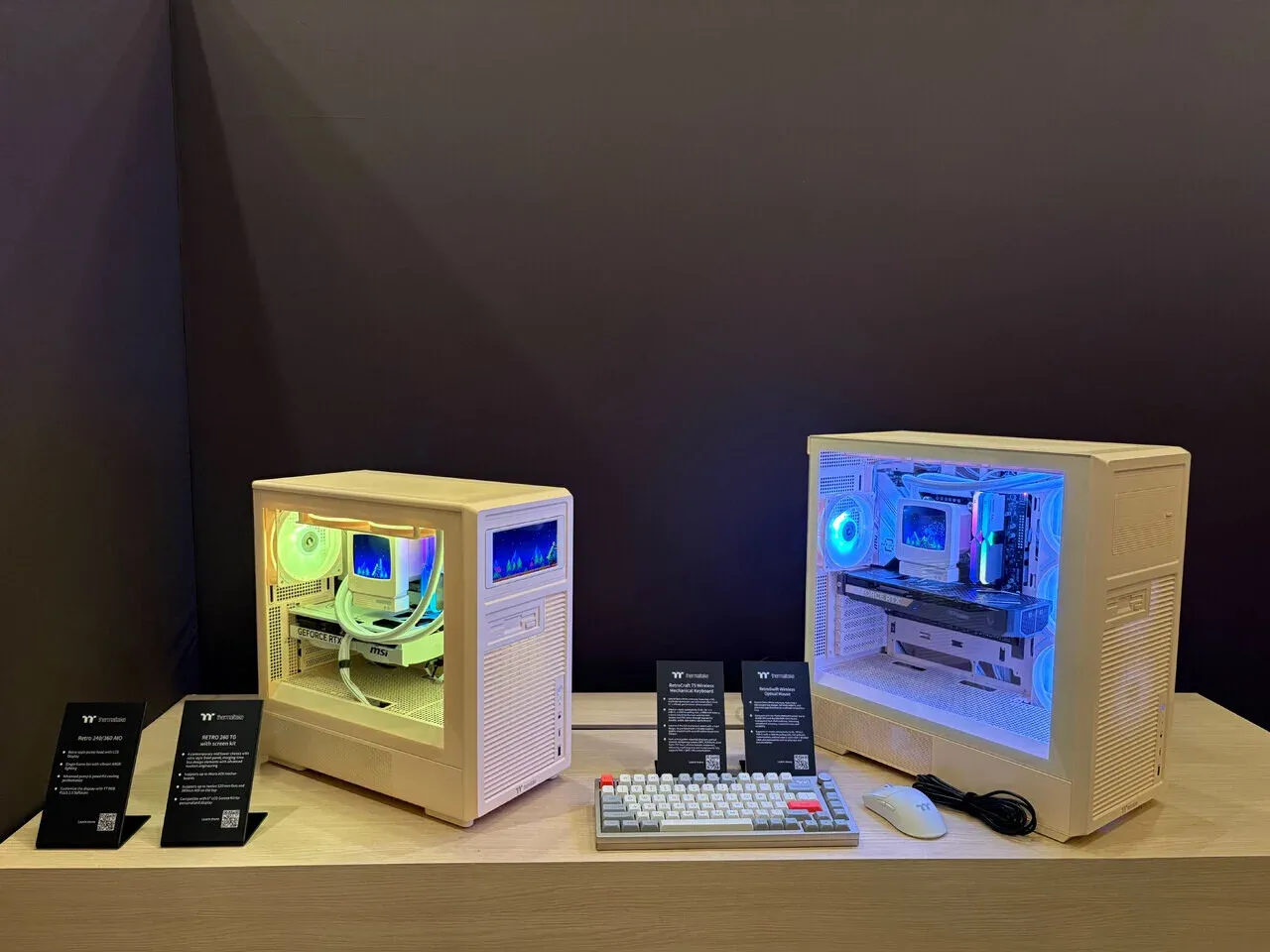


Most mid tower cases released in the past few years look identical. Black rectangle, tempered glass panel, some RGB fans pre-installed, done. Thermaltake has been pushing against that trend with its Retro lineup, and the Retro 360 TG is the most fully realized version of that idea yet. It launched alongside several other new chassis from Thermaltake, including the TR300 TG and TR200 series, but the Retro 360 TG is the one that stands out on a shelf.
The design direction here is clear: textured panels, squared-off corners, and a silhouette that nods to early 2000s tower cases without actually being inconvenient to build in. That balance is harder to pull off than it sounds.

Use code TRYHARD33 at checkout to redeem this offer before code expires again.
Get 33% Off GAMES+ Subscription
What the Retro 360 TG actually offers builders
As a mid tower, the Retro 360 TG supports ATX motherboards, which covers the vast majority of gaming builds. The tempered glass side panel is the headline feature visually, giving a clear view of the interior without the cheap plastic-window look that plagued cases from the era it's stylistically referencing.
Here's the thing: the "360" in the name refers to its radiator support. The case accommodates up to a 360mm radiator at the front, which makes it genuinely useful for anyone running a high-end AIO cooler alongside a modern GPU. That's not a given at this form factor and price tier.
Key specs at a glance:
- Form factor: Mid tower
- Motherboard support: ATX, mATX, Mini-ITX
- Max radiator support: 360mm front mount
- Side panel: Tempered glass
- Drive bays: Multiple 3.5-inch and 2.5-inch options
- Front I/O: USB 3.0 ports, audio headers
Where the retro aesthetic actually works
The Retro 360 TG earns its name in the details. The front panel texture and the overall proportions give it a presence that generic glass-box cases simply don't have. For builders who spend time at their desk and actually look at their PC, that matters.
What most players miss when evaluating cases is that aesthetics aren't separate from function. A case you're proud to display tends to be one you keep clean, maintain better, and build more carefully. The Retro 360 TG's design invites that kind of attention.
The tempered glass panel does its job without adding unnecessary bulk. Cable management routing is straightforward, which keeps the visible interior tidy once the build is complete.
How it fits into Thermaltake's current lineup
Thermaltake dropped several new chassis at once, which makes positioning the Retro 360 TG worth thinking about. The TR300 TG sits in similar territory as a mid tower with tempered glass, while the TR200 series covers the micro chassis segment. The Retro 360 TG is clearly the option for builders who want something that looks different from every other case on the market right now.
The key here is that the Retro 360 TG isn't trying to compete on raw feature count. It's competing on identity. For a gaming PC that's also a desk centerpiece, that's a legitimate differentiator.
If you're building a system and want guidance on optimizing every component decision, the gaming guides cover everything from hardware choices to in-game optimization. And for a broader look at what's worth your money across gaming hardware and software, check out our latest reviews.
The verdict on Thermaltake's retro bet
The Thermaltake Retro 360 TG makes a case (no pun intended) that PC cases don't have to look like they were designed by committee. The 360mm radiator support gives it real utility for performance builds, the tempered glass panel is executed cleanly, and the retro styling is specific enough to feel intentional rather than gimmicky.
Builders who want a mid tower that does the basics right while actually having a personality should put this one on their shortlist. Those chasing maximum airflow or the lowest possible price point will find better fits elsewhere, but that's not who this case is for.
Thermaltake's full current chassis lineup, including the TR series and the Retro 260 TG micro tower, is worth browsing if the 360 TG's mid tower footprint is either too large or too small for your setup. You'll want to see the whole range before committing.