

In Deep Rock Galactic: Survivor, you unlock the UltraClock by completing Hazard 6 Weapon Mastery for your chosen weapon. You then obtain this powerful Artifact from Supply Pods during a later dive while that specific weapon variant is equipped.
In Deep Rock Galactic: Survivor, UltraClock grants an additional Unstable Overclock without requiring the weapon to reach its usual level for one. It also makes two Unstable Overclocks on one weapon possible. UltraClock and Hazard 6 belong to the free Update 1.2, so you do not need the paid Knockout Expansion to pursue these rewards for weapons you already have.
How do you unlock UltraClock through Hazard 6 Weapon Mastery?
You need the Hazard 6 Weapon Mastery completion for the specific weapon you want to improve. Finishing a regular high-difficulty dive does not substitute for that challenge.
Open and complete the correct challenge
Follow this progression for your chosen weapon:
- Raise the weapon to level 18 during a dive to unlock its Weapon Mastery.
- Meet the relevant Hazard access requirements in the Mastery menu.
- Select that weapon's Mastery challenge and choose Hazard 6.
- Finish the challenge objectives and extract successfully.
Weapon Mastery lasts three stages and restricts you to one selected weapon. Shockwave Emitter Mastery, for example, tracks rewards for Shockwave Emitter itself, not every weapon available to its class.
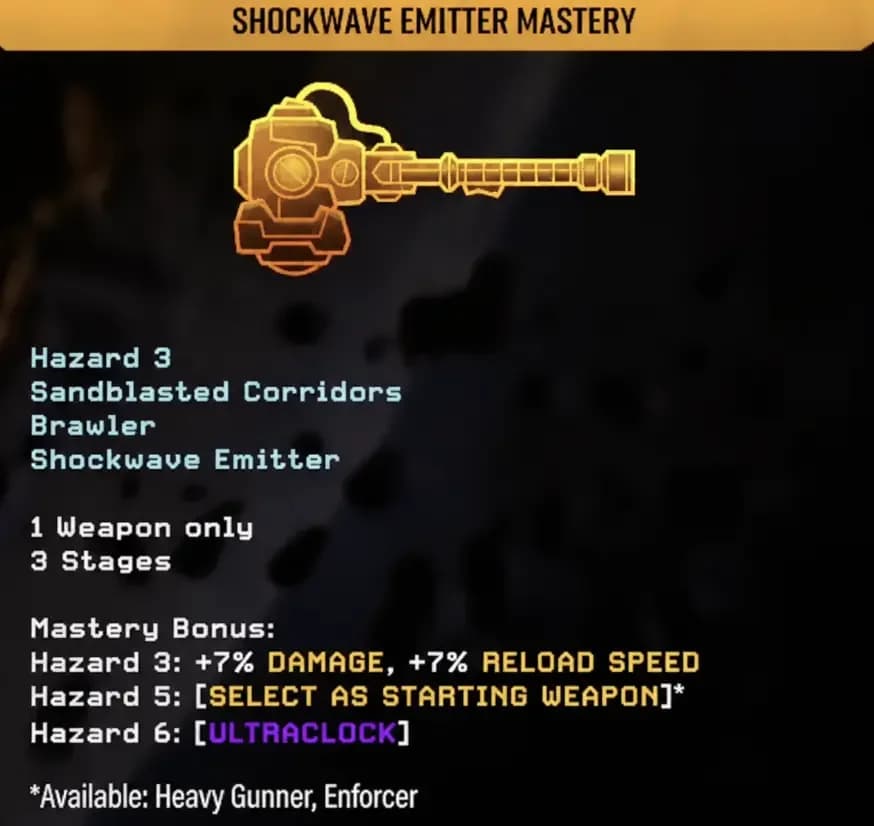
Shockwave Emitter Mastery rewards
The Mastery categories serve different progression goals. Choose the one that matches the reward you want before committing to a run.
| Challenge | Progression or reward | Unlocks UltraClock? |
|---|---|---|
| Hazard 5 Weapon Mastery | Makes the mastered weapon a starting option for compatible Class Mods | No |
| Hazard 6 Weapon Mastery | Unlocks the selected weapon variant's UltraClock eligibility | Yes |
| Regular Hazard 6 dive | Standard mission progression at the higher difficulty | No |
| Class Mod Mastery | Permanent bonuses for the selected Class Mod | No |
| Biome Mastery | Permanent progression associated with the selected biome | No |
Prepare for the single-weapon restriction
Pick a weapon you expect to use regularly, but account for how it performs alone. A useful supporting weapon in an ordinary dive may struggle when it must handle both crowds and dangerous individual targets.
Spend upgrades on the weakness currently threatening the run. A narrow attack needs reliable coverage through upgrades and positioning. A slow weapon may benefit from Reload Speed or other attack-frequency improvements. Strong crowd clearing does not help enough if an Elite survives long enough to trap you.
Hazard 6 also carries surviving enemies into the next stage. Escaping a crowded stage can leave you under pressure immediately after the next one begins. Keep damaging ordinary enemies while collecting experience and resources instead of relying entirely on running away.
Use terrain to limit approach directions, but keep an exit open. Near extraction, clear what you safely can and move toward the Drop Pod before the route closes. Missing extraction to chase the last enemies still loses the attempt.
Which weapon variant does an UltraClock unlock apply to?
Each unlock applies to the weapon variant whose Hazard 6 Mastery you completed. It is not a universal reward for a class, a weapon family, or every weapon sharing a Tag.
Completing Shockwave Emitter's challenge does not unlock Thunderlash's UltraClock. If you want the Artifact for another weapon, that weapon needs its own qualifying Mastery completion.
This makes your first target a practical decision: choose a weapon that earns a regular place in your loadout. An unlock for something you rarely equip has fewer opportunities to help your future dives.
Use the starting-weapon reward when it helps
After earning the Hazard 5 reward, you can bring an eligible weapon from the beginning of a supported Main Mission or Endless dive. Choose a compatible Class Mod, then use the controls beneath the starting-weapon panel to cycle through your unlocked options.
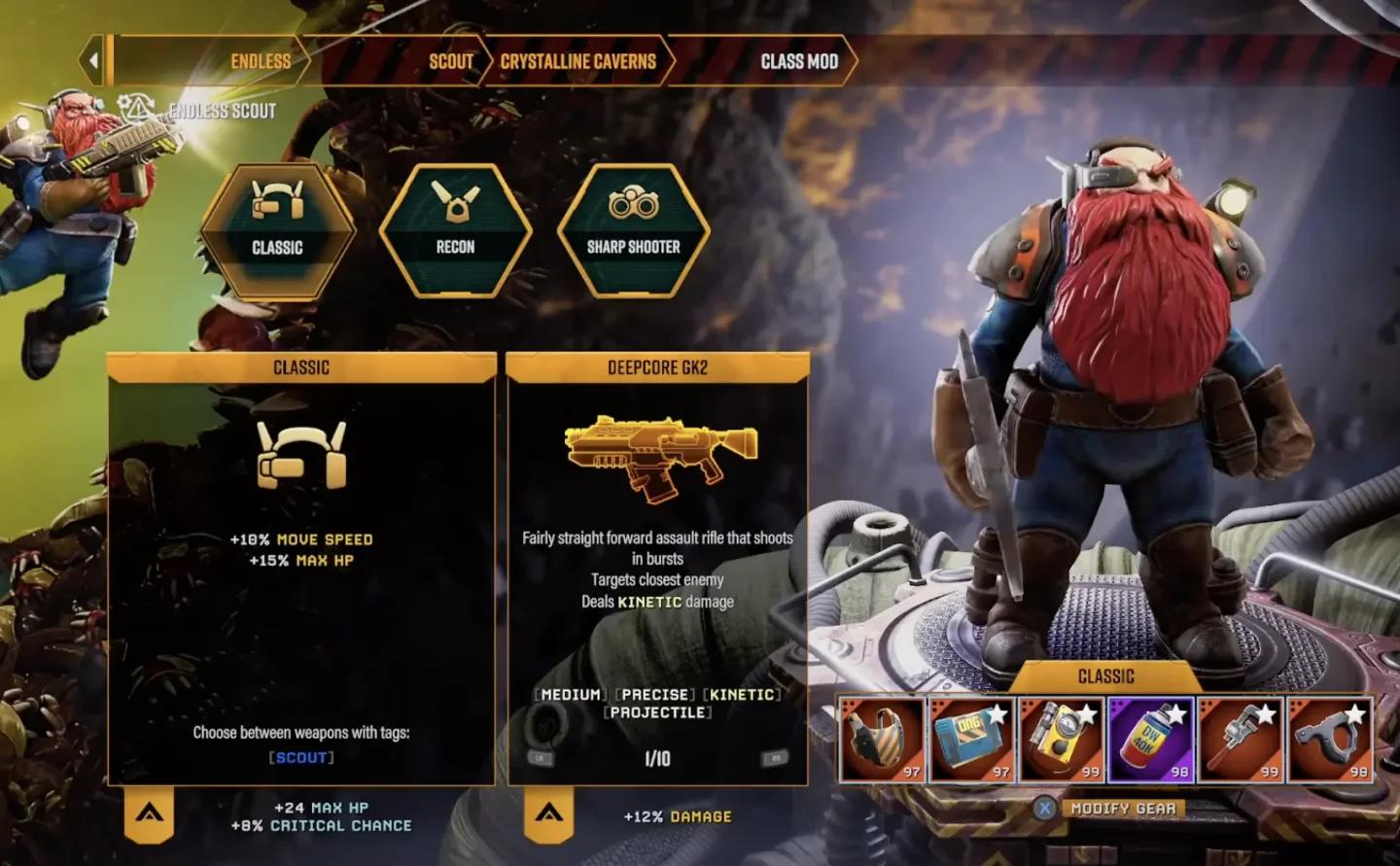
Starting-weapon selection panel
The controller interface displays LB and RB beneath that panel. Keyboard players should use the displayed bindings. Compatibility still applies, so an unlocked weapon may appear for one Class Mod and remain unavailable for another.
Starting with the weapon is convenient, but it is not an UltraClock requirement. You can also acquire and equip the eligible weapon during the dive.
What must you equip for UltraClock to appear?
The mastered weapon variant must be equipped in your current dive. Having its reward unlocked does not make its UltraClock eligible when that weapon is absent from your loadout.
Once it is equipped, open Supply Pods and inspect their Artifact choices. UltraClock enters the Artifact selection system; the Mastery completion does not place one directly into your inventory.
Its appearance is randomized. A Supply Pod can offer other Artifacts, and a dive can end without the UltraClock you wanted appearing. Neither situation means you need to repeat a successfully completed Mastery.
If several equipped weapons have their UltraClock rewards unlocked, an offer can target a different weapon from the one you hoped to strengthen. More completed Masteries create more possible eligible targets when those weapons are in your loadout, not free assignment of the Artifact afterward.
Does UltraClock require a specific weapon level?
No. UltraClock grants its Unstable Overclock regardless of the receiving weapon's level. You do not need to delay taking it until the weapon reaches its normal Unstable Overclock choice.
The level 18 requirement earlier in the progression opens Weapon Mastery. It is not a minimum level for receiving UltraClock during a later dive.
| Upgrade route | How you obtain it | Weapon-level condition |
|---|---|---|
| Normal Unstable Overclock | Progress through the weapon's usual leveling choices | Requires reaching its normal Unstable Overclock choice |
| UltraClock's Unstable Overclock | Select the matching UltraClock Artifact | Can apply at any weapon level |
An early offer can therefore change your weapon before normal leveling would provide that effect. Judge the actual Overclock on the card against the problems your current run needs to solve, not against whether the weapon looks sufficiently leveled.
How does UltraClock make two Unstable Overclocks possible?
UltraClock grants an additional Unstable Overclock. A weapon that already has its normal one can receive another through the Artifact. If the Artifact arrives first, the weapon can still gain its normal Unstable Overclock through leveling.
The two routes let you combine effects on the same weapon, but the value depends on the combination. Two Unstable Overclocks are not automatically a better fit than the other Artifact options available to your current build.
Read the offered weapon and effect together
An UltraClock card can offer Explosive Tip for Thunderlash, for example. Both names belong to that offer: selecting it grants the displayed effect to Thunderlash, not to another weapon in your loadout.
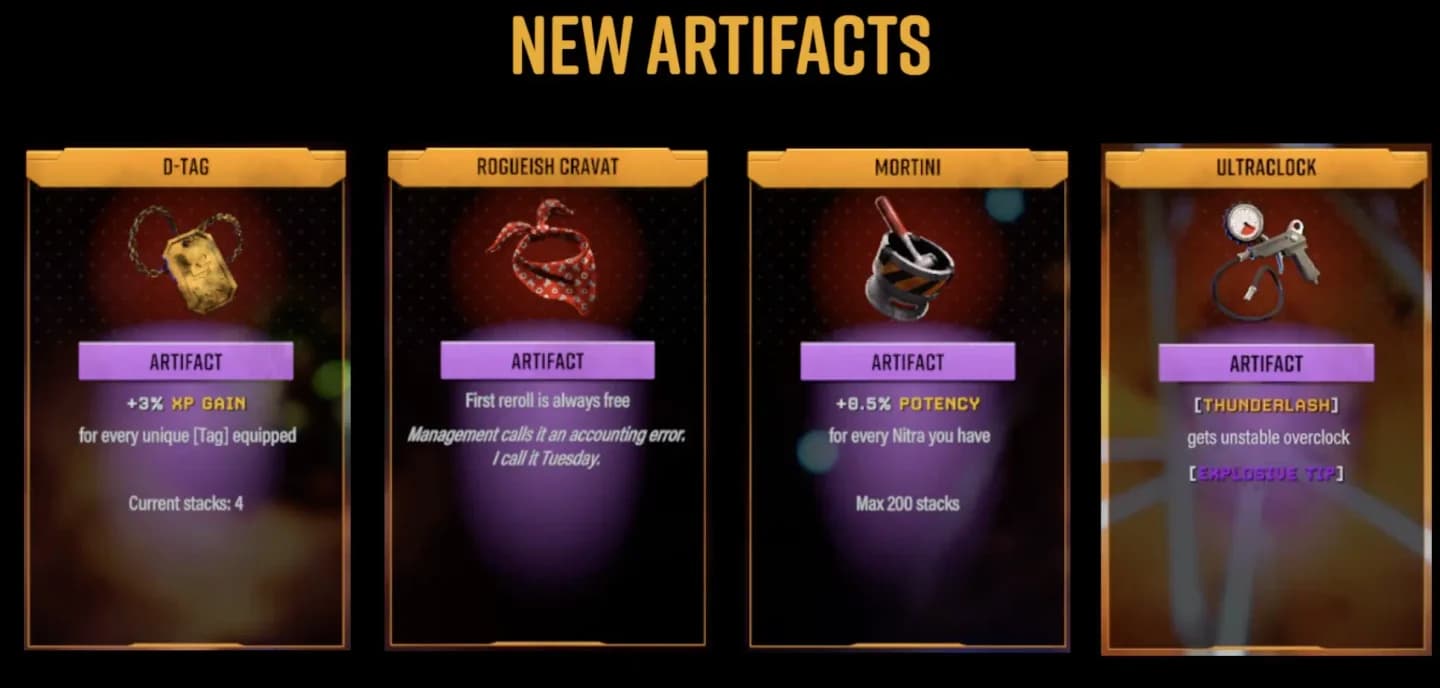
Thunderlash UltraClock Artifact
Choose the offer when its effect supports your current setup or addresses the weakness putting the dive at risk. If it targets a weapon you are not relying on, or its effect does not suit your upgrades, another Artifact may serve the run better.
