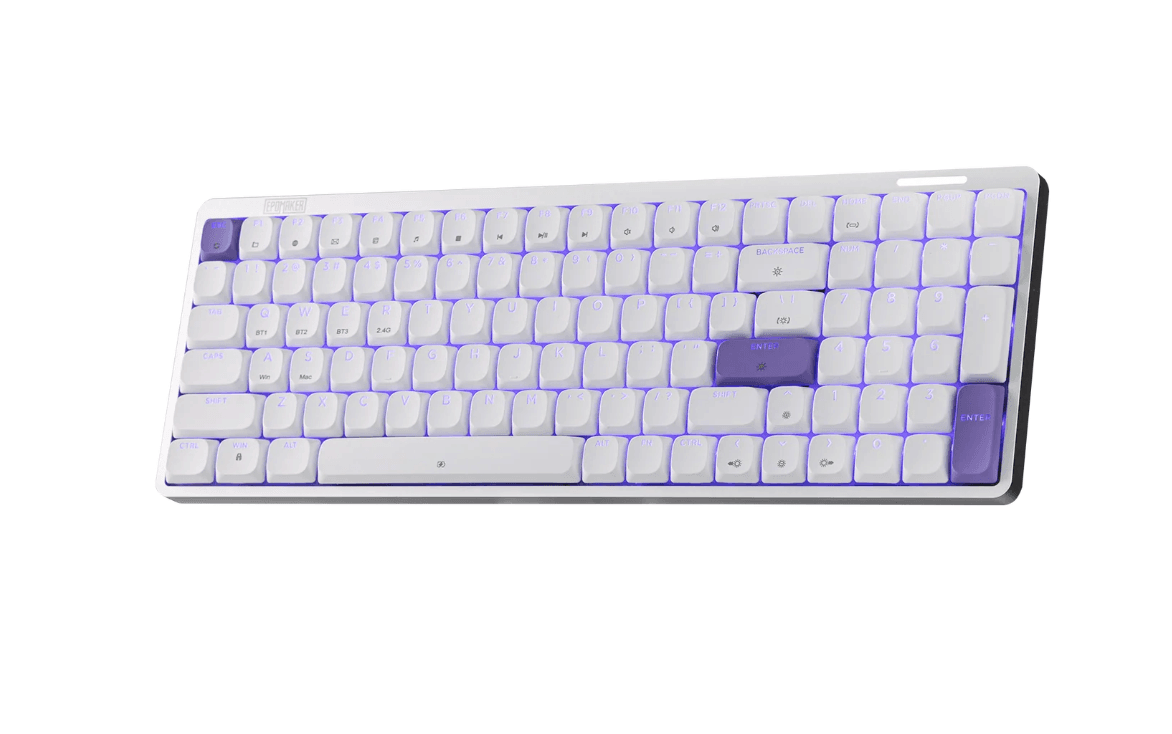


The EPOMAKER Luma100 takes a different approach to mechanical keyboards. Rather than following the increasingly common chunky, retro-inspired designs seen across the market, it adopts a slim, modern aesthetic that is reminiscent of Apple's Magic Keyboard. That gives it a distinctly different identity while retaining many of the features mechanical keyboard users have come to expect.
With a 96% layout, 100 keys, a dedicated number pad, hot-swappable low-profile switches, tri-mode connectivity, RGB lighting, and VIA support, the Luma100 aims to combine practicality with a minimalist design.
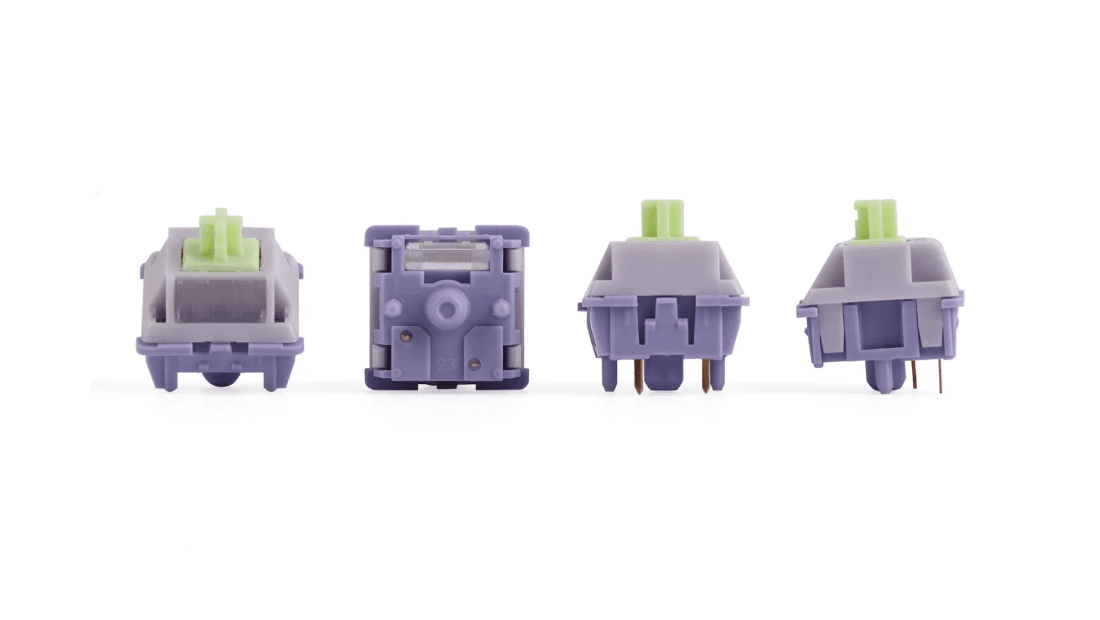
After spending time with the keyboard, its biggest strength is arguably the balance between its low-profile construction and satisfying mechanical typing experience. The included Mint Low Profile Switches provide noticeable tactile feedback without producing the louder, sharper sound associated with some mechanical keyboards.

Use code TRYHARD33 at checkout to redeem this offer before code expires again.
Get 33% Off GAMES+ Subscription
Design and Build Quality
The Luma100 immediately stands out because of its design. Its slim profile and clean lines give it a much more understated appearance than many traditional mechanical keyboards.
The keyboard is housed in an anodized aluminum body, which provides a solid feel without making the Luma100 unnecessarily heavy. At approximately 0.73kg, it is considerably lighter than many full-size mechanical keyboards, making it practical for users who regularly move between locations.
EPOMAKER also includes a carrying case, further reinforcing the Luma100's portability. While compact keyboards are already easier to transport, having a dedicated case is a useful addition for anyone who takes their keyboard to an office, gaming setup, or workspace away from home.
The 96% layout is another sensible choice. The Luma100 retains the functionality of a full-size keyboard, including the number pad, while reducing the amount of space between the keys. This makes it more compact without forcing users to give up dedicated numerical input.
For productivity users, that is an important distinction. Many smaller mechanical keyboards sacrifice the number pad in favor of a more compact footprint, whereas the Luma100 manages to preserve it.
A Modern Alternative to Traditional Mechanical Keyboards
The Luma100's minimalist appearance will not appeal to everyone, particularly users who prefer the retro styling and substantial construction of traditional mechanical keyboards. However, that is also what makes it interesting.
The design takes clear inspiration from Apple's keyboard aesthetic, with a thin chassis and restrained appearance. It looks equally comfortable on a gaming desk or an office workstation.
Instead of a display, which appears on some other EPOMAKER keyboards, the Luma100 features an RGB light bar running across the keyboard. The lighting produces a subtle moving rainbow effect that complements the minimalist design without dominating it.
There is also RGB lighting beneath the keys. The translucent characters on the keycaps allow some of the illumination to shine through, creating a more understated effect than some gaming keyboards.
Several lighting modes are available, including static, dynamic, single-colour, and standard RGB configurations. The overall implementation is relatively restrained, which suits the Luma100's design.
Mint Low Profile Switches
The included Mint Low Profile Switches are one of the Luma100's biggest selling points.
Low-profile mechanical switches can sometimes compromise the feeling that makes mechanical keyboards appealing in the first place. The Luma100 avoids that issue particularly well.
The Mint switches offer a noticeable tactile response while keeping the overall sound relatively muted. They sit between the louder, more pronounced feel of EPOMAKER's Creamy Jade switches and the quieter characteristics of its Sea Salt Silent V2 switches.
The result is a typing experience that remains recognisably mechanical without being excessively loud.
For an office environment, shared workspace, or anyone who simply prefers a quieter keyboard, this is particularly useful. The switches are not completely silent, but they avoid the sharper acoustic profile that can make some mechanical keyboards distracting.
The tactile feedback also makes the Luma100 enjoyable for longer typing sessions. Each keystroke has enough resistance and feedback to make typing feel deliberate, while the low-profile design gives the keyboard a faster, flatter feel than conventional mechanical switches.
Hot-Swappable Switches
The Luma100 is hot-swappable, allowing users to replace its low-profile switches without soldering.
That adds some useful flexibility. The stock Mint switches are already well matched to the keyboard, but users who want to experiment with different switch characteristics can do so without having to replace the entire keyboard.
The included double-shot ABS keycaps also provide a solid foundation for the keyboard's typing experience.
There is one minor issue worth noting, however. Removing the keycaps can sometimes pull the switches out with them. The switches and keycaps can then require some effort to separate.
It is not a major problem, particularly for users who intend to leave the keyboard in its stock configuration, but anyone planning frequent switch or keycap experimentation should take care when removing them.
Tri-Mode Connectivity
The EPOMAKER Luma100 offers three connectivity options:
- USB-C wired
- Bluetooth wireless
- 2.4GHz wireless
This makes the keyboard flexible enough for gaming, productivity, and portable use.
The 2.4GHz connection is particularly useful for gaming because it provides a responsive wireless connection without requiring a Bluetooth pairing. Bluetooth, meanwhile, is convenient for laptops, tablets, and other compatible devices.
In testing, latency across the three connection methods was effectively negligible during normal use. Keystrokes registered quickly and consistently, regardless of the connection method.
The Luma100 is also compatible with Android devices, meaning it can be used with phones and tablets in addition to PCs and Macs.
One of the few connectivity-related omissions is the lack of a dedicated storage compartment for the 2.4GHz wireless dongle. Since the keyboard is designed with portability in mind, having somewhere to store the dongle when it is not being used would have made the package more convenient.
Switching Between Windows and Mac
The Luma100 is designed to work with both Windows and Mac, and switching between the two is straightforward.
Dedicated key combinations allow the keyboard to change its operating system mapping, while six additional Mac-specific keycaps are included in the box.
That means Mac users do not have to rely entirely on the Windows-labelled keycaps. The included keycap puller makes the replacement process relatively straightforward, although the aforementioned tendency for the switches to come out with the keycaps can make the process slightly more cumbersome than expected.
Still, the ability to switch between operating systems without installing additional software is a useful feature for anyone who works across multiple platforms.
VIA Programming
Another major advantage is the inclusion of VIA support.
VIA is an industry-standard web-based configuration tool that allows users to remap keys and create custom macros without installing a dedicated desktop application.
For enthusiasts, this is a significant benefit. Users can customize the keyboard's layout around their preferred workflow, assign alternative functions, and create macros as required.
The Luma100 would benefit from a more unified software approach across EPOMAKER's wider keyboard range, as different models can use different configuration systems. Nevertheless, VIA is a strong choice for the Luma100 and makes customization relatively accessible.
Gaming Performance
Although the Luma100's design leans heavily toward productivity and minimalist desktop setups, it remains perfectly capable as a gaming keyboard.
The combination of responsive tri-mode connectivity, tactile switches, and low-profile keycaps makes it suitable for a wide range of games.
The 96% layout is particularly useful for players who also use their keyboard for productivity. The dedicated number pad remains available without requiring a separate peripheral, while the more compact arrangement takes up less desk space than a conventional full-size keyboard.
The subdued RGB lighting is also a good fit for users who want some gaming aesthetics without turning their entire desk into a light show.
Competitive gamers looking specifically for features such as adjustable actuation or highly specialised gaming switches may want something more purpose-built. For general PC gaming, however, the Luma100 offers a good balance between gaming and everyday use.
Typing Experience
Typing is where the Luma100 makes the strongest case for itself.
The combination of the low-profile chassis and Mint switches creates an experience that feels noticeably different from EPOMAKER's more conventional mechanical keyboards. There is still enough tactile feedback to provide the satisfying response expected from a mechanical keyboard, but the sound is more controlled.
The result should appeal to users who want mechanical switches but do not necessarily want the louder acoustic character associated with them.
The keyboard is also comfortable for general productivity. The compact layout keeps frequently used keys close together while retaining the number pad, making it suitable for everything from writing and browsing to spreadsheets and everyday office work.
Pros and Cons
Pros
- Modern minimalist design
- Strong anodized aluminum construction
- Lightweight at approximately 0.73kg
- Included carrying case
- Compact 96% layout with dedicated number pad
- Excellent Mint Low Profile Switches
- Good balance between tactile feedback and quieter acoustics
- Hot-swappable low-profile switches
- Tri-mode connectivity
- Responsive wired and wireless performance
- Windows and Mac compatibility
- Android compatibility
- Subdued RGB lighting
- Translucent key legends allow RGB illumination through the keycaps
- VIA support for remapping and macros
- Six additional Mac keycaps included
- Competitive pricing
Cons
- No storage compartment for the 2.4GHz wireless dongle
- Keycap removal can unintentionally pull out switches
- Mint switches are quieter, but not completely silent
- Different EPOMAKER keyboards use different customization software
Verdict
The EPOMAKER Luma100 is an appealing alternative to the increasingly common retro-style mechanical keyboard. Its low-profile construction, minimalist aesthetic, aluminum chassis, and lightweight design give it a distinct character, while the feature set ensures it does not sacrifice functionality in the pursuit of appearance.
The Mint Low Profile Switches are particularly impressive. They provide enough tactile feedback to retain the appeal of a mechanical keyboard while keeping the sound relatively restrained. For users who want a mechanical typing experience without an especially loud keyboard, they strike a convincing balance.
The combination of tri-mode connectivity, hot-swappable switches, VIA support, RGB lighting, Windows and Mac compatibility, and a 96% layout also makes the Luma100 a versatile option. It can function as a gaming keyboard, productivity keyboard, or portable workstation accessory without being overly specialised toward any one use case.
The lack of wireless dongle storage and the slightly awkward keycap removal process are minor drawbacks rather than significant weaknesses.
Overall, the EPOMAKER Luma100 is a well-rounded low-profile mechanical keyboard that successfully combines a modern design with the functionality and tactile experience expected from a mechanical board. It is particularly well suited to users who want something slimmer and more understated than a traditional mechanical keyboard while still retaining a dedicated number pad and strong customization options. More information is available here.