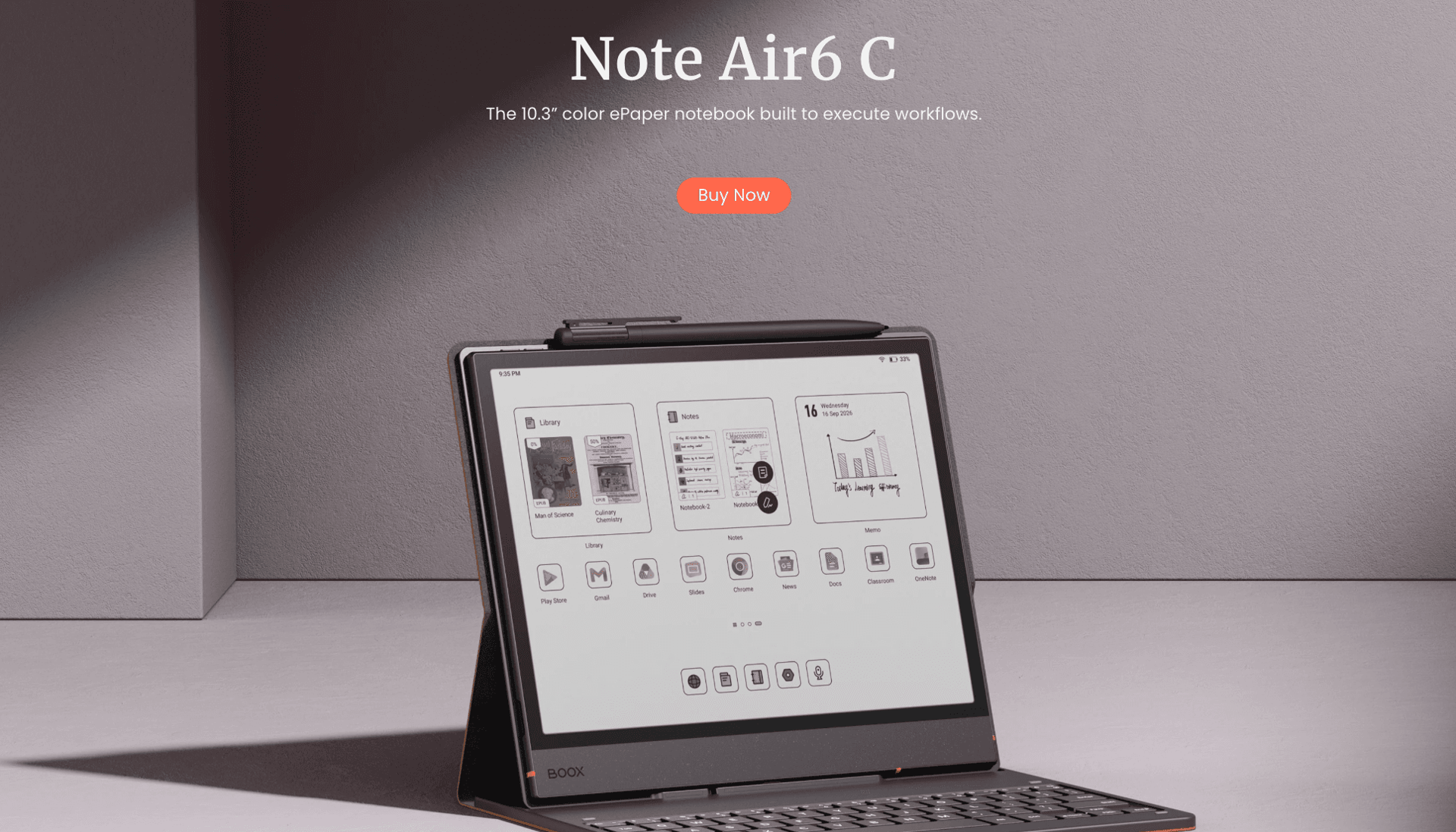

The BOOX Note Air6 C is a color E Ink tablet designed for students, researchers, professionals, and anyone who prefers writing and reading on a screen that feels closer to paper. Combining a 10.3-inch color display with Android 16, an upgraded octa-core processor, 6GB of RAM, and 64GB of internal storage, the device aims to bridge the gap between a traditional e-reader and a productivity-focused tablet.
Rather than competing directly with conventional LCD or OLED tablets, the Note Air6 C focuses on a more deliberate approach to digital work. Its paper-like writing surface, adjustable front light, extensive document support, and multitasking features make it particularly suitable for reading academic papers, annotating PDFs, organizing research, and taking handwritten notes.
The addition of Google's Play Store also gives users access to a broad selection of third-party applications, while support for services such as Google Drive, Readwise, and Zotero helps integrate the tablet into existing workflows.
With a focus on productivity, the BOOX Note Air6 C offers an appealing combination of digital flexibility and the more comfortable, tactile experience associated with pen and paper.
Design and Build Quality
The BOOX Note Air6 C adopts a slim, understated design that prioritizes portability and practical use. Measuring just 5.8mm thick and weighing approximately 440g, it is light enough to carry in a backpack or laptop bag without taking up much space.
Its 10.3-inch display provides a useful balance between portability and workspace. The screen is large enough to accommodate full-page documents, handwritten notes, diagrams, and annotated research papers without requiring the constant zooming and repositioning often associated with smaller devices.
The tablet's minimalist appearance suits both academic and professional environments. It can serve as a dedicated reading device during a commute, a digital notebook during lectures, or a document review tool at a desk.
BOOX also offers several accessories, including a magnetic case, Pen3 stylus, and magnetic keyboard cover. The keyboard connects through a pogo-pin interface and includes a USB-C port for charging. This expands the Note Air6 C's capabilities beyond handwriting, allowing users to type emails, draft essays, and prepare meeting notes.
The keyboard cover is particularly useful for people who want to alternate between handwritten and typed work without carrying a separate laptop for every task. However, buyers should factor the cost and availability of accessories into their purchasing decision.
10.3-Inch Color E Ink Display
The display is one of the most important features of the BOOX Note Air6 C. It uses a Kaleido 3 color E Ink panel with a resolution of 300 pixels per inch for black-and-white content and 150 pixels per inch for color.
This configuration prioritizes clear text and detailed monochrome documents while providing color for illustrations, charts, diagrams, and highlighted passages.
For academic reading, the distinction is important. Most books, research papers, and written documents rely primarily on black text, allowing the screen's higher monochrome resolution to deliver sharp, readable results. Color becomes useful when reviewing illustrated textbooks, presentations, annotated PDFs, and other documents where visual distinctions matter.
The color reproduction is designed for an e-paper experience rather than the vivid presentation associated with conventional tablets. Users should not expect the same saturation, contrast, or overall brightness as an OLED display. Instead, the Note Air6 C emphasizes readability and a more restrained visual presentation.
This makes it particularly attractive for people who spend extended periods reading documents rather than watching videos or playing graphically demanding games.
A Paper-Like Writing Experience
BOOX has designed the Note Air6 C's screen surface to provide friction when writing with a compatible stylus. This textured finish helps the pen feel more controlled than it would on a smooth glass display.
The result is a more natural writing experience for handwritten notes, sketches, formulas, and diagrams. Users can build on existing documents, mark up PDFs, or develop ideas directly on the screen without switching between separate applications or physical notebooks.
The screen protector is an important part of this experience. BOOX advises against removing it because it contributes to the intended writing and reading characteristics of the display.
For users who prefer handwriting to typing, this paper-like surface is one of the tablet's strongest selling points.
Adjustable Dual-Tone Front Light
The integrated dual-tone front light allows users to adjust the screen's illumination between cooler daylight tones and warmer amber tones.
This flexibility is useful when working in different environments. Cooler lighting can suit a bright office or library, while warmer illumination may be preferable for evening reading.
The front light also means the device can be used in low-light conditions without relying entirely on an external light source. However, continuous use at high brightness increases power consumption, so users who prioritize battery life should adjust the illumination to suit their surroundings.
Although E Ink can provide a different viewing experience from conventional backlit displays, individual comfort levels vary. Regular breaks remain important during extended reading sessions.
Performance and Android 16
The BOOX Note Air6 C features an upgraded octa-core processor built on a 4nm process node, alongside 6GB of RAM and 64GB of internal storage.
These specifications are designed to improve responsiveness when navigating documents, switching between applications, and handling more demanding productivity workflows.
BOOX's proprietary Super Refresh Technology is another important part of the package. The technology is designed to improve refresh performance and image quality, helping reduce the visual lag and ghosting associated with E Ink displays.
This is particularly relevant when navigating large PDFs, scrolling through documents, switching between applications, or using productivity tools that require frequent screen updates.
However, the Note Air6 C remains an E Ink device. Refresh behavior differs from that of conventional tablets, and the experience will not be identical to using an LCD or OLED panel. Its performance should be judged in the context of reading, writing, and document management rather than high-frame-rate gaming or fast-moving video.
Android 16 provides the software foundation, giving the tablet access to the Google Play Store and a wide range of third-party applications. Users can install their preferred reading tools, cloud storage services, research applications, and productivity software instead of being restricted to a closed ecosystem.
The combination of Android 16 and 6GB of RAM also supports multitasking, allowing users to move between research materials, note-taking tools, and other applications as needed.
For those who want an e-reader that can do considerably more than display books, this flexibility is a major advantage.
Note-Taking and Digital Organization
The Note Air6 C is built around the idea that a digital notebook should be capable of replacing several separate tools. Its note-taking features support handwritten text, sketches, formulas, diagrams, and other forms of visual thinking.
Users can organize information in a digital environment, reducing their dependence on physical notebooks and loose sheets of paper. The ability to keep notes alongside digital documents also makes it easier to connect research materials with personal observations.
For students, this can mean maintaining lecture notes, revision materials, and reading annotations on one device. Professionals can use the same tools for meeting notes, planning, brainstorming, and project documentation.
The tablet's writing tools provide flexibility for different tasks, from rough sketches to more structured notes. Features such as pressure-sensitive brush adjustments, the updated lasso tool, and additional note-taking functionality are available through compatible firmware updates.
BOOX also offers a Template Hub within its Notes application, providing additional ways to organize handwritten content. The feature requires an internet connection and the appropriate firmware.
These tools make the Note Air6 C more than a simple e-reader. It is intended to become a central workspace for collecting, developing, and organizing information.
Academic Research and PDF Annotation
One of the device's strongest use cases is academic research. Its 10.3-inch screen provides enough room to read documents at a practical size while maintaining the ability to annotate content directly.
The tablet supports a broad range of digital formats, including PDF, EPUB, EPUB3, AZW3, MOBI, DOC, DOCX, TXT, RTF, HTML, DJVU, CBR, CBZ, PPT, and PPTX, alongside several image and audio formats.
This extensive compatibility is valuable for users who work with materials from multiple sources. Research papers, digital books, presentations, and illustrated documents can be accessed without necessarily converting them into a single format first.
The built-in NeoReader application adds reading controls for fonts, margins, and layouts. Users can adjust the presentation of compatible documents to improve readability, search for specific keywords, and locate citations more efficiently. Dark Mode is also available within NeoReader.
Color highlighting and underlining make it possible to distinguish arguments, evidence, definitions, and important passages. Users can also write margin notes directly on supported documents, creating a more interactive reading process.
For researchers, these features can help connect source material with personal analysis. For students, they provide a practical way to annotate textbooks and prepare revision notes without printing every document.
The ability to keep documents and annotations together is particularly useful when working on long-term projects, where information needs to remain organized and accessible.
Talk Insights: Transcription and Summarization
The Note Air6 C also includes Talk Insights, a feature designed to support meetings, lectures, and research interviews.
When enabled with the latest compatible firmware, Talk Insights can transcribe speech in real time and help summarize recorded discussions. Users can record a session while writing down key words or observations, allowing them to concentrate on the conversation rather than attempting to capture every sentence manually.
A Focus Mode option can hide the scrolling live transcription for users who prefer a less distracting screen during a discussion.
This feature could be particularly useful for students attending lectures, professionals participating in meetings, and researchers conducting interviews. It offers a way to combine handwritten observations with a transcript for later reference.
However, Talk Insights has some important limitations. It requires an internet connection and the latest firmware, and availability is restricted to selected regions and supported languages. Transcription quality can also vary depending on background noise, speaker volume, and microphone distance.
Users should therefore confirm regional availability and supported languages before relying on the feature for important meetings or academic work. It is best treated as a productivity aid rather than a guaranteed substitute for accurate, manually verified transcripts.
AI Assistant for Contextual Learning
The built-in AI Assistant adds another layer to the Note Air6 C's research capabilities. According to BOOX, it can analyze selected text or images and provide contextual explanations through an interactive, Socratic-style approach.
This can be useful when encountering unfamiliar terminology, complex theories, or difficult passages in a textbook or research paper.
Rather than leaving the document to search for an explanation elsewhere, users can explore the meaning of selected content directly from their reading workflow. This has the potential to make the tablet a more active learning tool, particularly for independent study.
AI-generated explanations can also help users identify areas that require further investigation or develop questions to explore in greater depth.
As with other AI tools, however, the responses should be checked against reliable sources. BOOX states that the AI Assistant's answers are intended for reference, so the feature should complement critical thinking rather than replace independent verification.
Productivity and Multitasking
Beyond reading and note-taking, the BOOX Note Air6 C includes several features designed to support everyday organization.
Its combination of Android, Super Refresh Technology, and 6GB of RAM is intended to make switching between applications more practical. Users can consult a document while taking notes, move between research sources, and use compatible productivity tools without relying exclusively on a single built-in application.
The device's Smooth Mode uses optimized algorithms to improve the perceived responsiveness of the E Ink interface. EinkWise Code also provides a way to apply screen settings for different tasks, including reading text, reviewing color PDFs, and browsing online research.
These features address an important challenge with E Ink tablets: different activities benefit from different display configurations. Reading a novel does not require the same refresh behavior as navigating a complex document or browsing a webpage.
The ability to tailor the display to the task helps make the Note Air6 C more adaptable.
Nevertheless, users should keep expectations realistic. Android app compatibility does not automatically guarantee that every application will perform equally well on an E Ink screen. Apps designed around rapid animations, frequent scrolling, or video may feel less natural than those built around static text and documents.
Cloud Storage and Cross-Device Integration
The Note Air6 C supports cloud synchronization and wireless file transfer, helping users move between their tablet, computer, and phone.
BOOX provides 10GB of free Onyx cloud storage for each account, allowing users to back up notes, books, annotations, and other supported information. The company also supports synchronization and integration with third-party services such as Google Drive, Readwise, and Zotero.
For research-heavy workflows, Zotero integration is particularly relevant because it can help users maintain connections between their reading materials and reference management process. Readwise can also form part of a broader system for reviewing highlights and collected insights.
BOOXDrop enables wireless file transfers between compatible BOOX devices and computers or mobile devices over a local network. Screen mirroring is available for presentations and collaborative brainstorming, providing another way to use the tablet outside individual reading sessions.
The Calendar Memo feature brings scheduling and handwritten planning into the same environment. Users can organize their schedules and turn handwritten content into tasks, subject to the appropriate firmware and feature support.
Together, these tools make the Note Air6 C a more integrated productivity device. Rather than treating handwritten notes as isolated files, users can incorporate them into a wider digital workflow.
BOOX also states that it provides free firmware updates for more than three years after a model's launch, giving users a route to ongoing software improvements. The exact timing and availability of individual features can depend on firmware versions.
Storage and Expandability
The tablet includes 64GB of internal storage, which provides room for applications, documents, books, and handwritten notes. A microSD card slot adds further flexibility for users with larger digital libraries.
This is particularly useful for people who maintain extensive collections of academic papers, technical manuals, textbooks, and reference documents. Local storage also makes it easier to keep important materials accessible without relying entirely on an internet connection.
The combination of expandable storage and broad file-format support strengthens the device's appeal as a long-term reading and research companion.
Battery Life and Everyday Use
The BOOX Note Air6 C is equipped with a 3,700mAh battery. Its E Ink display is designed for reading and writing rather than constant high-refresh visual output, which can be advantageous for users who spend much of their time working with static documents.
However, actual battery life will depend on how the tablet is used. Front-light brightness, wireless connectivity, third-party applications, recording features, and refresh settings can all influence power consumption.
BOOX specifically notes that continuous or high-brightness front-light use increases energy consumption. Intensive multitasking and connected features may also produce different results from a primarily offline reading routine.
Without a verified battery-life figure under controlled testing conditions, it would be premature to assign a specific number of hours or days to the device. Buyers should instead consider their expected mix of reading, handwriting, connectivity, and application use.
For a tablet focused on research and digital note-taking, the more important consideration is whether its battery and charging routine suit the user's working habits.
BOOX Note Air6 C: Specifications
- Display: 10.3-inch Kaleido 3 color E Ink
- Resolution: 300 PPI black and white; 150 PPI color
- Processor: Upgraded octa-core CPU, built on a 4nm process
- RAM: 6GB
- Internal storage: 64GB
- Expandable storage: microSD card slot
- Operating system: Android 16
- Refresh technology: BOOX Super Refresh Technology
- Front light: Adjustable dual-tone illumination
- Battery: 3,700mAh
- Thickness: 5.8mm
- Weight: Approximately 440g
- Connectivity: Next-generation 6.0 connectivity, as described by BOOX
- Applications: Google Play Store support
- Cloud storage: 10GB free Onyx cloud storage
- Document support: PDF, EPUB, DOCX, PPTX, and numerous other formats
- Accessories: Compatible magnetic stylus, keyboard cover, and case
Verdict
The BOOX Note Air6 C is a compelling color E Ink tablet for people who want a dedicated space for reading, writing, research, and organization. Its combination of a 10.3-inch color display, paper-like writing surface, Android 16, and broad document compatibility makes it considerably more flexible than a conventional e-reader.
Its biggest strengths are the quality of its productivity-focused feature set and the freedom offered by Android. Handwritten notes, PDF annotations, third-party applications, cloud synchronization, and expandable storage give users several ways to build a workflow around their needs.
The color display is particularly useful for illustrated documents, diagrams, and highlighted research, while the 300 PPI monochrome resolution keeps text-focused reading at the center of the experience. Talk Insights and the AI Assistant add further possibilities for people who want help organizing discussions and understanding complex material.
There are compromises. Color E Ink cannot match the vibrancy of a conventional tablet, and its refresh behavior remains less suitable for fast-moving content. Some of the more advanced features also depend on firmware updates, internet access, supported languages, or regional availability. The optional keyboard and stylus accessories may further increase the overall cost.
For students, academics, writers, and professionals who spend more time reading and developing ideas than consuming video or playing games, these limitations are unlikely to undermine the tablet's main appeal.
The BOOX Note Air6 C is best understood as a digital notebook and research companion rather than a conventional all-purpose tablet. For users who value focused reading, natural handwriting, and flexible document management, it offers a well-rounded set of tools in a slim and portable design. You can learn more here.