
The TerraMaster D8 Hybrid 2 takes a different approach to external storage by combining traditional SATA drives with modern NVMe SSDs in a single eight-bay enclosure. Rather than forcing users to choose between the capacity of hard drives and the performance of SSDs, the D8 Hybrid 2 is designed to provide both.
With four SATA bays and four M.2 NVMe slots, the enclosure can accommodate up to 152TB of raw storage when configured with four 30TB HDDs and four 8TB NVMe SSDs. It also uses USB 3.2 Gen 2 with 10Gbps bandwidth, allowing the faster NVMe storage to reach read speeds of up to 1,020MB/s under the right configuration.
The result is a storage enclosure aimed at users who have outgrown conventional external drives but do not necessarily need to invest in a dedicated NAS. It has applications across video editing, photography, backups, media libraries, workstation storage and NAS expansion.
A Hybrid Approach That Makes Sense
The biggest advantage of the TerraMaster D8 Hybrid 2 is its hybrid storage architecture.
Four SATA bays support 3.5-inch HDDs as well as 2.5-inch SATA HDDs and SSDs, while four additional slots accommodate M.2 2280 PCIe NVMe SSDs. This allows the enclosure to be configured around two very different storage requirements.
NVMe SSDs can handle active projects and frequently accessed files where speed matters most. HDDs, meanwhile, provide significantly more capacity at a lower cost per terabyte, making them well suited to backups, archives, media collections and other less frequently accessed data.
TerraMaster refers to this approach as hot and cold data tiering. In practical terms, users can keep current projects on the NVMe portion of the enclosure while moving completed work and large archives to HDD storage.
That flexibility is particularly useful for creators. A video editor, for example, could use NVMe storage for current 4K or 8K projects while keeping a much larger library of completed footage on hard drives without requiring two separate external storage systems.
The maximum advertised capacity of 152TB is also substantial. That figure requires four 30TB HDDs and four 8TB NVMe SSDs, so it represents maximum raw capacity rather than the amount of usable storage available after formatting or any RAID configuration.
10Gbps USB Connectivity
The D8 Hybrid 2 is equipped with a USB Type-C connection supporting USB 3.2 Gen 2 at up to 10Gbps.
TerraMaster rates the enclosure for read speeds of up to 1,020MB/s with a single NVMe SSD, while four HDDs in an appropriate configuration can reach speeds approaching 980MB/s according to the manufacturer.
Those figures put the D8 Hybrid 2 well beyond the performance of conventional USB hard-drive enclosures. Large files, project folders and media libraries can be moved considerably faster, while applications working directly from fast NVMe storage can benefit from the additional bandwidth.
The USB-C interface also makes the enclosure practical for modern desktop and laptop setups. TerraMaster states that it is compatible with USB 3.0, 3.1, 3.2 and 4.0 connections, as well as Thunderbolt 3, 4 and 5 systems.
However, the 10Gbps connection is worth keeping in perspective. The enclosure is capable of impressive throughput for a USB DAS, but it does not provide the bandwidth of a dedicated Thunderbolt 4/5 storage enclosure or a faster multi-gigabit network storage solution. The advertised 1,020MB/s figure should therefore be viewed as a best-case maximum rather than an expected speed across every drive configuration and workload.
That is not a major weakness, though. For a device focused on combining large-capacity HDD storage with high-speed NVMe storage, 10Gbps USB provides a sensible balance between performance, compatibility and cost.
Designed for Creators
The D8 Hybrid 2's combination of capacity and speed makes it particularly well suited to creative workloads.
Video editors can keep active projects on NVMe storage while using the HDD bays for raw footage and finished projects. Photographers can use the larger hard drives for image archives while retaining faster SSD storage for current Lightroom, Photoshop or other editing workflows.
The enclosure also makes sense for users working with large game libraries, media collections, surveillance footage and other datasets where storage requirements can quickly exceed the capacity of conventional external SSDs.
The ability to combine both types of storage without buying separate enclosures is arguably the product's strongest selling point.
Tool-Free Installation
TerraMaster has also put considerable attention into the physical installation process.
The four SATA bays use Push-Lock tool-free drive trays, allowing compatible HDDs and SSDs to be installed without requiring a screwdriver. The M.2 NVMe drives can also be installed quickly using the side-mounted access mechanism and hand-tightened screws.
For a device that is likely to be populated with multiple drives, this is a welcome design decision. Storage upgrades should not require complicated disassembly, and the D8 Hybrid 2 is designed around the idea that drives can be installed and replaced with relatively little effort.
The enclosure itself measures 222 x 179 x 154mm and weighs around 1.9kg without drives, making it reasonably compact considering that it houses eight separate storage devices.
Cooling and Noise
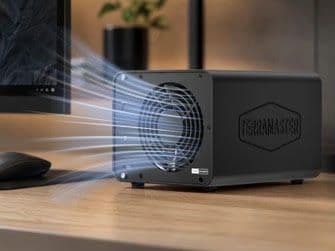
Eight drives can generate considerable heat, particularly when several NVMe SSDs and mechanical hard drives are operating simultaneously. TerraMaster has therefore equipped the D8 Hybrid 2 with a temperature-controlled 120mm Fluid Dynamic Bearing fan.
The fan is rated for more than 50,000 hours of operation, while the manufacturer's specifications list a noise level of around 21dB(A).
The temperature-controlled approach is preferable to running a fan at a constant high speed. The enclosure can increase cooling when required while avoiding unnecessary fan noise during lighter workloads.
Actual noise will naturally depend on the drives installed. Four mechanical hard drives can produce considerably more acoustic noise than the enclosure's fan, so the quoted figure should not be interpreted as the total noise level of a fully populated system under load.
TerraMaster Power Management
Another new feature is TerraMaster's TPM, or TerraMaster Power Management technology.
The system is designed to improve energy efficiency, drive response times and operational safety while managing power consumption during different workloads. The D8 Hybrid 2 also includes a one-touch power mode switch that allows users to move between Power Save Mode and Active Mode.
This is useful for an enclosure intended to remain connected for extended periods. Storage does not always need to be operating at full performance, particularly when the device is being used primarily for archival data or backups.
The manufacturer's specifications also list HDD sleep functionality, further supporting the enclosure's role as an always-connected storage device.
NAS Expansion
The D8 Hybrid 2 becomes even more interesting when used alongside a NAS.
Rather than operating exclusively as direct-attached storage for a PC or Mac, it can be connected to compatible NAS hardware to expand available storage. TerraMaster specifically lists compatibility with its TOS 5 and TOS 6 systems, as well as platforms including Windows Server, Linux, Proxmox, TrueNAS and Unraid.
This gives the enclosure considerably more flexibility than a standard external hard-drive enclosure.
For users whose existing NAS is running short on capacity, the D8 Hybrid 2 provides another route to expansion without immediately replacing the NAS itself. TerraMaster also states that its NAS ecosystem can use the attached drives for storage pools, RAID configurations and snapshots.
That makes the D8 Hybrid 2 particularly appealing to enthusiasts and small businesses that want to build storage gradually.
Broad Operating System Compatibility
The D8 Hybrid 2 is designed to work across Windows, macOS and Linux without requiring dedicated drivers.
It supports a broad range of file systems, including NTFS, APFS, EXT4, FAT32 and exFAT, making it suitable for environments where files need to move between different operating systems.
Backup functionality is also covered. Windows users can use TerraMaster's TPC Backupper software for incremental and differential backups, while Mac users can use Apple's built-in Time Machine functionality.
This cross-platform approach is one of the enclosure's more practical strengths. It means the D8 Hybrid 2 does not have to be locked to a single workstation or operating system.
What Could Be Better?
Despite its impressive feature set, the D8 Hybrid 2 is not perfect.
The biggest consideration is that this remains a DAS rather than a standalone NAS. It does not provide the networking functionality of a dedicated NAS by itself. Users looking for remote access, built-in network services, applications and a full NAS operating environment will still need a NAS system or another host device.
The 10Gbps USB connection is also fast but represents the ceiling for communication between the enclosure and its host. The NVMe drives inside the enclosure may be capable of considerably higher speeds individually, but those speeds cannot be fully exploited over a 10Gbps USB connection.
The maximum 152TB capacity also needs context. Achieving it requires expensive high-capacity drives, and users configuring RAID will have less usable capacity than the headline figure suggests.
Finally, prospective buyers need to factor the cost of the drives into the overall investment. At around £299.99 for the diskless enclosure, the hardware itself is competitively positioned for an eight-bay hybrid system, but populating all eight bays can quickly become a significant expense.
Verdict
The TerraMaster D8 Hybrid 2 is a highly versatile storage enclosure that solves a problem many power users eventually encounter: needing both the speed of NVMe and the capacity of hard drives without maintaining multiple separate storage devices.
Its combination of four SATA bays, four M.2 NVMe slots, 10Gbps USB connectivity and up to 152TB of raw capacity gives it a compelling range of potential uses. The tool-free installation, intelligent cooling, power management and broad operating system support further improve its practicality.
For video editors, photographers, content creators, enthusiasts and professionals managing large datasets, the hybrid architecture is the standout feature. It provides a straightforward way to separate frequently accessed data from long-term storage while keeping everything within one enclosure.
The D8 Hybrid 2 is not a replacement for a full NAS, and users expecting multi-gigabit networking or workstation-class Thunderbolt storage performance should look elsewhere. For everyone else, however, it strikes a strong balance between capacity, speed, flexibility and ease of use.
At £299.99 for the diskless enclosure, the TerraMaster D8 Hybrid 2 is a strong option for anyone looking to build a high-capacity external storage system around both HDDs and NVMe SSDs. Its hybrid design gives it a level of flexibility that conventional multi-bay DAS enclosures simply cannot match.
Rating: 9/10
Pros
- Four SATA bays plus four M.2 NVMe slots
- Up to 152TB raw capacity
- 10Gbps USB 3.2 Gen 2 connectivity
- Up to 1,020MB/s advertised NVMe read performance
- Tool-free HDD and SSD installation
- Hot and cold data storage approach
- Broad Windows, macOS and Linux compatibility
- Useful NAS expansion capabilities
- Intelligent temperature-controlled cooling
- Power-saving features and drive sleep support
Cons
- 10Gbps USB limits maximum NVMe performance
- Does not operate as a standalone NAS
- 152TB figure represents raw maximum capacity
- RAID configurations can reduce usable capacity
- Populating all eight bays can become expensive