
To sell cars in Forza Horizon 6, list them in the Auction House and wait for another player to buy them. There’s no direct sell-back option that pays a fixed amount of Credits. You choose a starting bid, a required buyout price, and an auction duration, so your asking price needs to make sense to buyers. If you only want a car out of your garage, removing it or using Gift Drop also works, but neither option pays Credits.
Should you sell, gift, or remove your car?
Use the Auction House if you want Credits for an unwanted car. Other players can bid on your listing or pay its buyout price, but creating an auction does not guarantee a sale.
Gift Drop and garage removal are alternatives for clearing out vehicles without waiting for a buyer. The trade-off is straightforward: neither gives you Credits, and you’ll need to buy or unlock the car again if you want it back.
| Option | What happens | Do you receive Credits? | Best for |
|---|---|---|---|
| Auction House | Other players can bid on or buy your car | Yes, if it sells | Players who want Credits for unwanted vehicles |
| Gift Drop | You give the car away | No | Players who want to gift an unwanted car |
| Remove from garage | You remove the car without selling it | No | Players who only want to clear their garage |
Before gifting or removing something you might want later, check how to unlock vehicles. Having to acquire another copy is a good reason to pause before giving one away.

How do you list a car for auction?
The selling route starts in Buy & Sell on the main menu. You do not sell the car directly back to the game, so head into the Auction House rather than looking for a fixed-price sale button.
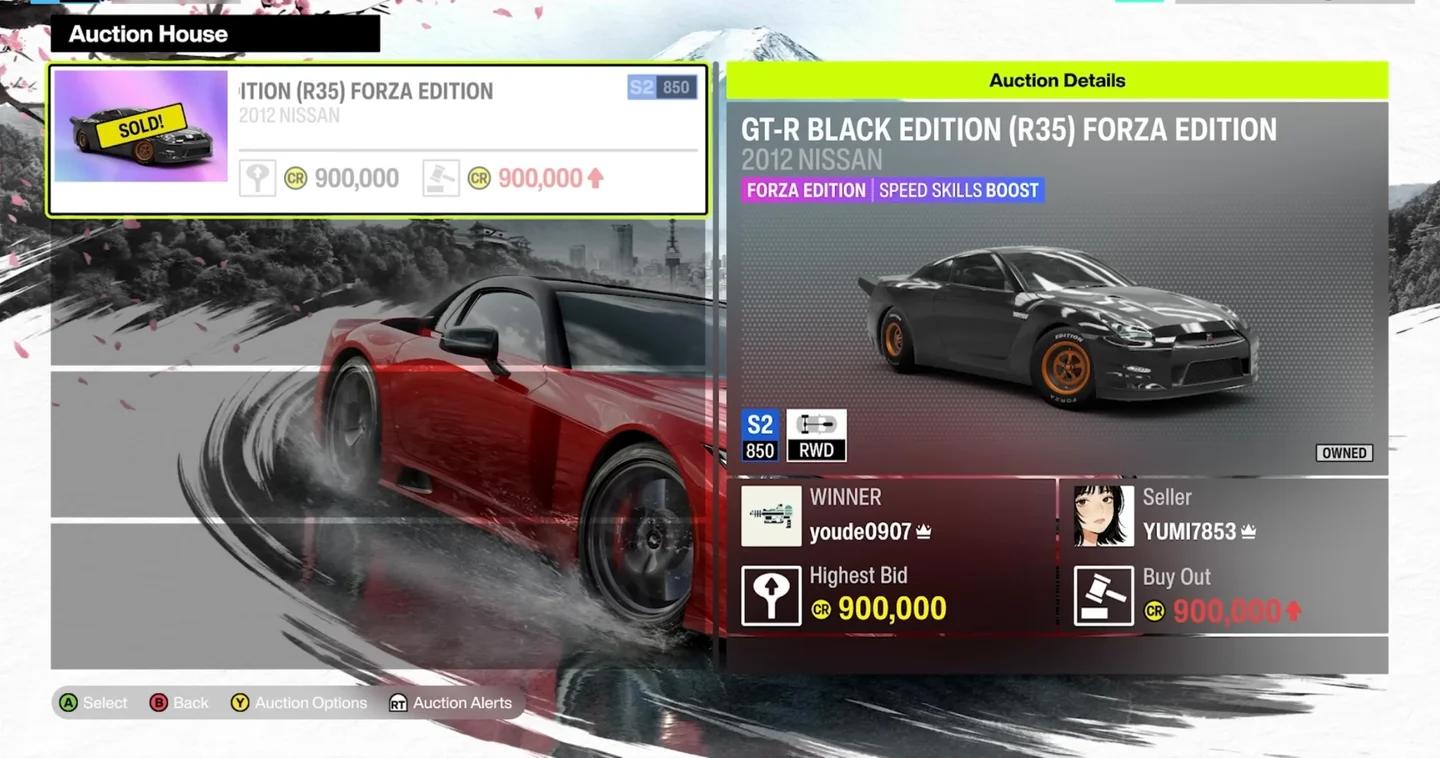
Choose the Auction House
Open the auction creation screen
Follow this menu sequence:
- Open Buy & Sell.
- Select Auction House.
- Choose Start Auction.
- Select the vehicle you want to sell from your garage.
- Choose Auction Car to open its listing settings.
When you highlight an owned car, its displayed value appears in the bottom-left corner. Check that figure before choosing your prices, but compare other auctions too. The garage value alone does not tell you what another player will pay.
Set the listing details
The auction setup lets you choose a starting price, buyout price, and auction length. Review each setting before confirming the listing.
| Setting | What it controls | What to consider |
|---|---|---|
| Starting price | The opening price for bidding | Compare other auctions for the same car; starting below its garage value is generally sensible |
| Buyout price | The amount a buyer can pay to skip bidding | Every auction needs one, so compare buyouts as well as starting prices |
| Auction length | How long the auction runs | Choose the duration before confirming your listing |
What price should you set for your car?
Check auctions for the same car before setting your asking prices. A comparable listing gives you a more useful pricing reference than treating the garage value as a guaranteed payout.
For most cars, a starting price below the displayed value is a sensible baseline. The buyout will generally sit at or below that value too, although this is a guideline rather than a rule for every vehicle.
Limited-time cars deserve a separate price check because their market value can be much higher. Pricing one like an ordinary car could mean asking for less than comparable auctions.
Keep your goal in mind: listing a car earns nothing unless someone buys it. If you need Credits without depending on an auction sale, the Credit farming guide covers other earning options.
Where can you check your auction?
After you confirm the listing, other players can find your car through Auction House searches. To check your own listing, open My Auctions inside the Auction House.
A buyer can participate through bidding or pay the buyout price to skip that process. If the auction ends without any bids or a buyout purchase, the car does not sell.
An unsold listing is a reason to revisit your comparison with other auctions. Check the same car’s starting prices and buyouts again before deciding what to ask next.
Common mistakes to avoid
The Auction House is a player-to-player sale system, so these mistakes can leave you without the result you wanted:
- Treating garage value as guaranteed income. The displayed figure is a reference; another player still has to buy your car.
- Checking only the starting price. Every listing also needs a buyout, which lets buyers skip bidding entirely.
- Ignoring limited-time availability. These cars can carry much higher values, so check comparable auctions before pricing one cheaply.
- Removing a car when you wanted Credits. Garage removal and Gift Drop clear the vehicle without paying you.
Pro tips
Before confirming Auction Car, use this short checklist to catch pricing and garage-management mistakes:
- Compare auctions for the same vehicle, not a different car with a similar garage value.
- Review the starting price and buyout separately, since they serve different buying routes.
- Check how you would acquire another copy before choosing Gift Drop or garage removal.
- Use My Auctions to find your own listing after it goes live.
Frequently asked questions
Can you sell cars directly back to the game?
No. Forza Horizon 6 uses the Auction House for car sales to other players. There is no fixed-payment sell-back option.
Does every car auction need a buyout price?
Yes. You must set a buyout price alongside the starting price and auction length. A buyer can pay that amount to skip bidding.
Is putting a car up for auction enough to earn Credits?
No. Another player must buy the car. An auction that ends without bids or a buyout purchase does not produce a sale.
What if you need Credits but your car is not selling?
Check comparable Auction House listings and reconsider your asking prices. For earning options beyond selling your garage cars, follow the guide to earning Credits fast.