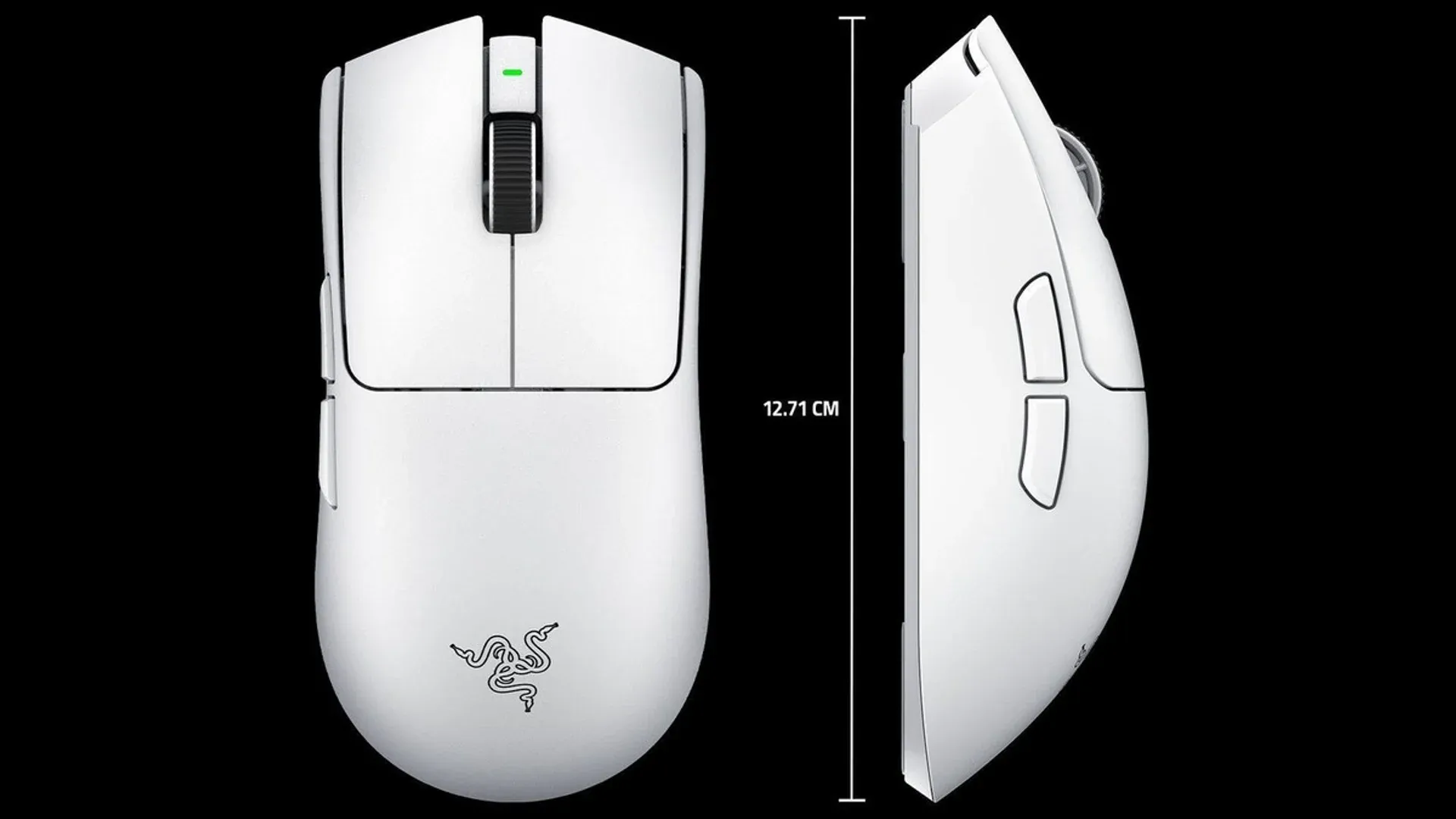


Four grams. That is the margin by which Razer quietly made the Viper V4 Pro feel like a completely different mouse from its predecessor. Combined with a battery life that nearly doubles what the V3 Pro offered, the latest Viper has landed as the mouse to beat in the competitive space right now.
Razer links take you to its online store. GAMES.GG may earn a commission from qualifying purchases.

Use code TRYHARD33 at checkout to redeem this offer before code expires again.
Get 33% Off GAMES+ Subscription
What changed from the V3 Pro
The Viper V4 Pro weighs in at 49g for the black version (50g for white), down from the V3 Pro's 54g. That might not sound like much on paper, but at this weight class, every gram removed translates directly into faster flicks and less fatigue during long sessions. Razer achieved this without punching holes through the shell or going ultra-thin on the casing, which is the more common approach from competitors.
The sensor has been upgraded from the Focus Pro 35K Gen-2 to the Focus Pro 50K Optical Sensor Gen-3, pushing maximum DPI from 35,000 to 50,000. For most players, that ceiling is academic, but the underlying accuracy improvements at normal sensitivity ranges are real. The switches have also moved to Razer Optical Mouse Switches Gen-4, rated to 100 million clicks and free from the double-click issues that plague mechanical alternatives over time.
The scroll wheel is another notable change. Razer swapped in an optical encoder, claiming it is 3.3x more reliable than the mechanical encoder used previously. In practice, the wheel feels precise and consistent, with no slippage between detent positions.
The battery life situation is genuinely impressive
Here is the thing: 180 hours at 1kHz polling rate is not just an incremental improvement. The V3 Pro topped out at 95 hours, and that was already competitive. The V4 Pro doubles it, putting serious distance between itself and alternatives like the Corsair Sabre V2 Pro (70 hours) and the Logitech G Pro X2 Superstrike (90 hours).
In real-world terms, using the mouse for both work and gaming at 1kHz, you are looking at roughly two weeks between charges. Even cranked up to 8kHz, the mouse still delivers around 45 hours of use. The wireless connection has also moved to HyperSpeed Wireless Gen-2, which Razer says cuts power consumption by 60% compared to the previous generation.
The noise problem nobody warned you about
The V4 Pro's biggest quirk is one that does not show up in spec sheets. The Gen-4 optical switches are loud. Not clicky-keyboard loud, but high-pitched and reverberant in a way that carries across a room. Anyone sharing a space with you will hear every click. If you are streaming, recording, or sitting next to a partner who already tolerates your mechanical keyboard, consider yourself warned.
This is the same characteristic found in the Deathadder V4 Pro, so it is not a surprise for Razer regulars, but first-time buyers should factor it in.
Synapse Web and the $159.99 question
Razer launched Synapse Web alongside the V4 Pro, allowing full mouse configuration through a browser at synapse.razer.com without installing any software or even creating an account. DPI settings, button assignments, polling rate, and surface calibration are all accessible. Changes save directly to the mouse. For players who have always resented bloated peripheral software, this is a meaningful quality-of-life improvement.
The price sits at $159.99, which puts it firmly in flagship territory. The Corsair Sabre V2 Pro undercuts it significantly at under $80, and it is lighter at 36g. The tradeoff is build quality and that class-leading battery. For a mouse with no RGB, no charging dock, and a feature set that reads as minimal on paper, $159.99 requires some conviction.
What most players miss is that the V4 Pro is not trying to win on features. It is trying to win on fundamentals: weight, sensor accuracy, battery, and wireless reliability. On those terms, it delivers.
For a deeper look at how it stacks up against other top-tier options, check out the latest reviews. If you are still deciding between this and other peripherals in the same price bracket, the guides section has you covered with side-by-side comparisons.