
The Steam Machine never quite got its moment. Valve's bold push to bring PC gaming into the living room launched in 2015, sold modestly, and was quietly discontinued by 2018. For the handful of early adopters who kept their units running, the hardware has mostly soldiered on. Until now, apparently.
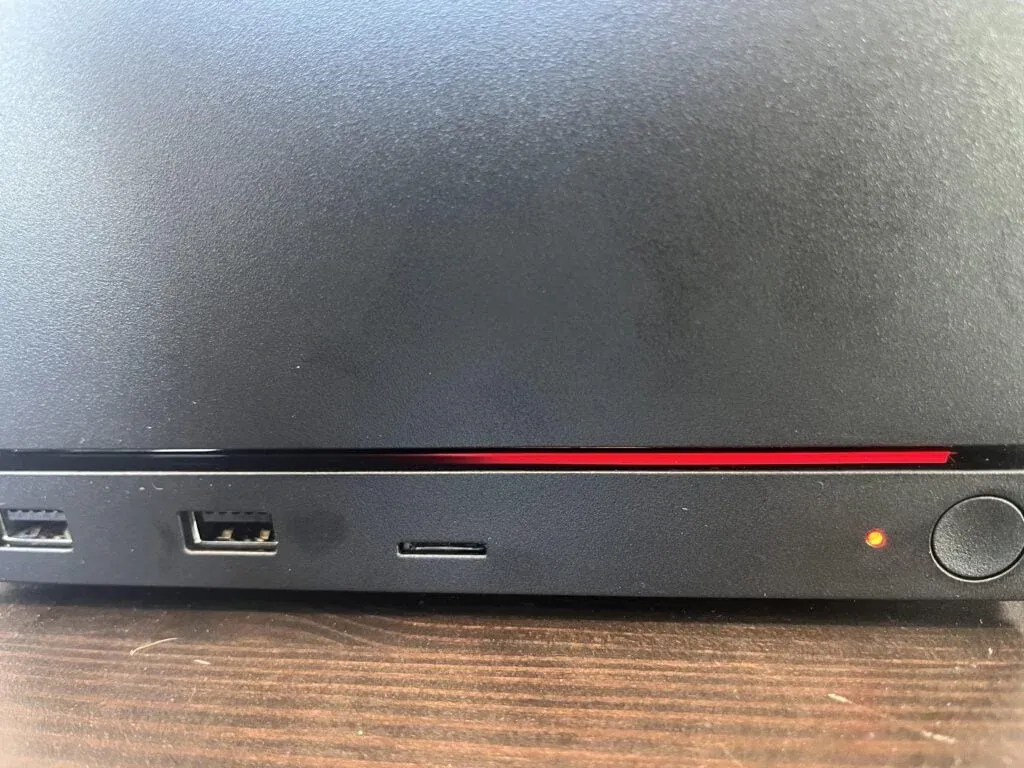
A Steam Machine owner recently surfaced online reporting a blinking red LED on their unit with the system refusing to boot. No display output, no startup chime, just a persistent red blink that signals something has gone wrong at the hardware level.

Use code TRYHARD33 at checkout to redeem this offer before code expires again.
Get 33% Off GAMES+ Subscription
What a blinking red LED actually means
On most PC hardware, a blinking or solid red LED is the system's way of flagging a POST failure. POST (Power-On Self-Test) runs every time a machine boots and checks core components like RAM, CPU, and GPU before handing off to the operating system. When something fails that check, the system halts and signals the fault through LED codes.
The Steam Machines sold under the Valve program were built by third-party manufacturers including Alienware, Zotac, and Gigabyte, each using their own hardware configurations. That matters here because the exact meaning of a red LED blink pattern depends entirely on which unit you have. An Alienware Alpha Steam Machine uses a different diagnostic system than a Zotac ZBOX SN970.
For most of these units, a blinking red LED points to one of a few culprits: failed RAM, a dead CMOS battery, GPU failure, or in older machines, capacitor degradation on the motherboard. Hardware that has been sitting powered on for a decade is genuinely susceptible to all of these.
A decade of dust and the reality of aging hardware
Here's the thing about hardware from 2015: it is now over ten years old. That puts it squarely in the window where electrolytic capacitors start failing, thermal paste has long since dried out, and fans may be running on borrowed time. The blinking red LED this owner is seeing is likely a symptom of normal hardware aging rather than any Steam Machine-specific flaw.
Valve officially pulled support for the Steam Machine program years ago, which means there is no warranty path and no manufacturer support pipeline to speak of. Owners are effectively on their own, which is both the challenge and the upside of these units being standard PC hardware underneath.
The silver lining is that most Steam Machine components are replaceable. RAM is socketed and standardized. CMOS batteries are cheap. Thermal paste replacement is a straightforward fix for overheating-related failures. For owners comfortable opening up their unit, the repair path is the same as any aging mini-PC.
If you have been dealing with stuttering or performance issues on other PC hardware, the Killer Bean performance fix guide is a useful reference for diagnosing hardware-side bottlenecks on compact systems.
Why this story still resonates in 2026
The Steam Machine experiment is worth revisiting not because it succeeded, but because of what it tried to do. Valve was attempting to solve a real problem: PC gaming was locked to desks, and consoles controlled the living room. The Steam Deck eventually cracked that problem far more elegantly, but the Steam Machine was the first serious attempt.
For the owners who bought in early, these machines represent a specific moment in gaming history. Seeing them fail now, quietly and without any support structure, feels like a small but real loss.
The broader question for anyone still running legacy PC hardware is how long you can reasonably expect decade-old components to hold up. The answer, based on what we know about capacitor lifespans and thermal degradation, is that failures like this one will become more common as these machines age further.
For PC hardware troubleshooting in general, the 007 First Light PC crash fix guide covers GPU detection and driver issues that overlap with the kind of faults a blinking red LED can indicate on older systems.
If you are sitting on a Steam Machine that still works, now is a reasonable time to check thermals, reseat RAM, and replace the CMOS battery before a fault forces the issue. For anyone who wants to stay sharp on hardware and software fixes across gaming platforms, the full gaming guides library is worth bookmarking.