
As game libraries, video projects, and personal media collections continue to grow, finding an affordable way to expand storage has become increasingly important. Modern games can occupy hundreds of gigabytes, while content creators often need several terabytes of space for footage, recordings, and project files. A traditional external hard drive can help, but users who need more flexibility may benefit from a multi-bay storage enclosure.
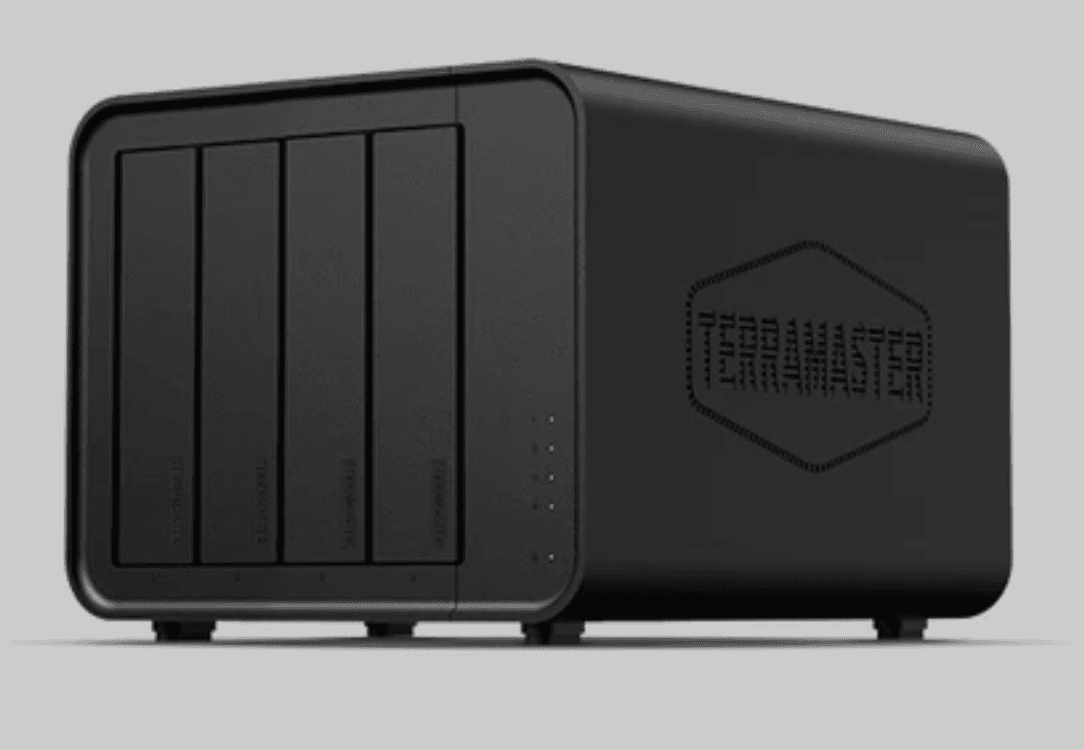
The TerraMaster D4-320 is a four-bay direct-attached storage (DAS) enclosure designed to provide additional capacity without the expense or complexity of building a dedicated network-attached storage (NAS) system. With USB 3.2 Gen 2 connectivity, support for multiple SATA drive types, hot-swapping, and tool-free installation, it offers a straightforward way to expand an existing computer's storage.
Priced at $183.99 at the time of writing, reduced from its listed regular price of $229.99, the D4-320 also targets users who want to build a substantial storage setup without spending too much on the enclosure itself.
It has some important limitations, particularly its lack of built-in RAID functionality. However, for users who understand what it offers, the D4-320 is a practical and capable storage solution.
Design and Build Quality
The TerraMaster D4-320 adopts a minimalist desktop design that should fit comfortably alongside a gaming PC, workstation, or home server. Measuring 222 x 179 x 154 mm and weighing approximately 1.9 kg without drives, it provides four drive bays in a relatively compact enclosure.
Its understated appearance is appropriate for a product designed primarily for functionality. Rather than relying on gaming-oriented aesthetics or unnecessary visual features, TerraMaster focuses on providing accessible storage with a relatively small desktop footprint.
The enclosure supports four SATA drives, including 3.5-inch hard disk drives (HDDs), 2.5-inch HDDs, and 2.5-inch solid-state drives (SSDs). This flexibility allows users to configure their storage around their budget and performance requirements.
For example, a gaming enthusiast could install several high-capacity HDDs for archived games, recordings, and older projects while reserving an internal NVMe SSD for frequently played titles. A video editor could instead use a combination of drives for footage, completed projects, and general file storage.
The ability to mix drive types also makes the D4-320 useful for users upgrading an existing storage setup. Rather than abandoning older drives when replacing a computer, they can continue using compatible SATA drives in the enclosure.
The overall design prioritizes practicality, and that is the right approach for a device that may spend most of its life sitting on a desk or beside a home server.
Tool-Free Installation Makes Drive Management Easy
One of the D4-320's most convenient features is its tool-free drive installation system.
Installing a hard drive into some multi-bay enclosures can involve removing panels, handling several screws, and navigating awkward mounting brackets. The D4-320 simplifies this process with tool-free drive trays and a push-lock mechanism that secures each tray when it is inserted.
This makes the initial setup easier, particularly for users who are building their first multi-drive storage system. It also benefits anyone who regularly changes drives or maintains several separate storage volumes.
The push-lock design is intended to prevent drives from becoming dislodged or disconnected during operation. While it does not eliminate the need to handle drives carefully, it provides a straightforward way to install and remove them without turning routine maintenance into a complicated task.
The enclosure also supports hot-swapping, allowing compatible drives to be replaced without powering down the entire device. This is useful when working with multiple independent drives or moving between storage collections.
However, hot-swapping should not be treated as permission to remove a drive whenever it is busy. Users should ensure that transfers have finished, unmount the drive safely where required, and follow the relevant operating system's procedures before removal.
Overall, the installation system is a strong part of the D4-320's appeal. It makes the enclosure approachable for beginners while providing useful flexibility for experienced users.
Performance: USB 3.2 Gen 2 Connectivity
Storage performance is one of the most important considerations when choosing a multi-bay enclosure, particularly for users handling large files.
The TerraMaster D4-320 uses a USB 3.2 Gen 2 Type-C interface with a theoretical bandwidth of up to 10Gbps. This doubles the 5Gbps interface bandwidth of its predecessor, the D4-300, according to TerraMaster.
The manufacturer lists the following maximum read and write speeds for the D4-320:
| Configuration | Maximum read speed | Maximum write speed |
|---|---|---|
| One SSD | 560 MB/s | 520 MB/s |
| Four SSDs | 1,016 MB/s | 960 MB/s |
These figures are manufacturer specifications rather than guaranteed results for every drive configuration. Actual performance will depend on the installed drives, the host computer, the USB connection, and the workload.
Nevertheless, the listed figures indicate that the enclosure can provide considerably more throughput than a typical single mechanical hard drive when several suitable drives operate together.
For gamers, this makes the D4-320 particularly useful as a library for games that are not currently installed on the main system drive. It can also store gameplay recordings, screenshots, video captures, and other files that would otherwise consume valuable internal SSD capacity.
Content creators may find the additional throughput helpful when transferring large video files or working with projects stored across multiple drives. Photographers and other media professionals can also use the enclosure to manage extensive libraries without relying on several separate external drives.
It is worth remembering that USB 3.2 Gen 2's 10Gbps rating refers to interface bandwidth, not a promise of 10Gbps file transfers. Protocol overhead and the capabilities of the installed drives limit real-world speeds.
Likewise, installing four mechanical HDDs will not automatically deliver the same throughput as four SSDs. Mechanical drives have substantially different performance characteristics, and results depend on how the workload is distributed across them.
Even with these caveats, the D4-320 offers a useful performance upgrade over older USB storage enclosures, particularly for users who plan to install multiple SSDs or use the enclosure with a suitable multi-drive workflow.
Up to 128TB of Storage Capacity
The D4-320's four bays provide considerable room for expansion.
TerraMaster advertises a maximum raw capacity of 128TB, based on four 32TB drives. However, its product information also notes that compatibility with larger drives remains subject to verification, while the detailed feature description references 22TB drives. Buyers should therefore check the current compatibility list before purchasing high-capacity disks.
Even with smaller drives, the enclosure provides a straightforward way to build a large storage pool at a relatively low initial cost.
Four 8TB HDDs, for example, would provide 32TB of combined raw capacity. Four 16TB drives would increase that figure to 64TB. Users can start with one or two drives and add more as their storage requirements grow, provided the chosen configuration and software support their intended setup.
This incremental approach is one of the enclosure's biggest advantages. Rather than paying for all the storage immediately, users can spread the cost of their drives over time.
For gaming households, this could mean maintaining a large collection of game installers, mods, recordings, and media. For streamers, it offers room for archived broadcasts and edited videos. For home offices, it provides additional capacity for documents, creative work, and other large files.
The enclosure is also compatible with a range of file systems, including NTFS, APFS, FAT32, exFAT, and EXT4. Actual compatibility depends on the operating system and how each drive is formatted, so users should verify their requirements before moving disks between platforms.
An Important Limitation: No Built-In RAID
The D4-320's biggest limitation is also one of the most important details to understand before purchasing it: it does not provide hardware RAID functionality or a built-in RAID management system.
The enclosure presents its drives individually rather than combining them into a hardware-managed RAID array.
This is not necessarily a disadvantage. Users who want four independent drives can benefit from the simple configuration, and those who prefer to manage storage through their computer have the freedom to use compatible software tools.
However, anyone expecting the D4-320 to function as a ready-made RAID 5 enclosure should look elsewhere or investigate their software options before buying.
RAID 5, for example, requires a compatible hardware or software implementation. Simply installing four drives in the D4-320 will not create a RAID 5 array automatically.
Software RAID may be possible through the host operating system or a suitable storage platform, but the exact configuration, performance, and compatibility will depend on the software and system being used.
It is also important to distinguish RAID from backup. Even when a RAID configuration provides redundancy, it does not replace a separate backup of important files.
For users who need built-in RAID management, automated array rebuilding, drive-health alerts, or a more comprehensive storage management interface, a dedicated NAS or a suitable RAID enclosure may be a better investment.
For everyone else, the D4-320's individual-drive approach can be a benefit rather than a drawback. It keeps the device straightforward and leaves storage management in the user's hands.
Cooling and Noise: Designed for Desktop Use
A multi-bay enclosure needs effective cooling, especially when several drives operate simultaneously. Heat can affect drive reliability, while poorly controlled vibration can make a desktop storage device unpleasant to use.
TerraMaster equips the D4-320 with a 120mm temperature-controlled fan. Its speed adjusts according to drive temperatures, helping balance cooling requirements against noise.
The manufacturer also describes internal airflow improvements and vibration-damping measures intended to reduce resonance between the drives and the enclosure.
According to TerraMaster, the D4-320's noise level can fall below 21 dB(A) in standby mode, with noise reductions of up to 50% compared with the previous generation under its stated test conditions.
These figures need some context. The standby measurement was taken with four SATA drives installed in a test environment measuring 17.3 dB(A), at a distance of one metre. It should not be interpreted as the expected noise level during sustained transfers.
Mechanical HDDs produce their own spinning and seeking sounds, and the overall noise level will vary with the drives selected, fan activity, and the surrounding environment.
Even so, the temperature-controlled fan and vibration-damping design are welcome features for a product intended to sit close to a user. A storage enclosure does not need to be completely silent, but reducing unnecessary fan noise makes it easier to keep one running in a home office or gaming room.
The D4-320 also supports intelligent disk sleep, allowing drives to enter a lower-power state alongside the connected computer when the configuration supports it. This can reduce unnecessary drive activity when the system is idle.
For users who want storage available at their desk without the constant noise associated with some multi-drive systems, the D4-320's cooling design is a meaningful advantage.
Connectivity and Compatibility
The D4-320 connects to a host device through USB Type-C and includes a USB-C-to-USB-C cable. It is compatible with Windows, macOS, and Linux, and its USB interface can work with supported USB 3.0, USB 3.1, USB 3.2, Thunderbolt 3, and Thunderbolt 4 host connections.
This broad compatibility makes the enclosure relatively easy to integrate into an existing setup.
A desktop gaming PC, laptop, workstation, or compatible mini PC can all serve as the host, provided the operating system and connection support the intended drives and workload. It can also connect to certain other devices, such as compatible servers and media systems.
There is an important distinction between connector compatibility and maximum performance, however. Connecting the D4-320 to a slower USB port will limit transfer speeds accordingly. A USB-C connector alone does not guarantee USB 3.2 Gen 2 performance.
The enclosure is also a direct-attached storage device rather than a standalone network storage server. It does not have its own network interface, and users should not expect it to provide independent network file sharing without a suitable connected host.
That makes it less self-contained than a NAS, but it also means users do not have to configure a network service just to access their files from the connected computer.
For buyers who simply need more storage connected to an existing system, this is a sensible balance between flexibility and simplicity.
Expanding a TerraMaster NAS
Although the D4-320 is primarily designed as a USB storage enclosure, it can also expand compatible TerraMaster NAS systems.
TerraMaster states that the enclosure can connect to the USB interface of supported NAS devices running TOS 5.1 or later. This allows users to add external drives and manage them through the NAS operating system's supported storage features.
This is a useful option for people whose existing NAS is running short on capacity but who do not want to replace the entire system.
It can also provide a way to repurpose the enclosure as storage requirements change. A user might initially connect the D4-320 directly to a desktop computer before later using it with a compatible TerraMaster NAS.
However, buyers should check their specific NAS model and software version before relying on this feature. Compatibility with the USB connection does not mean every NAS storage feature or configuration will be supported.
The D4-320 is therefore best viewed as a flexible storage expansion option rather than a replacement for a complete NAS system.
Automatic Backups and Power Management
TerraMaster provides additional software support through TPC Backupper, a Windows backup utility designed to schedule backups of folders and disk partitions to compatible TerraMaster USB storage devices or NAS systems.
The software supports scheduled jobs alongside incremental and differential backup strategies. These options can reduce the amount of data that needs to be copied during subsequent backup runs, depending on the selected configuration.
For a gaming PC, this could help preserve important documents, creative projects, configuration files, and other data stored on the computer. Content creators may also find scheduled backups useful for keeping working files copied to separate storage.
As with any backup tool, users should verify that their tasks complete successfully and periodically test their ability to restore files. Simply connecting a large storage enclosure does not guarantee that data is protected.
The D4-320 also includes power protection intended to guard against problems associated with an incompatible power source. Its specifications list a 72W power supply, a 12V DC input, and support for 100–240V AC mains input through the supplied power adapter.
Listed power consumption is 40.8W during access and 3.7W in hibernation. Actual consumption will vary with the number and type of installed drives and the operating conditions.
These features reinforce the D4-320's focus on being a practical device for long-term storage rather than a product that requires constant manual management.
Price and Value
At its listed promotional price of $183.99, the TerraMaster D4-320 offers an accessible entry point into four-bay direct-attached storage. The listed regular price is $229.99, although prices and promotions may change.
The price does not include the cost of the drives, which can represent a much larger part of the total investment. Buyers should account for that when comparing the D4-320 with a single external HDD, a multi-bay RAID enclosure, or a complete NAS.
Its value comes from the combination of four drive bays, 10Gbps USB connectivity, tool-free installation, hot-swapping, and broad operating system compatibility.
The D4-320 is particularly appealing to people who already own SATA drives and want to reuse them. It can also suit users who prefer to choose their own drive capacities instead of paying for a preconfigured storage system.
However, the lack of built-in RAID is an important consideration. If automated redundancy, RAID management, or independent network access is central to the intended setup, paying more for a different enclosure or NAS may be worthwhile.
The D4-320 delivers its best value when buyers understand that they are purchasing a flexible enclosure rather than a complete storage server.
Final Verdict
The TerraMaster D4-320 is a capable four-bay storage enclosure that gets the fundamentals right. Its USB 3.2 Gen 2 connection provides a useful performance upgrade over older USB enclosures, while its tool-free drive trays and hot-swapping support make storage management straightforward.
The temperature-controlled fan, vibration-damping design, and relatively compact footprint also make it a sensible choice for desktop environments where noise and convenience matter. Meanwhile, support for HDDs and SSDs gives users considerable flexibility when planning their storage setup.
Its biggest weakness is the lack of built-in RAID functionality. Buyers who want a ready-to-use RAID 5 array or a standalone NAS should consider alternatives, and anyone building a software-managed array will need to check compatibility carefully.
For gamers, streamers, content creators, and home-server enthusiasts who simply want to expand their storage, however, the D4-320 offers a compelling combination of capacity, speed, and ease of use.
At $183.99 before the cost of drives, it is a worthwhile option for anyone who needs four-bay direct-attached storage without the added complexity of a dedicated network storage system.
Pros
- Four drive bays supporting 3.5-inch HDDs and 2.5-inch HDDs or SSDs.
- USB 3.2 Gen 2 connectivity with bandwidth up to 10Gbps.
- Tool-free drive installation and a convenient push-lock mechanism.
- Hot-swapping support for compatible drive-management workflows.
- Temperature-controlled 120mm fan and vibration-damping design.
- Compatible with Windows, macOS, and Linux.
- Supports expansion of compatible TerraMaster NAS systems.
- Useful storage capacity for game libraries, media archives, and backups.
Cons
- No built-in hardware RAID or RAID management system.
- Does not function as a standalone network-attached storage server.
- Maximum advertised speeds depend on the installed drives and host connection.
- Drive compatibility should be checked before purchasing high-capacity disks.
Overall: The TerraMaster D4-320 is an excellent option for users who want a fast, quiet, and easy-to-manage four-bay storage enclosure. Its limitations are clear, but for the right setup, it provides a practical and cost-effective way to expand a growing digital library. You can learn more here.