

Before buying a Steam key, check five things: who is selling it, what the code includes, where it activates, which account will redeem it, and what happens if something goes wrong. A lower price is useful only when the product fits your needs and the seller's terms are clear.
A Steam key is a product code intended to activate a game or other supported content through Steam. Buying one from another retailer can add the product to your Steam library, but the payment and refund relationship stays with that retailer. That distinction matters before you open your wallet.

Use code TRYHARD33 at checkout to redeem this offer before code expires again.
Get 33% Off GAMES+ Subscription
Confirm the Listing Actually Sells a Steam Key
Look for an explicit statement that the product activates on Steam. A game being available on Steam does not establish that every PC copy uses Steam. The listing might instead supply a code for another launcher, a different platform, DLC, or another type of product.
Read the delivery description as closely as the title. You should know whether you are receiving a redeemable key, when it will arrive, and whether it has a redemption deadline. Be especially careful with preorders: buying today does not necessarily mean receiving a working code today.
Steam's retail-key guidance says the packaging or delivery email should specify Steam registration. If the seller cannot clearly identify the activation platform, resolve that uncertainty before paying.
Is a Steam Key the Same as a Steam Gift Card?
No. A game key activates the specific product described in its listing. A Steam digital gift card adds credit to the recipient's Steam Wallet, which they can spend on an eligible purchase.
Gift-card country restrictions appear during Steam checkout and recipient selection, so check those separately from a game key's activation region.
Check the Seller Behind the Checkout
Identify the business taking your payment and the support channel you would use. On a marketplace, the site hosting the listing and the seller supplying the key may be different businesses. Check which one handles replacements, disputes, and refunds.
Look for a clear explanation of where the retailer obtains its keys. A publisher's own purchase links or named distribution relationships provide more useful context than an unexplained badge. Read recent feedback about delivery and problem resolution, rather than relying only on an average star rating.
Confirm the Exact Activation Region
Ask whether the specific key can be activated in your country. Labels such as "Europe" or "Global" need an actual supported-country list or an unambiguous confirmation from the seller. Do not assume that a language option, currency, or familiar store logo establishes compatibility.
Steam explains that retail-key region restrictions vary by publisher. A Steam store page for a game is therefore not enough to verify the restrictions on a particular third-party key package.
If the listing is unclear, give support the exact product link and ask about your country before purchase. Keep the reply with your receipt. For a gift, check the recipient's country rather than yours.
Match the Edition and Included Content
Compare the actual contents, not just words such as Deluxe, Complete, or Ultimate. Edition names do not consistently mean the same thing across games.
Check whether the product includes:
- The base game required to play
- The particular expansions or DLC you want
- An upgrade that requires an existing copy
- Cosmetic items, a soundtrack, or an artbook rather than extra gameplay
A cheap expansion key is poor value if you do not own the compatible base game. If you already have the game through another store or a subscription, confirm that the add-on works with that exact version.
Also check your existing Steam library and DLC list. A useful comparison is the cost of content you are missing, especially when a bundle overlaps with games you already own.
Read the Refund Rules Before Revealing the Key
Steam's familiar refund policy doesn't travel with a game just because it launches through Steam. Valve explicitly says it cannot refund purchases made outside Steam, including third-party CD keys. Steam refund policy.
Read the seller's policy before paying and before revealing or redeeming a code. Find out whether those steps affect change-of-mind returns, what evidence you need to support a faulty key, and how quickly you must report a problem. Keep the order confirmation and the listing details.
Distinguish a change-of-mind request from a code that does not work or differs from its description. Ask the retailer how it handles each situation. Consumer rights can depend on where you live and the circumstances, so do not treat a short checkout message as a complete statement of your rights.
Check Whether the Game Will Work for You
A valid key answers an activation question. It does not establish that your hardware can run the game comfortably.
Read the game's current Steam page for:
- Operating-system support, minimum and recommended specifications
- Storage requirements
- Language availability
- Any third-party account or launcher requirements
If you play on Steam Deck or another handheld, inspect compatibility information and relevant recent reports separately.
For multiplayer, check the features you actually need: cross-play with your friends, local co-op, server availability, or controller support. These details can matter more than a small price difference.
If you are uncertain about performance, factor the seller's refund conditions into your decision. Do not assume you can activate an external key, test the game, and then use Steam's standard purchase-refund process.
Buy a Code for Your Account, Not Someone Else's
A listing offering account credentials is a different product from a Steam key. Steam's account-ownership guidance says account ownership cannot be transferred and warns against buying accounts or letting someone else access yours.
Redeem a genuine key yourself through Steam. A seller should not need your password, Steam Guard code, or access to your email to carry out ordinary key delivery. If instructions ask you to hand over credentials or install unfamiliar activation software, stop and reassess the purchase.
Sign into the Steam account where you want the game before redeeming. The Steam Subscriber Agreement restricts account and license transfers, so don't plan to activate on one account and move the game later.
Compare the Final Price and Keep the Evidence
Once the key matches your platform, region, and edition, compare the full checkout amount. Include taxes, payment charges, and any optional extras. An advertised saving matters less when checkout adds unexpected costs.
You can include the GAMES.GG store in that comparison. Apply the same product, activation, and refund checks to every retailer, and choose based on the complete offer. If a region is not stated clearly, ask before buying.
For purchases from GAMES.GG, the GAMES.GG refund policy allows hidden keys to be refunded from the order page with no time limit, but the full key price returns as store credit, not to the original payment method. Revealing a key ends ordinary cancellation, even if you have not activated it. For a revealed key that fails to activate, contact support within 14 days of revealing it with your order reference and exact Steam error.
The policy provides a replacement first, or store credit if no replacement is available. Use outside a key's stated activation region is excluded from faulty-key remedies.
Redeeming Your Key
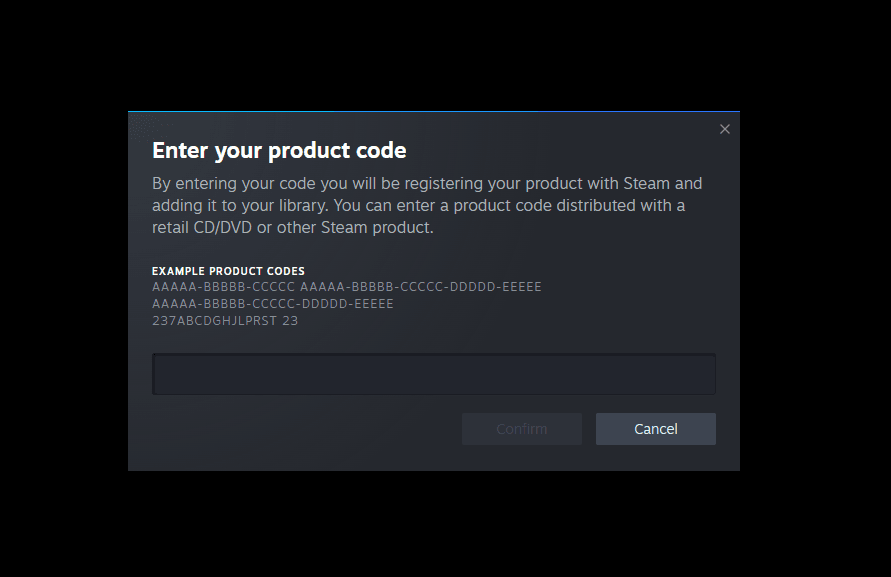
After delivery, use Steam's Add a Game menu and Activate a Product on Steam option, following the official instructions. Keep the code private. If Steam reports a duplicate, invalid, or region-restricted key, record the error and contact the seller with your order details. Avoid posting an unredeemed key in a public review or support forum.
The best Steam-key purchase is one you can explain before paying: the correct game and edition, for your country and account, from an identifiable seller with terms you understand. If any of those points remains unclear, a small discount is a good reason to keep comparing rather than rush.