Visual recoil is one of the most frustrating things to deal with in Call of Duty: Modern Warfare 4. Your aim can be exactly where it needs to be, but screen shake, muzzle flash, and weapon movement still conspire to hide the target at the worst possible moment. The good news is that a combination of display settings and Gunsmith attachments can cut most of that chaos down significantly. Here is exactly what to change and why.
Set optic position to Near
What is visual recoil, and why does it matter?
Visual recoil is the on-screen movement of your weapon, sights, and camera during firing. It is separate from mechanical recoil, which actually shifts where your bullets land. You can have perfect recoil control on paper and still lose a gunfight because the visual noise made it impossible to track a moving target.
MW4 redesigned its weapon system to make recoil more readable, but visual movement is still part of the shooting experience. The goal here is not to eliminate every firing animation but to reduce the interference enough that your sight picture stays usable under sustained fire.

Best display settings to reduce visual recoil
Start with these four settings before touching any attachments. They are the fastest wins available and cost nothing in terms of weapon performance.
| Setting | Recommended value |
|---|---|
| Optic Position | Near |
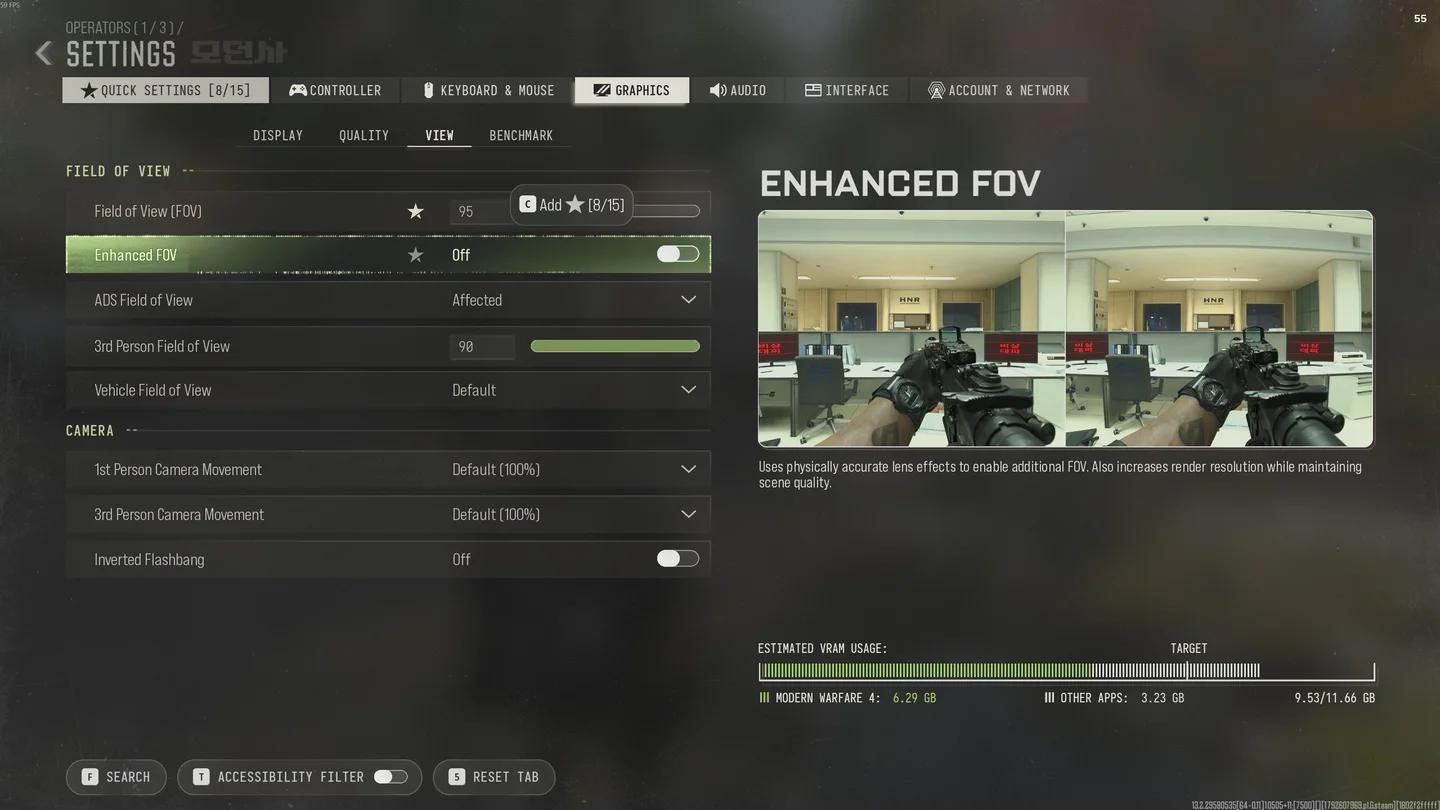
| Field of View (FOV) | 100-129 |
| Enhanced FOV | On |
| ADS Field of View | Affected |
| First Person Camera Movement | Minimal (25%) |
| HUD Widget Shake | Off |
How to move your optic to the Near position
The optic position slider in Gunsmith is the single most impactful display-side change you can make. Moving the sight toward the rear of the weapon rail reduces the amount of distracting movement that fills your screen while firing.
To adjust it:
- Open your loadout and enter Gunsmith.
- Select the weapon you want to modify.
- Choose the installed optic.
- Find the optic position slider.
- Drag it toward the rear of the rail until it reads Near.
Test this in a practice environment before taking it into a live match. Some optic and weapon combinations feel noticeably different at the Near position, so give yourself a few minutes to adjust.
What FOV range should you use in MW4?
A wider Field of View gives you more peripheral information and makes weapon movement feel less overwhelming on screen. The recommended starting range is 100 to 129. Begin somewhere in the middle of that range and push higher if the screen still feels cluttered during sustained fire.
One thing to keep in mind: a very wide FOV makes distant targets appear smaller. If you are regularly fighting at range, test a few values rather than jumping straight to 129.
Pair the FOV increase with Enhanced FOV set to On. This complements the wider view and improves how the surrounding scene is presented. Set ADS Field of View to Affected so the wider view carries through when you aim down sights, keeping your experience consistent between hipfire and ADS.
FOV and ADS settings panel
Reduce First Person Camera Movement
This setting lives under the Camera tab in Settings, not in Gunsmith. Set First Person Camera Movement to Minimal, which drops the movement intensity to 25%. The screen feels noticeably steadier during fast movement and sustained fire exchanges.
Turn off HUD Widget Shake
Under Interface Settings, find HUD Widget Shake and turn it off. It does not affect weapon recoil at all, but removing the HUD movement cleans up the screen and reduces the overall sense of chaos during heavy firefights.
Best Gunsmith attachments for recoil control
Display settings handle the visual side. Attachments handle the mechanical side. Once your screen is cleaner, any remaining weapon drift or climb needs to be addressed in Gunsmith.
Different weapons have different recoil characteristics, so there is no single attachment build that works universally. Use the table below as a diagnostic framework: identify your main problem, then target the relevant stat.
| Main problem | Attachment stat to target |
|---|---|
| Weapon climbs while aiming | ADS Recoil Control |
| Sharp kick with each shot | Gun Kick and ADS Gun Kick |
| Multiple recoil issues at once | General Recoil Control |
| Unstable aim while holding an angle | Idle Sway and ADS Gun Bob |
| Muzzle flash hiding the target | Muzzle Flash Concealment (Flash Hider) |
ADS Recoil Control
If your weapon becomes hard to manage specifically while aiming down sights, prioritize attachments that improve ADS Recoil Control. This is the most common issue at medium and long range, where you need the weapon to stay steady through multiple shots rather than pulling away from the target.
Check the Gunsmith statistics panel before equipping anything. A recoil-focused attachment often trades against handling speed or mobility, so weigh the full picture.
Gun Kick and ADS Gun Kick
Gun Kick describes the sharp upward or lateral movement the weapon makes with each individual shot. If your weapon lurches noticeably between rounds, attachments that reduce Gun Kick and ADS Gun Kick will have the most visible impact. These are worth prioritizing over general recoil stats when the per-shot movement is the specific problem.
Idle Sway and ADS Gun Bob
Not all distracting movement comes from firing. Idle Sway affects how much the weapon drifts while you hold an aiming position. ADS Gun Bob affects movement while walking with the sights up. If your sight picture feels unstable even between shots, these are the stats to address. They are not a replacement for recoil attachments but are worth adding once the main firing issues are handled.
Flash Hider
A Flash Hider improves the Muzzle Flash Concealment stat, reducing the visual obstruction caused by the weapon's firing effects. If muzzle flash is regularly hiding your target during sustained fire, this is the muzzle attachment to test. Compare it against other muzzle options for your specific weapon before committing, since other muzzle attachments may offer more relevant recoil benefits depending on the gun.
How to build a low-visual-recoil loadout step by step
Rather than changing everything at once, work through this order:
- Move the optic to Near in Gunsmith.
- Set FOV to 100-129, enable Enhanced FOV, and set ADS FOV to Affected.
- Set First Person Camera Movement to Minimal.
- Turn off HUD Widget Shake.
- Open Gunsmith and check the weapon's stats. If it climbs during ADS, add an ADS Recoil Control attachment. If each shot kicks sharply, target Gun Kick.
- If the weapon drifts while holding angles, address Idle Sway and ADS Gun Bob.
- If muzzle flash is the remaining problem, equip a Flash Hider.
Test after each stage. The goal is to identify which changes actually help your specific weapon and playstyle, not to stack every recoil stat available.
PC-specific visibility improvements
If you are on PC, a few graphics settings are worth reviewing alongside the above. Disabling motion blur removes an effect that amplifies the appearance of weapon movement during firing. Turning off film grain sharpens the image and makes targets easier to read. Prioritize a stable frame rate over visual effects that offer no competitive benefit. Higher frame rates make aiming feel more responsive, even if they do not directly reduce recoil.
Common mistakes that keep visual recoil feeling bad
Treating FOV as a complete fix. Widening the field of view makes weapon movement feel less dramatic, but it does not touch the underlying recoil pattern. If shots are still drifting off target after adjusting FOV, the problem is mechanical and needs Gunsmith attention.
Copying the same attachment build across every weapon. Each gun in MW4 has its own recoil profile. An attachment that solves the problem on one assault rifle may do very little on another. Always check the stats for the specific weapon.
Stacking recoil attachments without checking trade-offs. A fully stability-focused build can leave you with sluggish handling that costs you close-range fights. Balance is more useful than maximizing a single stat.
Changing multiple settings in one session. If you adjust FOV, optic position, and three attachments simultaneously, you will not know which change made the difference. One adjustment at a time is slower but gives you actual information.
For more help getting the most out of MW4, the full Modern Warfare 4 strategy guides collection covers everything from the Boot Camp event challenges and rewards to how to beat Makarov's knife QTE and alley duel and beyond.