
Steam capsule art is the set of banner images that represent your game across the store and library. The header capsule, at 920x430 pixels, is the one you must get right first. This guide lists every current capsule size from the Steamworks docs, shows what survives at thumbnail size using real indie games, and explains how to test your art before it costs you clicks.
What are the Steam capsule sizes?
Steamworks lists four store capsules and three library assets. These are the official specifications as of October 2026. Check the store graphical assets page and the library assets page before exporting, because Valve can change them.
| Asset | Upload size | Where players see it |
|---|---|---|
| Header capsule | 920x430 | Top of your store page, Recommended For You, Big Picture browse views, Daily Deals |
| Small capsule | 462x174; Steam generates 184x69 and 120x45 | Search results, top sellers, new releases and other lists |
| Main capsule | 1232x706 | Main capsule carousel at the top of the Steam store home page |
| Vertical capsule | 748x896 | Top of the front page during seasonal sales and on new sale pages |
| Library capsule | 600x900; 300x450 auto-generated | Library overview and collections |
| Library header | 920x430 | Recent Games and other spots in the Steam client library |
| Library hero | 3840x1240; 1920x620 auto-generated | Top of the library details page; art only, no text |
Steam's public image CDN also serves a 231x87 small capsule and a 616x353 file, which is half the main capsule's dimensions. You will see these in third-party tools, but they are not separate uploads.
The library hero has an 860x380-pixel safe area in the center that is never cropped. Keep faces and key shapes inside it.
What should Steam capsule art show?
Steam's guidance is short: use your marketing key art and logo, make the art tell customers something important about the game, and keep the logotype easily legible. Valve asks for art that is "graphically-centric" and gives "some sense of the game-play".
Under the graphical asset rules, base capsules may contain only game artwork, the game name and any official subtitle. They cannot contain:
- Review scores, including Steam reviews or press scores.
- Award names, symbols or logos.
- Discount copy such as "On Sale Now".
- Calls to action such as "Wishlist now" or "Prepurchase now".
- Promotion of another product, including sequels.
For text about a major update or event, use a Capsule Artwork Override. Overrides last at most one month, must be localized into the game's supported languages, and may describe only new content that is currently available.
How do you design a capsule that reads at thumbnail size?
Design the smallest version first and scale up. A header capsule appears at 920x430 on your page but is a thumbnail almost everywhere else, so every element has to earn its place. Four things matter most.
1. One focal point and one logo
A capsule works when the eye lands on the logo, then on one image that explains the game. Balatro fills most of the frame with its logo across the left and middle, with an ace of spades inside the lettering. You get "card game" before you read a word.

2. Genre signals through color, character and subject
Players scan for genre before reading a title. Color and subject do that work in these examples:
- DREDGE uses a dark, stormy sky, a lighthouse and a fishing boat. It reads as moody maritime adventure.
- DAVE THE DIVER uses a flat, bright blue background and a pixel-art diver. It reads as a casual, sunlit ocean game while keeping the character and logo clear.
- Cult of the Lamb uses a grayscale crowd of animals with one saturated red altar in the middle. That focal point reads as cute but occult.



Your art should match your top tags. Steam's tag documentation says your top five tags should paint a clear picture of the game. If your tags say "Cozy" and "Relaxing" but your capsule is dark and cluttered, one of them is wrong.
3. Logo legibility
Valve says the logotype should be easily legible against its background, and the small capsule needs a readable logo "even at smallest size". In practice:
- Use high contrast: a light logo on a dark area, or the reverse.
- Avoid thin strokes, tight kerning and long taglines inside the logo.
- Check the logo at 120 pixels wide. If you cannot read it, simplify it.
- Keep busy characters and effects from running behind the lettering.
Peglin pairs a short, chunky wordmark with a single character. The curved line above the logo even hints at a ball in motion. That is our reading of the art, not something the developer has said.

4. The small capsule is its own design
The small capsule is where most capsules fail. Valve says its art "does not need to be the same" as your other capsules and asks that the logo nearly fill it. In search results, it sits beside your price and review score.
Most games do better with a tighter crop that keeps the logo large and one anchor image. The DREDGE small capsule below, shown at 231x87, keeps the lighthouse and fully readable logo and drops everything else.

What are the most common Steam capsule mistakes?
- Squeezing key art into the small capsule. A scaled-down header rarely works. Recrop it.
- Breaking the text rules. Scores, awards, "Wishlist now" and sequel promotion are not allowed on base capsules.
- Giving the logo no contrast. It looks fine on your monitor and disappears on a phone-sized thumbnail.
- Missing the genre signal. A pretty image that could belong to any game fails the first glance.
- Blending in. If every capsule in your genre is dark red with a skull, another dark red skull gets lost. Look at the shelf before committing.
- Adding too much detail. Small characters, effects and UI turn to noise below 231 pixels wide.
- Ignoring the library hero safe area. Faces and key shapes outside the central 860x380 area can be cropped.
How do you test Steam capsule art?
You cannot split-test a capsule the way you would a web page, and the Steamworks docs do not describe a built-in capsule A/B tool. Testing happens in two stages: before publishing and after.
Before publishing: the shelf test
Judge your capsule on a shelf next to competitors, not alone on a white canvas. SteamBuddy's shelf test uses real Steam sizes and similar games chosen by tag overlap. It offers search results and recommendation shelf views, plus a "squint test" toggle that simulates a one-second glance while scrolling.
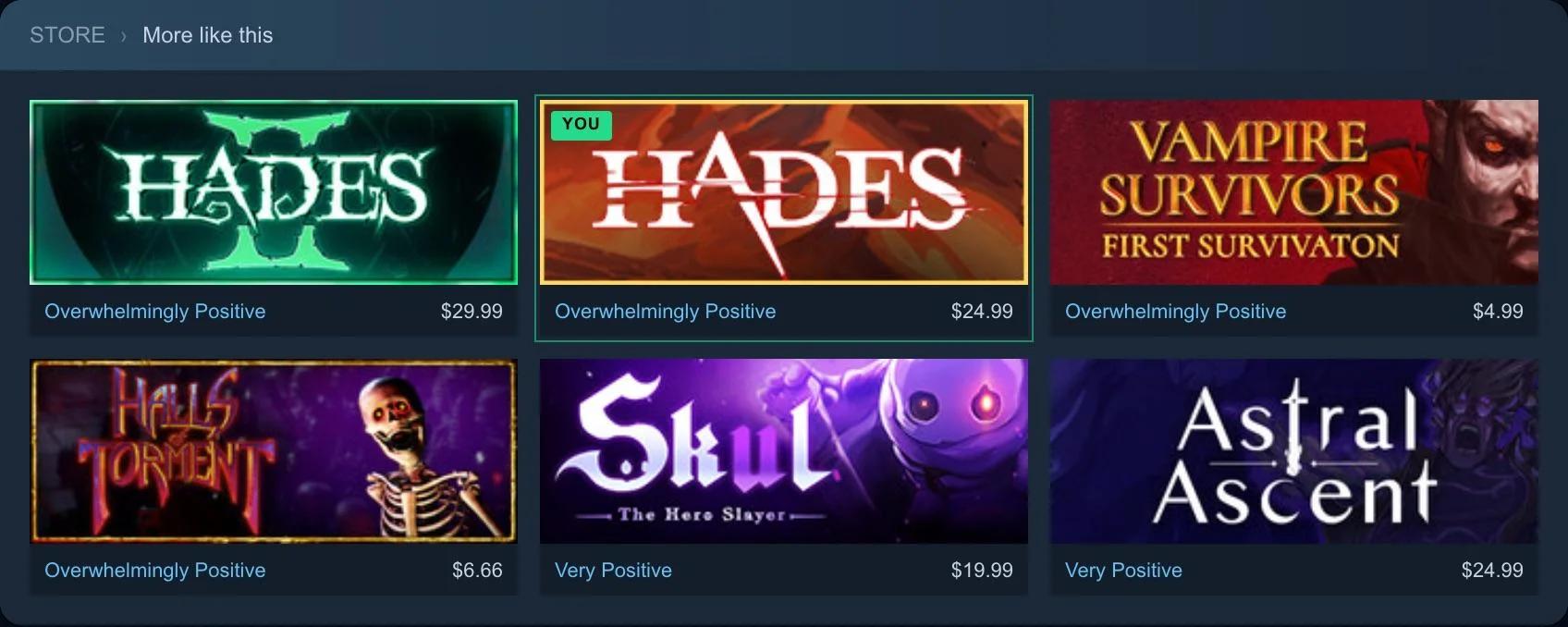
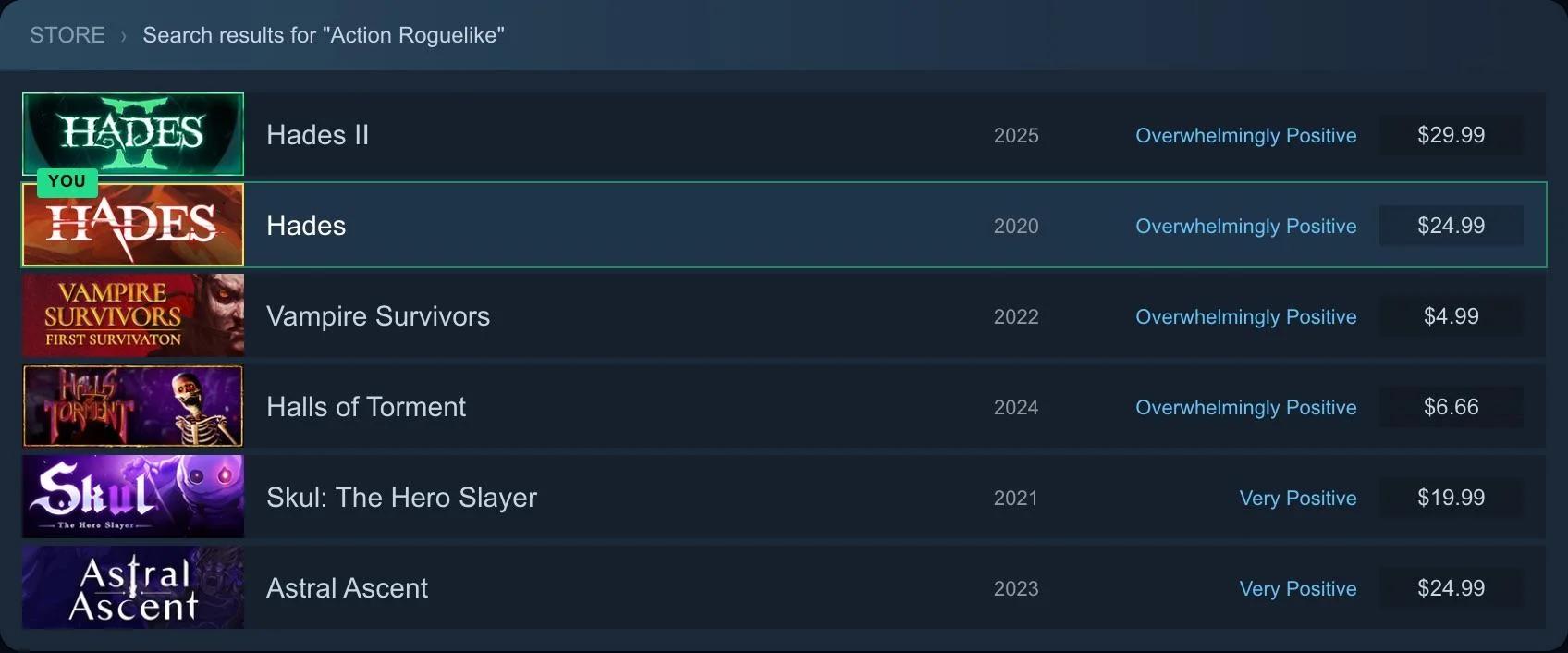
Run this checklist:
- Squint test. Blur your eyes or shrink the shelf. Can you still tell the genre and read the title?
- Stand-out test. Does the capsule duplicate its neighbors, or differ in color, shape or subject while still matching the genre?
- Five-second test. Show it to five or more people outside your team for five seconds. Ask the game's name and what kind of game it is. If they cannot answer, the capsule is not doing its job.
- Small-size check. View the 120- and 184-pixel-wide versions. The logo must still read.
After publishing: Steamworks traffic stats
Steamworks tracks impressions, visits and click-through rate. The traffic reporting docs define impressions as your game being displayed on screen, not proof someone saw it. Visits are unique page loads; click-through rate is the share of impressions that become visits.
Find these under Marketing Tools and Data, then Marketing and Visibility, then the Store and Steam Platform Traffic Breakdown tab.
To compare capsule versions:
- Record your click-through rate over a stable period before the change.
- Change one thing, such as the header or small capsule, not everything at once.
- Wait for a similar period under similar conditions, then compare.
- Do not compare a normal week with a Steam Next Fest or sale week. Traffic sources differ, making the numbers unsuitable for comparison.
Valve also notes that some placements, such as friend pop-ups, do not link to the store page, so their click-through rate cannot be measured.
Where do capsules fit in the rest of your Steam page?
The capsule earns the click. The page then has to earn the wishlist through its trailer, short description, screenshots and tags. Our guides on how to market your game and marketing an indie game with no budget explain how the Steam page fits into a wider plan.
For a quick assessment, SteamBuddy's free audit scores your capsule art, copy, tags and competitive standing out of 100, benchmarked against 20,000+ Steam games.
If you need traffic to test the page against, GAMES.GG Steam wishlist campaigns send players to your store page. A free game listing puts your game in front of the GAMES.GG audience at no cost.