
WOW51900337, the "valid access license" error, means the WoW game account you've picked in Battle.net has no WoW Forever access. Now that Forever is live, any active World of Warcraft subscription or Game Time gets you in, so the fix is almost always picking the right account from the dropdown.
Key takeaways
- Before the 3pm PST launch on November 4, this error was expected for everyone. Blizzard's support account said so on the day.
- Since launch, it means the selected WoW account has no active subscription, no Game Time and no redeemed invite code.
- One Battle.net login can hold several WoW accounts (WoW1, WoW2, an old trial). Picking the wrong one is the most common cause.
- A refund cancels access, purchases don't cross regions, and Blizzard can only refund a pack that went to the wrong account, not move it.

What does WOW51900337 mean in WoW Forever?
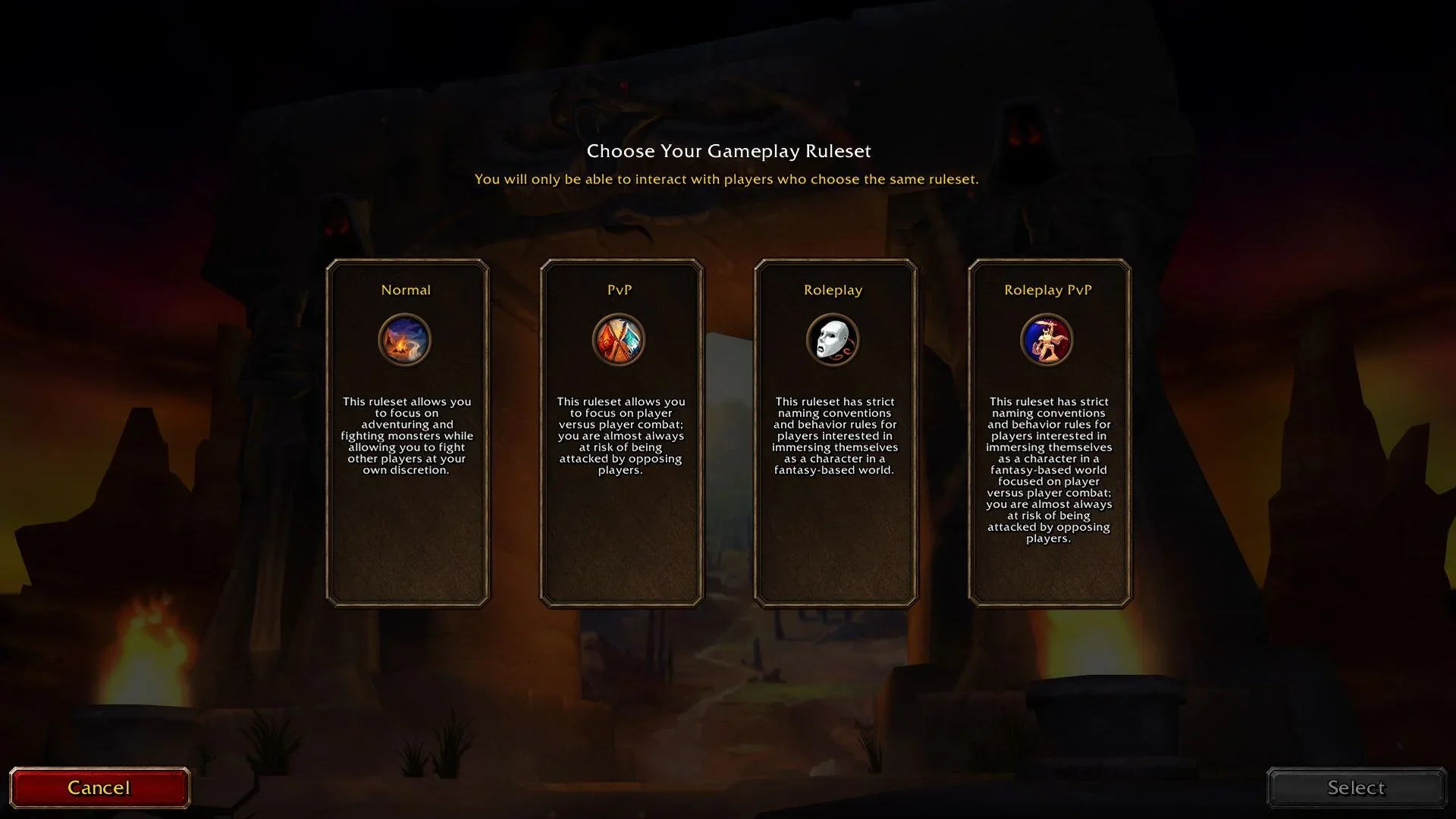
The full message is "Access to this realm requires an account with a valid access license. (WOW51900337)". It shows up right after you pick a ruleset, and it means the game can't see Forever access on the WoW game account you're logged into.
It means something different depending on when you see it. On launch day, before the servers opened, everyone got it. At 8am CST on November 4, Blizzard's support account posted on X: "Seeing error WOW51900337 when trying to log into #WoWForever? This is expected, as the game is not live yet." That's quoted by Account Shark, which also notes the EU support account posted the same thing.
After launch, it's about your account. According to Blizzard's New Player's Starter Guide, WoW Forever is included with any active World of Warcraft subscription or Game Time. Friends with a redeemed Invite-A-Friend launch code can also play from November 4 to 11. If none of those apply to the account you've selected, you get WOW51900337.
How do you fix WOW51900337?
Work through these in order. The first one fixes it for most people.
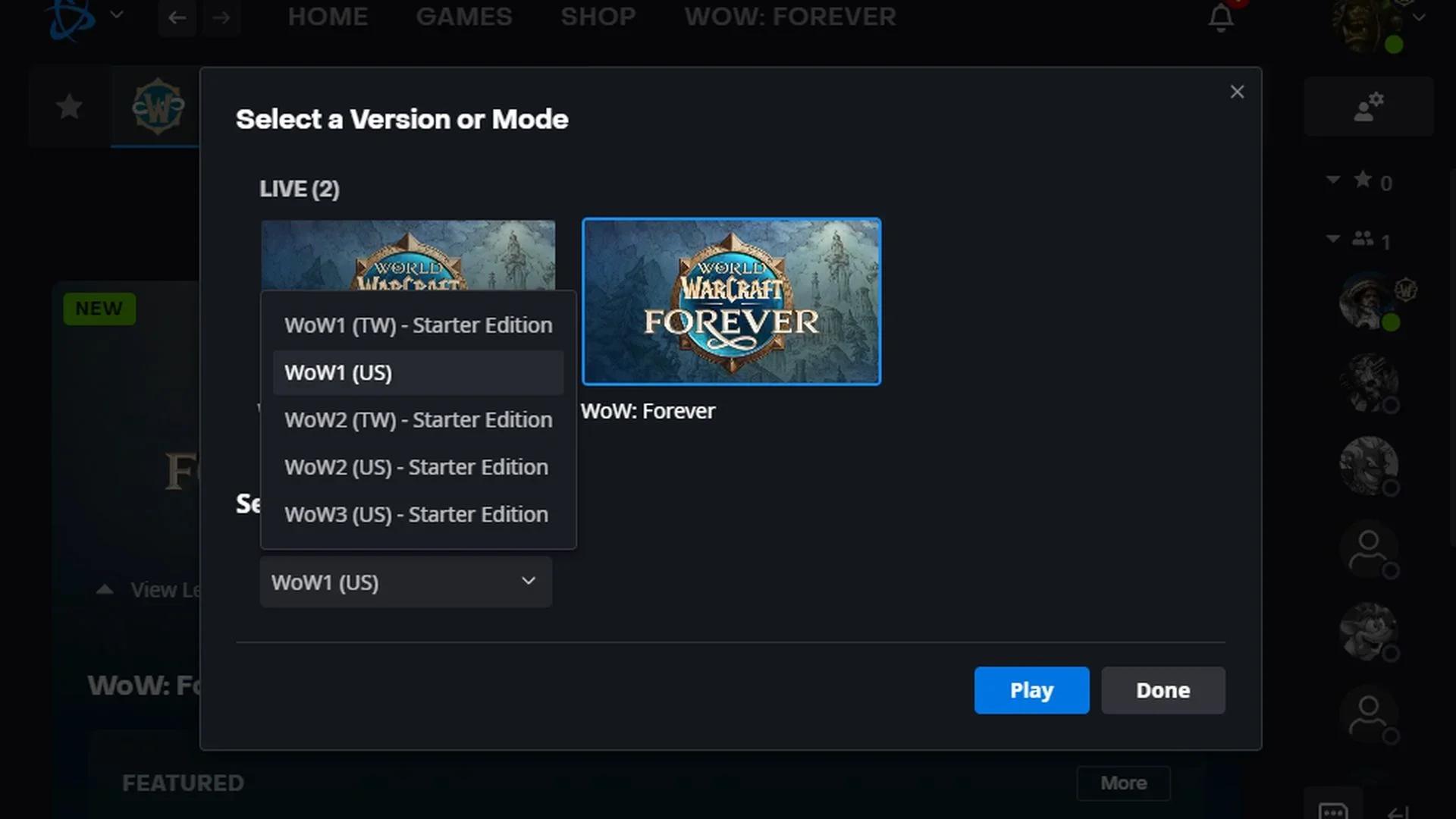
- Pick the right WoW account. In the Battle.net app, click WoW: Forever, then use the dropdown under Game Version to pick the account that actually pays for WoW. One Battle.net login can hold several WoW game accounts, and the upgrade "only applies to the specific WoW account it was purchased for", as Blizzard's reservation article put it. Players on the forums found packs attached to old trial accounts. It's easy to see how. My own Battle.net login lists five WoW accounts in that box: WoW1 (US), which is the one that pays, plus WoW1 and WoW2 in the Taiwan region and WoW2 and WoW3 in the US, all four of those marked Starter Edition. None of the Starter ones has a subscription, so picking one of those is exactly how you'd end up staring at this error.
- Check your subscription is on that account. The subscription or Game Time has to be active on that exact WoW game account, not just somewhere on your Battle.net login. Note the Skyborne Heroic Pack on its own doesn't include Game Time, so if that's all you bought, you still need a subscription.
- Bring back a missing dropdown. Players reported the account menu sometimes disappears. Fully quitting Battle.net from the system tray and reopening it brought it back. Another workaround from the forums: launch Wow.exe from the forever folder, which asks which account to use.
- Check your region. Purchases are per region. A pack or subscription on your EU account doesn't count on your Americas one. One EU player found their pack had gone to a North American account.
- Check your order went through. A refund, a chargeback or an order that's still held removes access. Look at your Battle.net transaction history and make sure it says complete.
- Redeem your Collector's Edition code. If you bought the physical Collector's Edition, the digital code in the box has to be redeemed. One player lost about six hours before realising theirs never was, according to Timesaver.
Scan and Repair and restarting your PC don't help with this one. The error is about which account you're on, not your install.
Can Blizzard move my WoW Forever pack to another account?
No. Blizzard has said it can refund a pack, but it can't move a licence between WoW accounts. If your pack went to the wrong account, your options are to play on that account, or get a refund and buy it again on the right one.
That matters more for the Skyborne race than for access. Since launch, plain access only needs a subscription or Game Time on the account you're using, so you can play straight away. But the Skyborne race and its starting zone are tied to the pack, so they stay on whichever account the pack was bought for.
What's the difference between WOW51900337 and WOW51900331?
They look alike and turn up on the same screen, but they're about different things.
| Error | Message | What it means | Fix |
|---|---|---|---|
| WOW51900337 | "...requires an account with a valid access license" | No Forever access on the selected WoW account | Pick the right account, check region and order |
| WOW51900331 | "Active Game Time Required" | Most likely no subscription or Game Time on that account | Pick the right account, add Game Time |
| WOW51900309 | "No realms are currently available" | The ruleset can't be reached | Restart Battle.net, install the update, log in again |
On launch night Timesaver logged WOW51900331 as one of the new errors, and noted that one player with a six-month subscription hit it too. So if you're sure your subscription is active, the account dropdown is still the first thing to check.
Do Invite-A-Friend codes get past WOW51900337?
Yes, for a week. A redeemed Invite-A-Friend launch code gives that account access from November 4 to 11, with no subscription. After that, it needs a subscription or Game Time like everyone else.
Two things to watch. The code has to be redeemed on the account you're actually logging into. And Blizzard says the codes don't work on accounts that have bought any Forever upgrade, so they're only useful to give to someone who hasn't.
During name reservation, Blizzard's support article was clear that "Pre-purchasing is the only way to have access to name reservation. If you claimed a Beta code or an Invite a Friend code, those codes do not grant access to name reservation." That's why so many people saw this error the week before launch: invite codes and beta codes didn't count until the game was live.
Still stuck?
The good news is it's quieter now. Timesaver, which was reading the US forums through launch night, said it had seen no new launch-night threads on WOW51900337 by 1:05am GMT on November 5. Most of the noise around it came the week before, when only pack owners could get in.
If you've checked the account, region, order and subscription and you still get WOW51900337, open a ticket with Blizzard support. Include which WoW account the pack or subscription is on. That saves a round of back-and-forth, because the first thing support will ask is which account you're trying to play on.
If you're still deciding where to play once you're in, here's my case for playing on Normal in WoW Forever. For launch times in your region there's the WoW Forever release times guide, and what's new in WoW Forever levelling covers what you're getting into.