
To delete a Roblox account, open Settings > Privacy & content restrictions > Account data, deactivation & deletion, select Delete, and complete identity verification.
The same website route works in a desktop or mobile browser. If you're locked out, you can submit a deletion request through Roblox Support instead. Uninstalling Roblox is not enough: it removes the app from your device without closing your account.
Should you delete or deactivate your account?
Deletion is permanent. Choose deactivation if you want to stop playing without giving up the option to return to the same account.
| Option | What happens to the account | Can you return? |
|---|---|---|
| Deactivate | The account is disabled, and its profile is hidden. Robux, items, and progress remain associated with it. | Yes. Log back in to reactivate it. |
| Delete | The account is permanently closed, and access to its associated items and progress ends. | No. A completed deletion cannot be reversed. |
To deactivate, open the same account-data page, find Deactivate Account, and select Deactivate. Confirm the choice and complete any security verification Roblox requests.
Marketplace items you listed may remain visible while your account is deactivated. Deactivation does not necessarily hide everything associated with your profile.

What to do before requesting deletion
Verify your email and save your account records
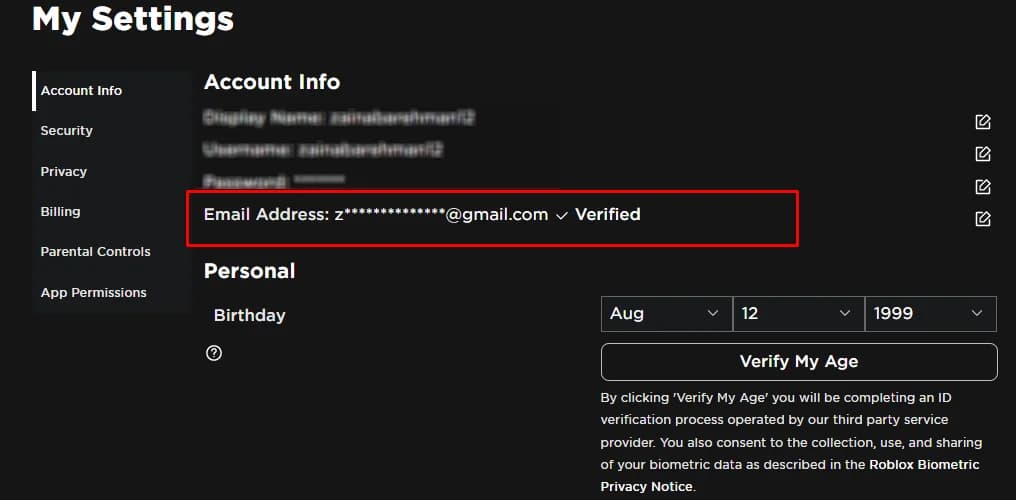
The settings-based deletion process requires a verified email address. If the account does not have one, open Settings > Account Info, select Add Email, and confirm the address using the message Roblox sends. A missing verified email can leave the Delete button greyed out.
Roblox account email settings
If you want a copy of your account records, open Account data, deactivation & deletion and select Request beside Request Account Data. This report can include account details, login history, and payment history. Roblox may ask you to verify your identity before providing it.
Roblox sends the report's download link to your account inbox and verified email. Wait for the report and save it before proceeding with deletion.
Cancel subscriptions and hand over creations
Cancel recurring subscriptions through the platform where you purchased them. For subscriptions managed on the Roblox website, open Settings > Subscriptions, select the subscription, and choose Cancel Renewal. Purchases made through Apple's App Store or Google Play must be cancelled through that store's subscription controls.
If other players depend on something you own, arrange its transfer before closing the account:
- Communities: Open the community, choose Configure Community, and change its owner under Information. Ownership transfers cannot be undone.
- Experiences: Use Creator Hub's experience ownership transfer to move the experience to a community you can publish to.
- Connected websites: If you use Sign in with Roblox elsewhere, arrange another sign-in method where the service supports one. Deleting the Roblox account may also remove your access to that service.
Spending your remaining Robux on more items will not preserve those purchases after deletion. Decide whether you still want to use the account before submitting the request.
How to delete your Roblox account through settings
Open the deletion controls
Sign in to the account you intend to close. On a computer, use the gear icon at the top right to open Settings. You can also use the Roblox website in a phone browser.
Follow this menu path:
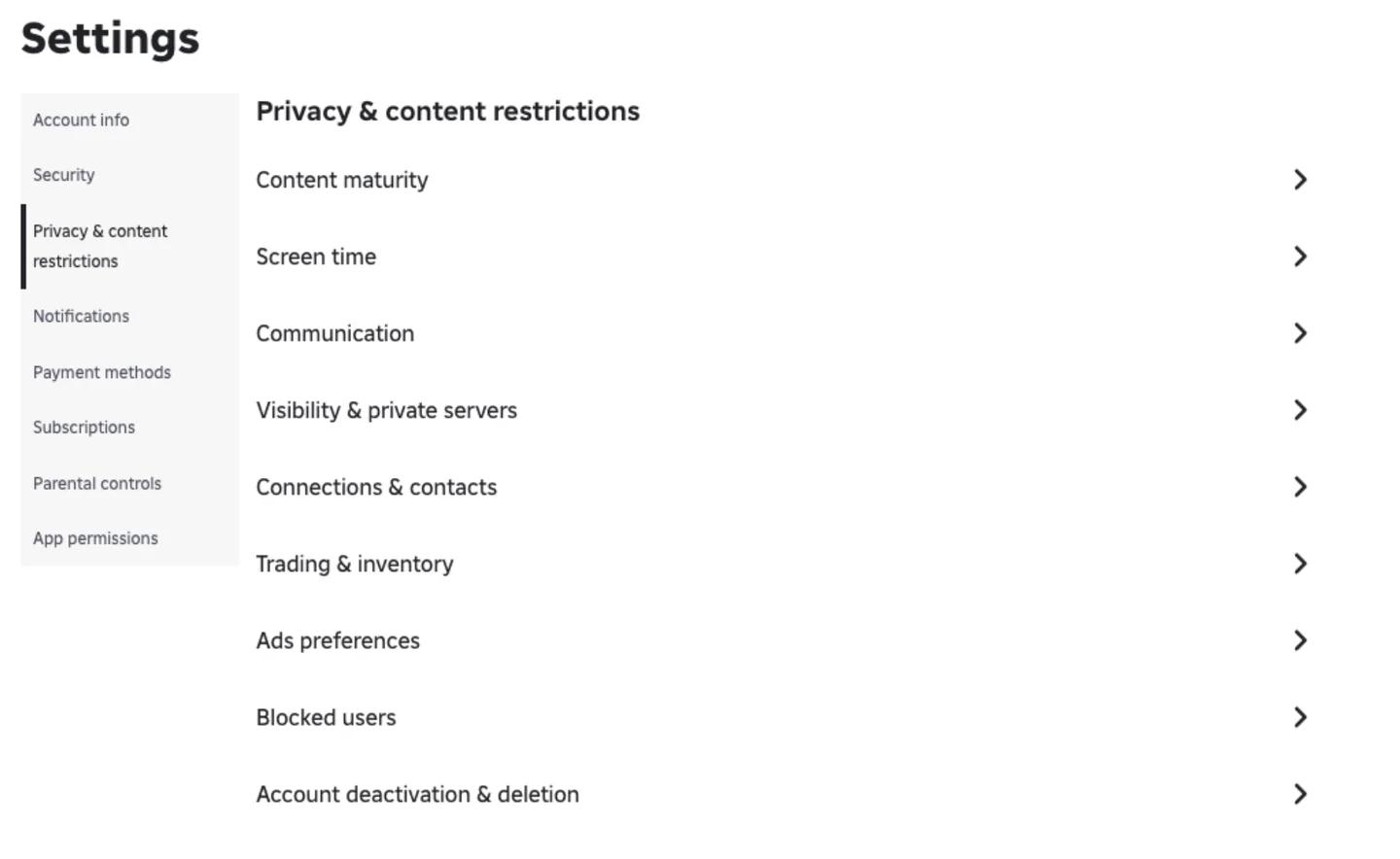
- Select Privacy & content restrictions.
- Open Account data, deactivation & deletion.
- Find the Delete Account entry.
The privacy menu contains the account-data page alongside the account's other privacy controls.
Privacy and content restrictions
Submit the request and confirm your identity
Select Delete beside Delete Account, then follow the confirmation prompts. Use the deletion control, not the separate Deactivate Account or Request Account Data options on the same page.
Follow the instructions Roblox sends to your email and complete its identity checks. Selecting the button starts the request; Roblox verifies the requester before fulfilling it.
Roblox does not publish a fixed completion time for account deletion. Processing depends on identity verification and any additional review, so respond to requests for information sent by Roblox Support.
How to request deletion through Roblox Support
Use Roblox Support if you cannot sign in or need help completing the settings process. Being locked out does not remove the ownership checks, but it does give you a route to request closure without first opening the account's settings.
Complete the Support form as follows:
- Enter your Roblox username and an email address you can access.
- Select the device you use to access Roblox.
- Under Type of Help Category, choose Data Privacy Requests.
- Select Right to Be Forgotten from the next dropdown.
- In Description of Issue, clearly request permanent deletion of the account and its associated personal data.
- Submit the form, then follow Roblox's reply to confirm the request and account ownership.
The Support form's privacy categories route the request to account-data deletion rather than a billing or technical issue.
Your description can be brief. State the username of the account you want closed and make clear that you want deletion, not temporary deactivation. Follow any further instructions in the response.
What happens to Robux, items, and personal data?
Remaining Robux become invalid when the account is deleted. Roblox's terms say they will not be reinstated if you create another account, unless applicable law requires it. Account deletion is not a way to move a balance to a fresh profile.
You also lose access to avatar accessories, purchased items, achievements, and saved progress tied to the deleted account. Creating another account does not recover the old account's content.
Deletion starts the permanent removal of account data, but some records can remain for tax, legal, billing, or security purposes. Roblox may process persistent identifiers for up to two years after deletion to address issues such as bots and abuse.
Content you created does not necessarily disappear from other players' accounts. Players who validly bought your avatar items or other virtual content may continue using those purchases after your account closes.
How parents can delete a child's Roblox account
If you can access your child's account, use the deletion controls from their account, following the settings steps above. Do not submit the request from your own profile unless that is the account you want closed.
If you cannot access the child's account, use Roblox Support to request closure or deletion of the child's personal information. Include the child's username, explain that you are their parent or guardian, and complete Roblox's verification of the request and your relationship to the child.
Unlinking a parent account only removes the parental-control connection. It does not close the child's account. To end access permanently, use the account-deletion process rather than Unlink accounts.