

IMAGE_QUALITY_GUIDELINES: Use clear in-game screenshots with readable interface text. The sealing image should show an eligible Abyss object held by Axiom Force and the Seal prompt. The storage image should show the Kuku Pot's contents menu. The workshop image should show the furnace's rune rows, selector, and lever. The crafting image should show Grimnir's connected recipes and ingredient panel. Keep the cover focused on the pot itself, separate from the menu screenshots. No unrelated weapons, combat scenes, or added interface graphics are needed.
CONTENT:
Use the Kuku Pot in Crimson Desert by grabbing a compatible object with Axiom Force, selecting Seal, and opening the pot to retrieve it.
The item is also called the Kuku Iron Pot. Its two jobs are easy to mix up: sealing keeps compatible objects for later, while Grimnir's crafting recipes turn pots and materials into equipment. Progress comes from learning blueprints and collecting ingredients, not filling a pot XP bar. Start with the storage controls, then check the workshop steps if you have not unlocked it yet.
How to seal and retrieve objects


Store an object with Axiom Force
You collect eligible world objects through Axiom Force, not by opening the pot and choosing an empty slot. Use this sequence when you find a power core or another Abyss component:
- Target the object and grab it with Axiom Force.
- Look for the Seal action among the displayed prompts.
- Press the corresponding button to store the object.
The Seal prompt is your compatibility check. If it does not appear while you are holding an object, do not assume that object belongs in the pot simply because it looks mechanical.
| Platform | Seal input |
|---|---|
| PlayStation | Triangle |
| Xbox | Y |
| PC keyboard | R |
Open the pot and release a stored object
Open Inventory, select the Kuku Pot, and choose Use to view its contents. This is where you find the objects you have already sealed.
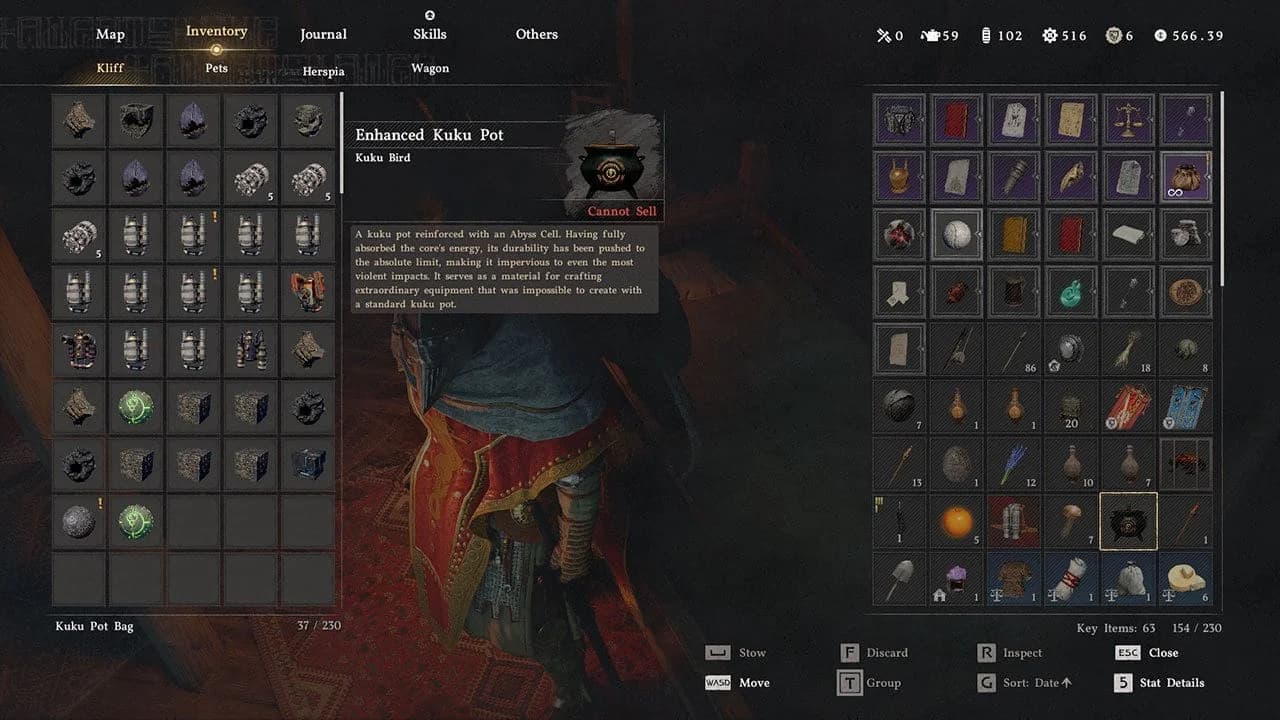
The Kuku Pot storage menu
To put a sealed object back into the world:
- Select the stored object you need.
- Choose Discard.
- Use the released object for the relevant puzzle or mechanism.
Despite the label, Discard releases a sealed object for use in the world. Choose an open patch of ground so you can see and move the part afterward. Keep this action separate from spending materials through Grimnir's crafting menu.
What can you store in the Kuku Pot?
The pot handles special Abyss objects and compatible mechanical components. It is not a general-purpose extension of your normal inventory.
| Item type | Examples | Stored in the pot? |
|---|---|---|
| Abyss objects | Abyss Cells and Abyss Transporters | Yes |
| Mechanical components | Power Cores, Electrical Components, Cogwheels, and Small Batteries | Yes |
| Special resources | Fusion Reaction Cores and Aeserion's Scales | Yes |
| Ordinary supplies and equipment | Food, weapons, armor, and recipes | No |
Some stored components have uses beyond equipment crafting. Abyss Transporters, for example, help repair broken Abyss Nexus teleporters. Keeping an unfamiliar component can be worthwhile even when it does not match your next gear recipe.
For food and ingredients, the Kuku Cooler in Crimson Desert provides a separate housing-storage option. It does not replace the pot's object-sealing function.
You can find useful Abyss materials through Sanctums and Mysterious Creatures. Stone Worms can reward named Power Cores used in Kuku recipes, so check the full component name before deciding that two cores are interchangeable.
How to unlock the Kuku Pot
Your first pot becomes available during Mysterious Pot in Chapter Four. The quest takes you to Kilnden Workshop, west of Hernand, where Grimnir needs the furnace and three kilns repaired.
Align the furnace runes
The golden rune at the bottom is your alignment reference. Use the selector to choose a movable row, then operate the lever to rotate that row into line.
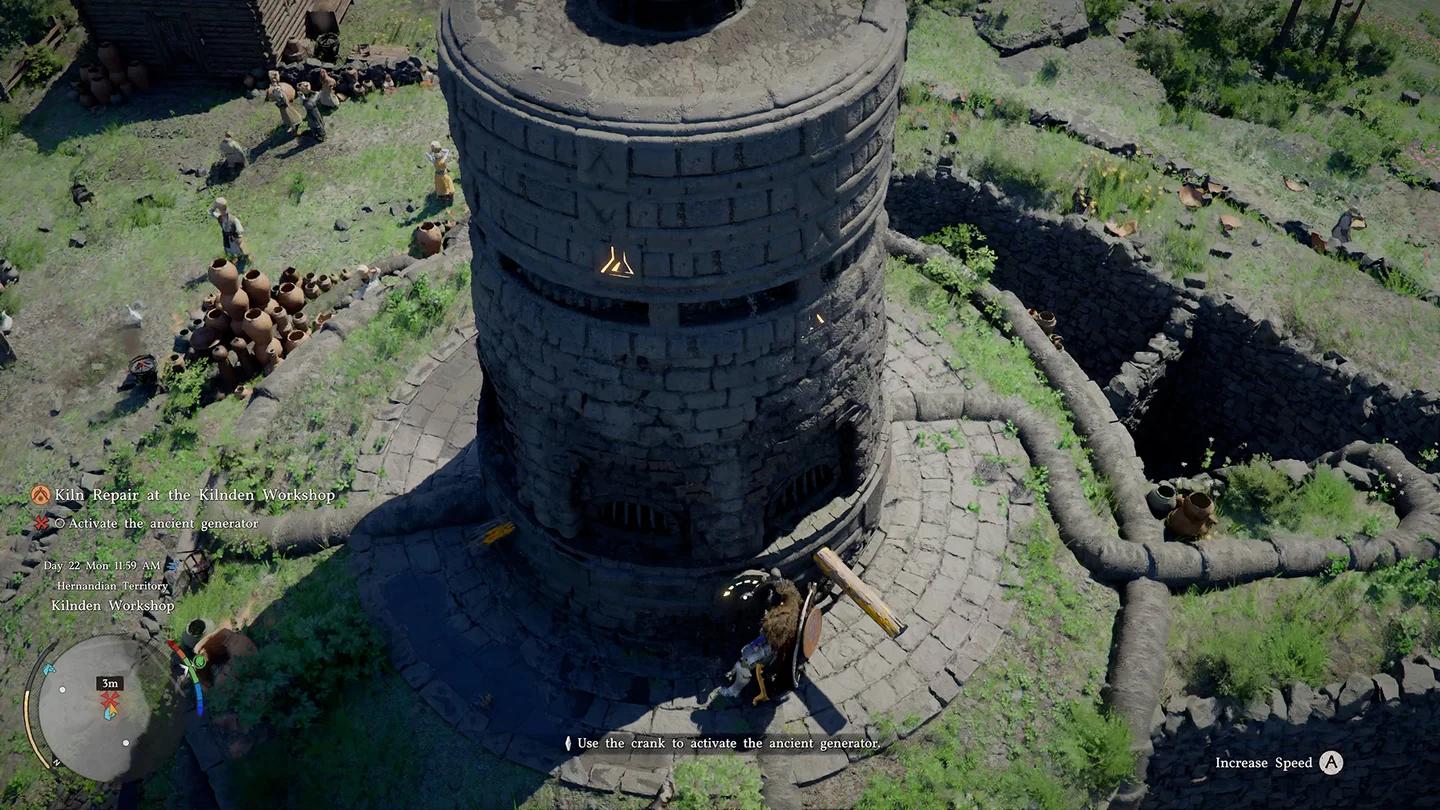
Kilnden Workshop's rune furnace
| Selector position | Row controlled |
|---|---|
| Left | Top row |
| Middle | Second row |
| Right | Third row |
Alignment needs to be precise. Listen for the click when a row reaches the correct position. Once the full set is aligned, the runes glow blue, confirming that the furnace is repaired.
Repair the three kilns
Each remaining kiln needs a different repair:
- Disconnected kiln: Reattach its cable, then push the lever left until the fires ignite.
- Dismantled kiln: Use Axiom Force to position the flatter broken section first, then place the upper section on it. Climb on top, jump, and use an aerial Force Palm to seat the pieces.
- Fuel kiln: Use Axiom Force to insert five blue fuel orbs into its receptacles, then operate its lever.
For the fuel kiln, collect two orbs beside the structure, one from the nearby water, one from the bird statue's eye, and one from the tunnel entrance. Pull the statue's orb free with Axiom Force.
If the tunnel-entrance orb is missing, save and reload before searching farther away.
Collect the pot and finish its tutorial
Return to Grimnir after completing the repairs. Follow the quest interaction at his device, turning the nearby handle clockwise and collecting the pot from the circular platform. If the objective asks you to wait for the right time, return during daytime.
Continue into The Iron Pot's Usage and speak with Togrum. Picking up the item is not the end of the introduction to its storage function.
How to use the pot for Kuku crafting
Return to Grimnir at Kilnden Workshop to open Kuku Item Crafting and Enhancement. Sealing an object preserves it; crafting combines the ingredients listed in the selected recipe.
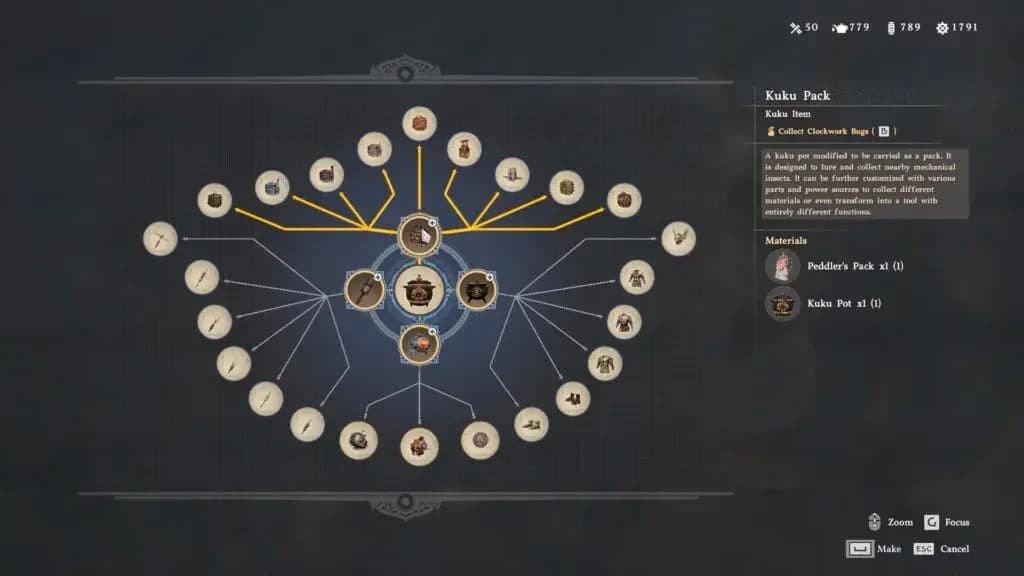
Grimnir's Kuku crafting recipes
Make replacement pots when a recipe needs them
Recipes can consume a pot as an ingredient. You can craft replacements with the following materials:
| Material | Quantity | How to collect it |
|---|---|---|
| Iron Ore | 5 | Mine iron nodes with a Pickaxe |
| Timber | 5 | Chop trees with a Logging Axe |
Greymane recruits can also obtain extra pots through dispatch missions to Kilnden Workshop. Additional pots share the same stored objects, so make extras for crafting requirements, not to create separate storage inventories.
Pick the crafting branch that answers your next need
The connected workshop recipes lead to different tools. You do not need to finish every branch in sequence.
| Crafting route | Main purpose | What to check first |
|---|---|---|
| Kuku Pack and specialist packs | Gathering tools, combat devices, and specialist movement | The pack's blueprint and required components |
| Kuku Spear and spear variants | Specialized elemental or mechanical weapons | The exact spear effect and named core |
| Enhanced Kuku Pot equipment | Boots, armor, and headgear | Whether the recipe requires an Enhanced Kuku Pot |
| Machinery recipes | Small Kuku ATAG and related crafts | Relevant faction progression and designs |
The Kuku Rocket Pack in Crimson Desert gives Oongka a flight device. Its route involves the Fire Breathing Pack faction quest, which becomes available after liberating Pailune in Chapter Seven.
A blueprint teaches a recipe; crafting an intermediate component does not teach every item connected to it. Read the selected node's ingredient panel before collecting materials for an entire branch.
Use Enhanced Kuku Pots only where required
After learning its blueprint, you can make an Enhanced Kuku Pot at Grimnir's workshop by combining one Kuku Pot with one Abyss Cell. It is an intermediate crafting material for specific equipment, not a universal requirement for every Kuku item.
Check the Abyss Cell's full name if the recipe does not recognize your materials. The crafting ingredient Abyss Cell and a sealed object named Abyss Cell: No. 0 are different items.
For a combat-focused wearable, Kuku Rishi's Boots in Crimson Desert improve the sliding evade from the Shoddy Rishi's Boots and allow refinement. Breeze-Step Boots serve a different purpose by improving your double jump with brief platforms underfoot.
Check storage before advanced conversions
Turning a pot into a Small Kuku ATAG retains its stored objects. Dismiss the mech when you need to examine those contents in your inventory.
Before spending materials on any finished item, check its blueprint, base equipment, named core, and ordinary materials separately. A similar-looking core or an Enhanced Pot from another branch will not replace the ingredient the recipe actually requests.