NBA 2K27 introduces meaningful changes to MyPLAYER progression, shooting, badge management, and The City. Players who understand these systems early spend less time correcting expensive mistakes and more time actually competing. Whether you're grinding Rec, Park, Theater, or any City mode, these 20 tips cover the settings, mechanics, and progression decisions that matter most.
What controller settings should you change first?
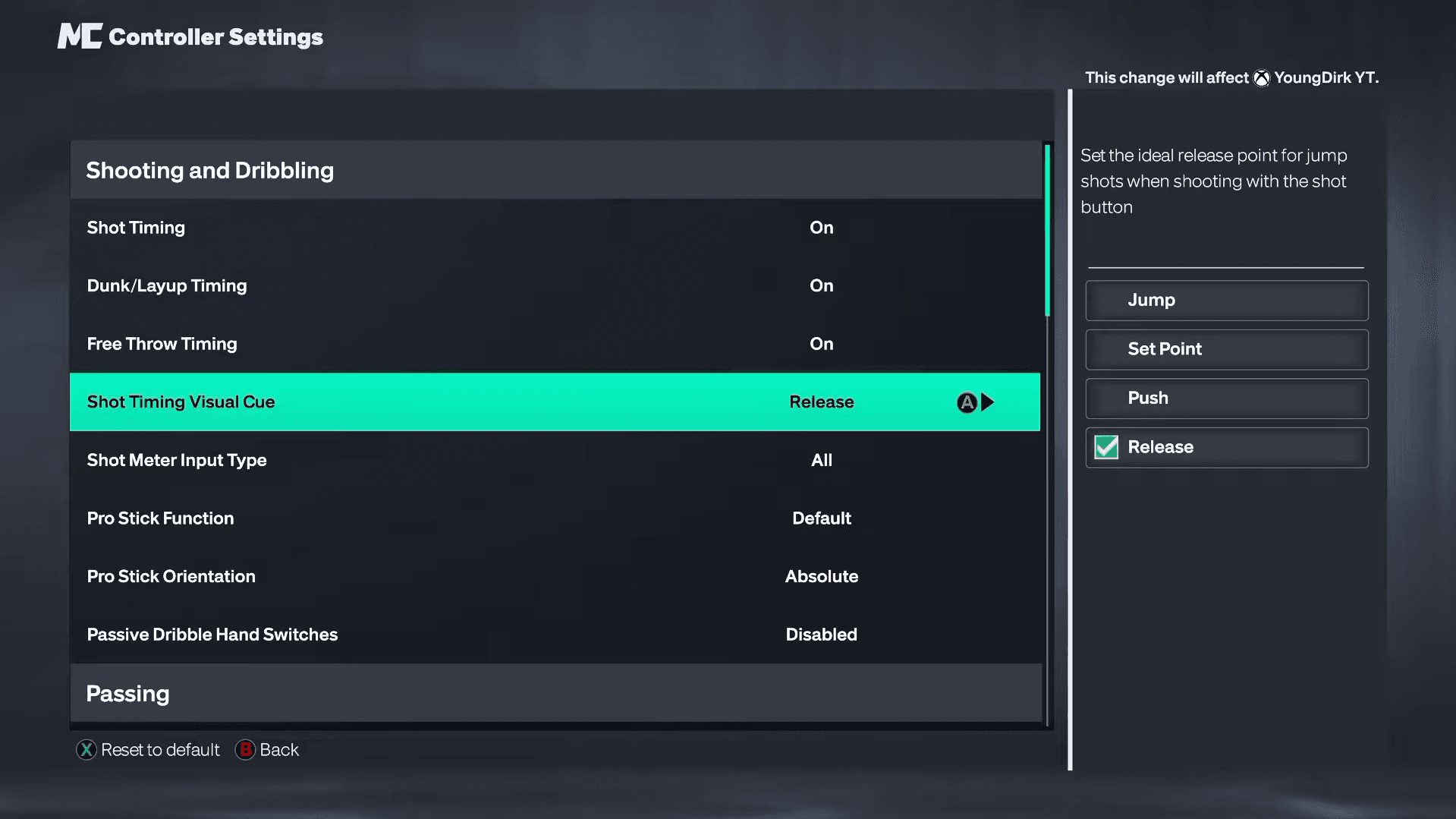
Before a single game, spend five minutes in the controller settings. A handful of defaults work against you in online play.
| Setting | Recommended Value |
|---|---|
| Shot Timing | On |
| Dunk & Layup Timing | On |
| Free Throw Timing | On |
| Shot Meter Input Type | All |
| Pro Stick Function | Default |
| Pro Stick Orientation | Absolute |
| Passive Dribble Hand Switches | Disabled |
| Auto Lob to Moving Receiver | Disabled |
| Defensive Assist Strength | Around 15 |
| Boxout Assist Strength | 0 |
Pro Stick Orientation: Absolute keeps your stick inputs consistent no matter where your player is standing on the court. Without it, the same stick direction can produce different results depending on which direction your player is facing. Disabling Passive Dribble Hand Switches stops the game from automatically changing your dribble hand mid-combo, which kills continuity on complex dribble sequences. The 15 Defensive Assist Strength and 0 Boxout Assist Strength combination gives you more manual control over both defensive positioning and rebounding.
NBA 2K27 Guide: Best Tips & Tricks Every Player Should Know

Should you turn the shot meter off?
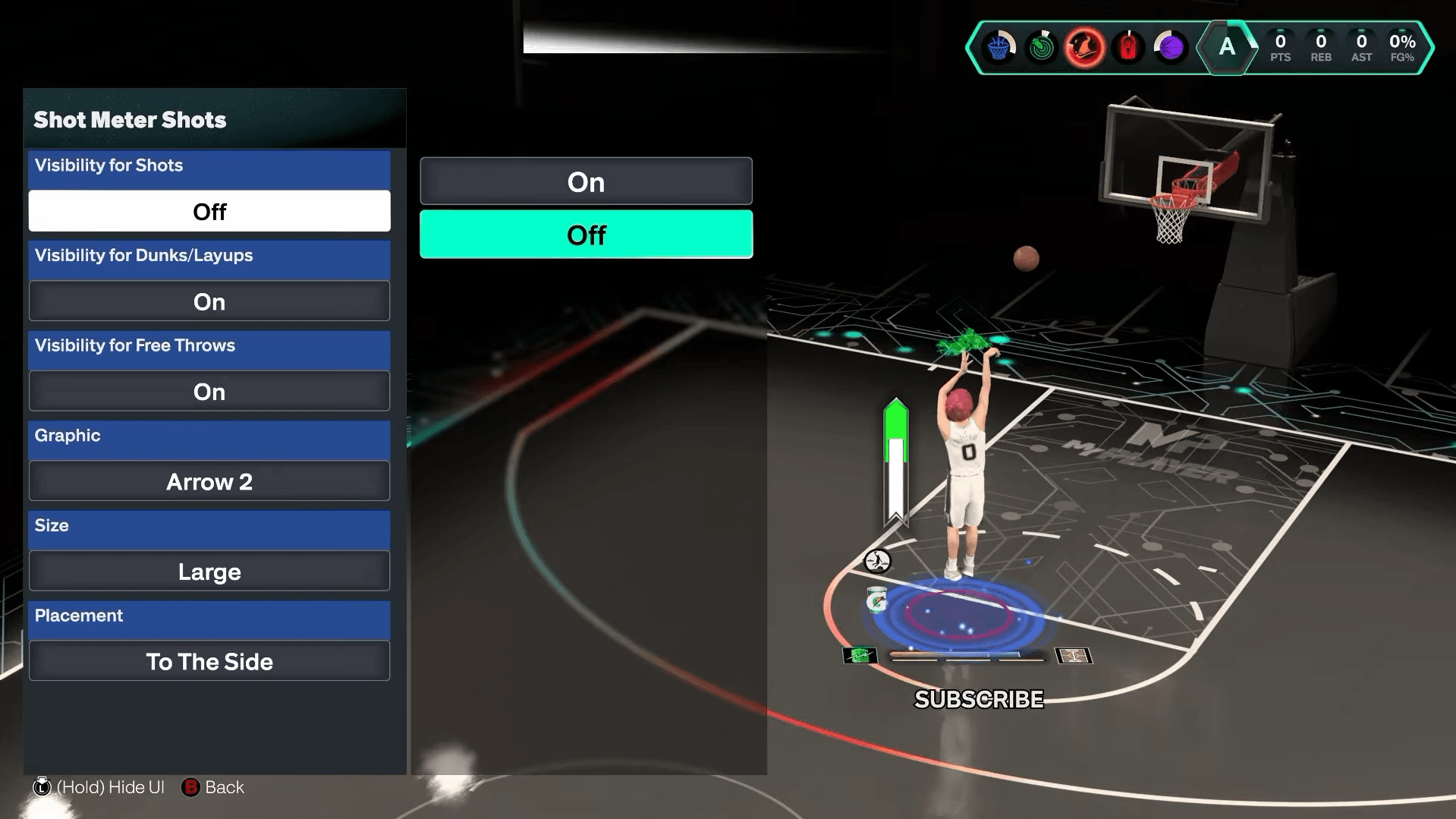
Yes, once you know your jump shot's visual cue. NBA 2K27 carries over a 10% shooting boost for playing with the meter off, and that number has been verified through controlled testing. Keep the meter visible while you're learning a new release, then switch it off once the timing feels natural.
Pair this with Shot Feedback set to All Shots. That setting displays release timing and defensive coverage after every attempt, including for teammates and opponents. It's the fastest way to understand whether your misses are coming from early timing, late timing, or a contested look rather than guessing.
NBA 2K27 Guide: Best Tips & Tricks Every Player Should Know
How does the Dunk Meter work in NBA 2K27?
NBA 2K27 puts more weight on manually timed dunks. Every dunk now runs through the Dunk Meter rather than treating metered dunks as a separate optional input. Keep the meter visible while you're getting used to the release window, then adjust your HUD preferences once the timing clicks.
For shooting consistency more broadly, commit to one jump shot and stay with it. Switching releases every few games resets your muscle memory. Find a custom jump shot that fits your height and shooting ratings, learn its visual release cue, and aim to release near the center of the green window. The green window itself can shift slightly depending on the animation and game situation, so reading the visual cue is more reliable than memorizing a fixed button-hold duration.
How do Gatorade workouts improve your build?
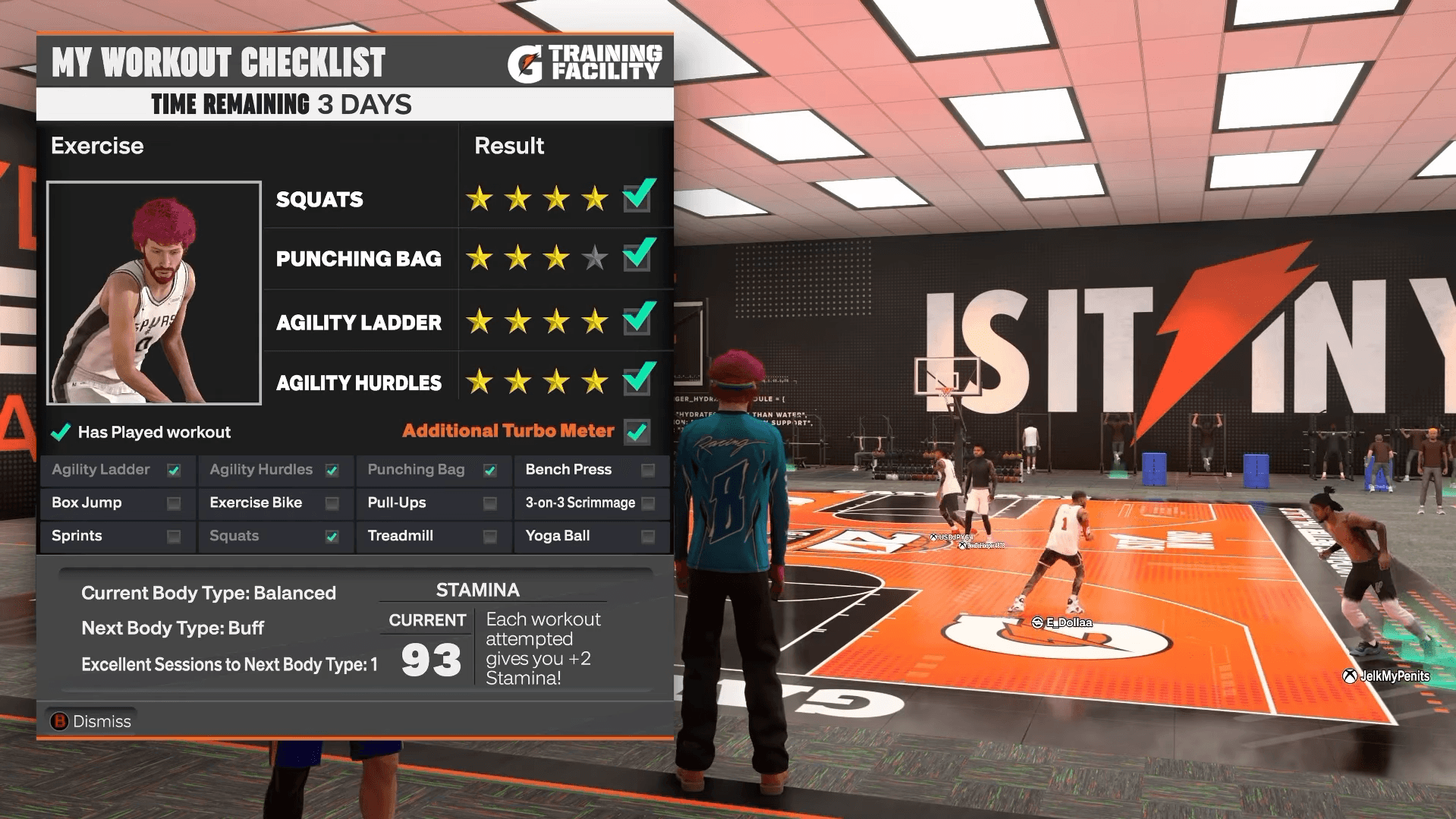
The Gatorade Training Facility is one of the most overlooked progression tools in MyPLAYER. Your Stamina starts at 85, and each workout adds +2 Stamina. Each weekly session contains four workouts, and earning at least three stars on all four qualifies as an Excellent Session, which grants an extra turbo meter for the week and progresses Body Type unlocks.
The real long-term goal is Workout Warrior. Completing all 12 unique workouts (not just repeating the same four) unlocks this reward, which makes the Stamina and extra turbo benefits permanent. Since only four workouts are available per week, the full set takes a minimum of three weekly sessions. The Tennis Ball Toss is a separate activity and does not count toward the 12, though it can provide discounts on Gatorade products.
Body Types unlocked through Excellent Sessions are purely cosmetic. Changing them through MyPLAYER > Appearance > Vitals > Body Type has no effect on your actual height, weight, wingspan, or attribute ratings.
NBA 2K27 Guide: Best Tips & Tricks Every Player Should Know
How do Badge Tokens and Synergy work?
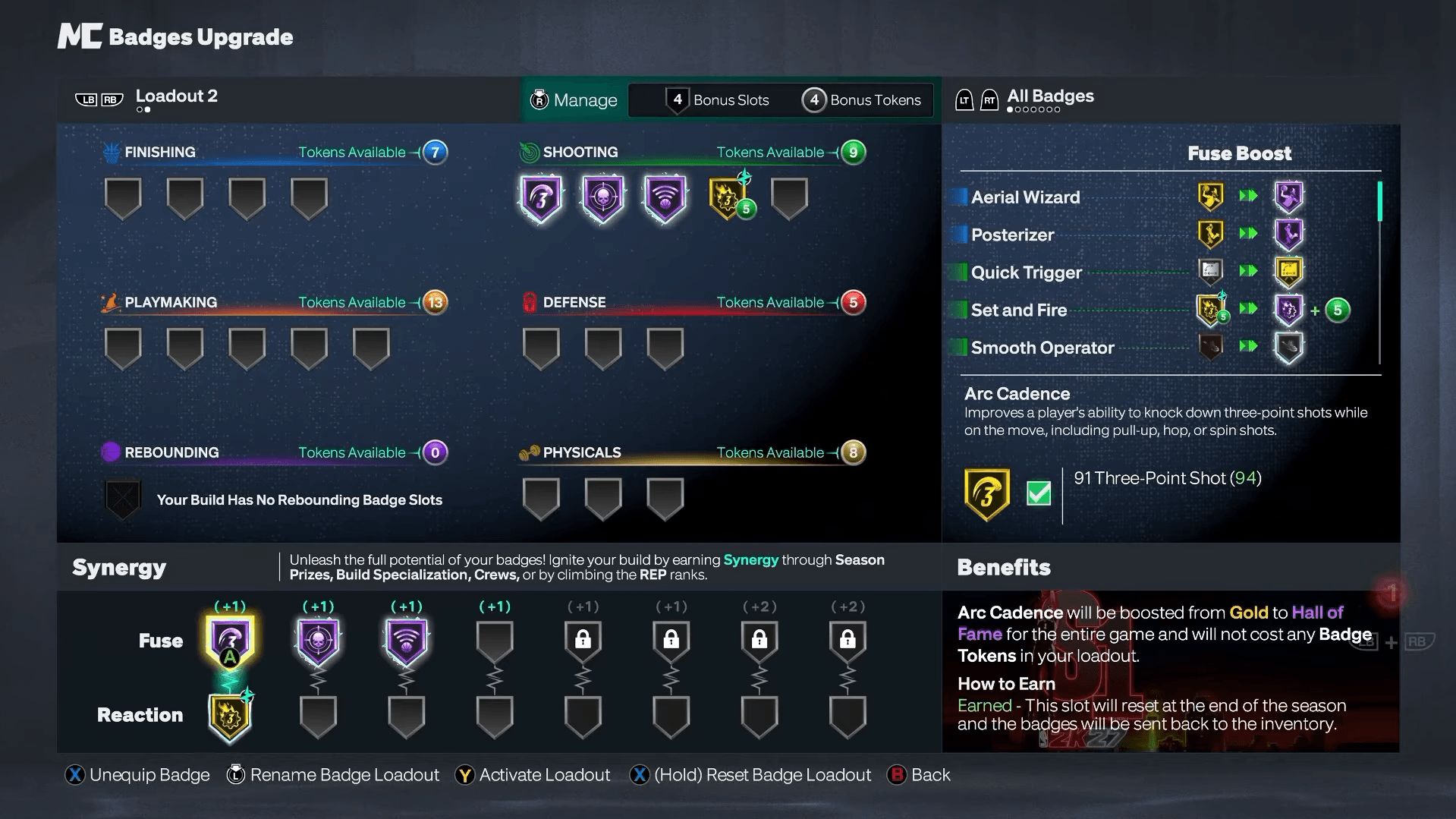
NBA 2K27 overhauls the badge system entirely. There are 53 Badges spread across six disciplines: Finishing, Shooting, Playmaking, Defense, Rebounding, and Physicals. Every build starts with 20 Badge Slots, and Badge Tokens determine which qualified badges you can actually equip and upgrade. You cannot simply stack everything your build qualifies for, which means prioritizing badges that match your actual role is essential.
NBA 2K27 Guide: Best Tips & Tricks Every Player Should Know
The Synergy system adds two new slot types on top of that:
- Fuse slots give the equipped badge a tier boost for the entire game. Fuse badges also do not consume the Badge Tokens you would normally spend to equip them, making Fuse slots especially valuable for expensive or frequently triggered badges.
- Reaction slots link to a Fuse badge. Once the Fuse badge activates enough times during a game, the linked Reaction badge receives its own +1 or +2 tier boost.
Because Reaction badges depend on Fuse activation, the best Fuse choice is a badge that triggers consistently rather than one that only fires in rare situations.
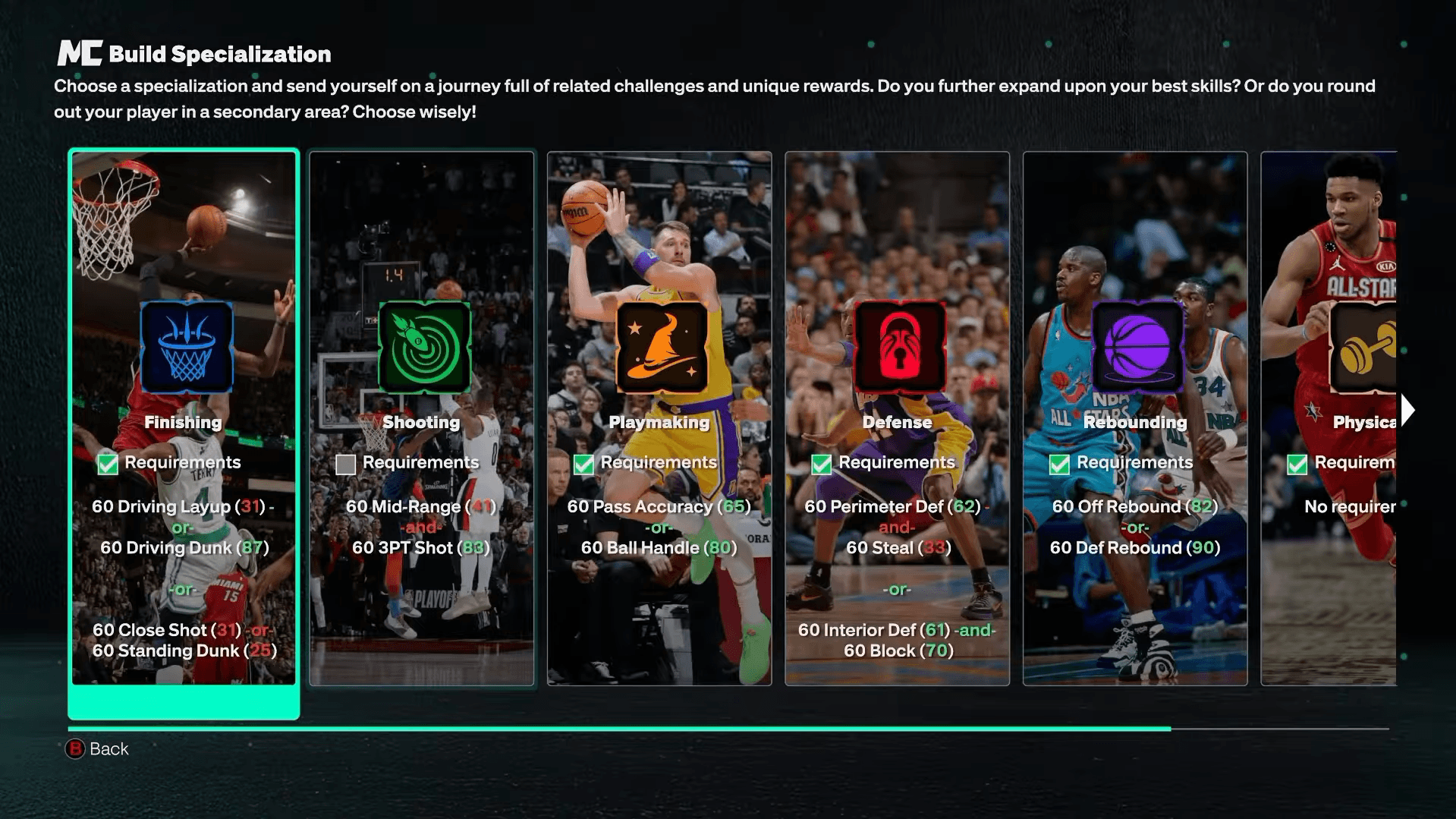
What is Build Specialization and why does it matter?
Build Specialization runs across six tracks that match the six badge disciplines. Each track has 10 goals, and completing a full specialization earns meaningful rewards:
| Reward | Amount |
|---|---|
| Bonus Badge Slots | 2 |
| Bonus Badge Tokens | 9 |
| Cap Breakers | 2 |
| Synergy Reward | +2 slot |
The two Cap Breakers from Build Specialization come with a restriction: they can only be applied to attributes within that specialization's category or to Physicals. They cannot be freely moved to any attribute. Choose a specialization that aligns with what your build actually does long-term, not just what sounds useful in isolation.
For a deeper look at how to structure your MyPLAYER around these systems, the NBA 2K27 best builds guide breaks down position-specific attribute targets and badge priorities.
NBA 2K27 Guide: Best Tips & Tricks Every Player Should Know
How should you use Cap Breakers?
Cap Breakers permanently raise attributes beyond your MyPLAYER's original potential. That permanence is what makes them dangerous to use carelessly. Each individual attribute can receive Cap Breakers a maximum of five times, and physical dimensions like height, weight, and wingspan can still cap the final rating regardless.
The safest approach is to preview Cap Breakers in the MyPLAYER Builder before applying anything. Use them to reach specific badge thresholds or unlock better animations rather than adding them to whatever attribute looks low. A Cap Breaker spent on the wrong attribute is gone for good.
Why should you join a Crew early?
A Crew is not just a squad finder. The Crew progression track includes REP and VC bonuses, cosmetics, Cap Breakers, and Synergy slots. The current launch reward track contains four Cap Breakers and two +1 Synergy slots, which are significant build upgrades available through Crew progression alone.
Some of the more substantial build rewards require at least seven days of Crew membership to unlock, so joining early matters even if you are not immediately playing with the group regularly. Use Crew search filters like game focus, active times, mic requirement, and region to find a group that fits how you actually play.
What are Lifetime Challenges worth grinding?
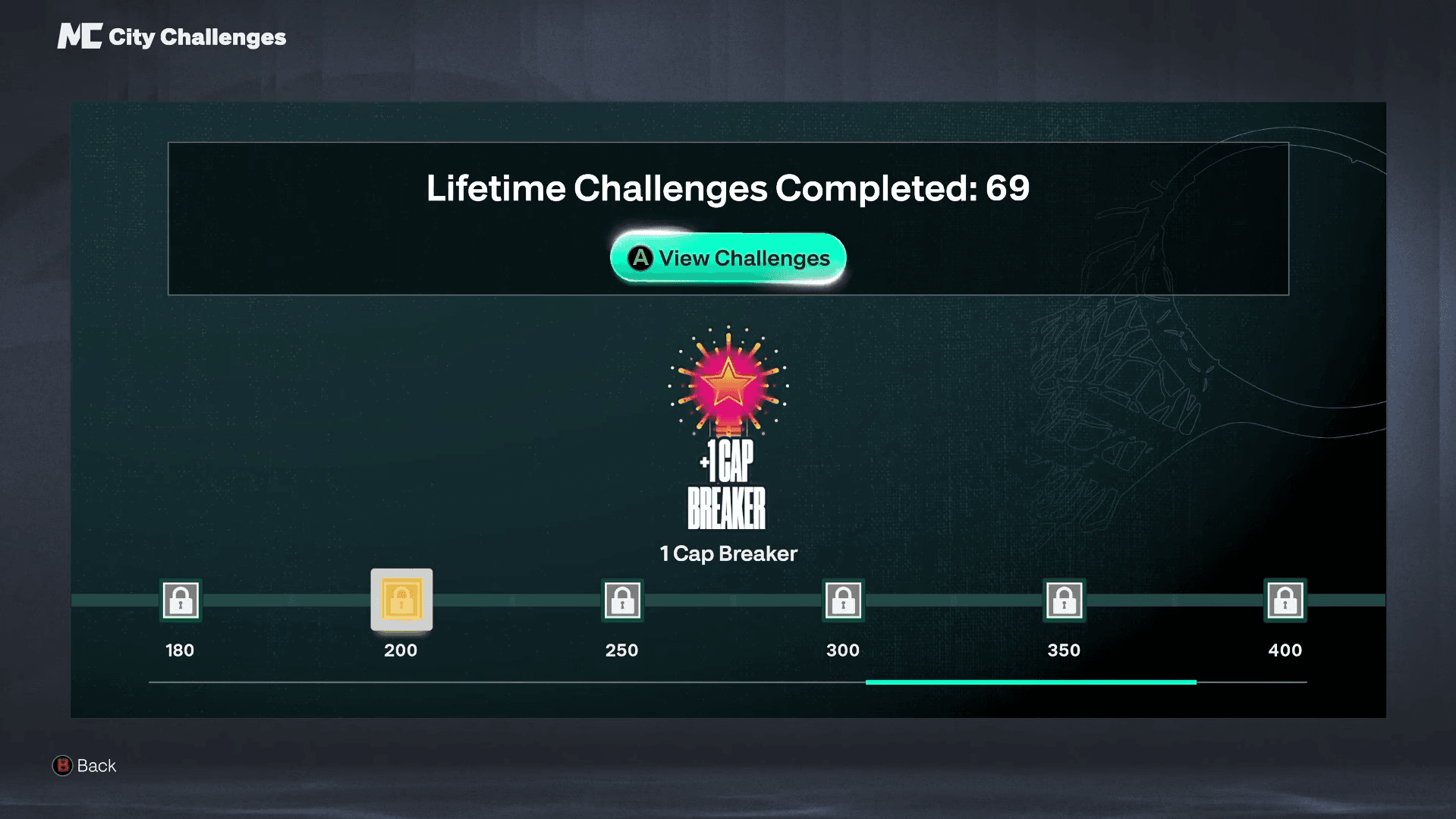
Lifetime Challenges provide some of the biggest long-term rewards in the game. The full reward track:
| Challenges Completed | Reward |
|---|---|
| 200 | +1 Cap Breaker |
| 250 | Dash 2K II – 2X Speed |
| 300 | Season 2 MyPLAYER Builder feature |
| 350 | Season 2 MyPLAYER Builder feature |
| 400 | +1 Cap Breaker |
| 500 | 500,000 VC |
| 600 | 5,000,000 VC |
The 600-challenge reward is 5,000,000 VC. These milestones take real time to reach, but the Cap Breakers and VC at the end make consistent challenge completion worth building into your regular session routine.
NBA 2K27 Guide: Best Tips & Tricks Every Player Should Know
What smaller features are easy to miss?
Vehicle shortcut in The City: Instead of holding LB/L1 and selecting a vehicle with the Right Stick every time, a single tap of LB or L1 summons your last selected vehicle. Small, but it saves repetitive inputs when moving between facilities frequently.
Swapping builds without leaving The City: You no longer need to back out to the main menu to switch MyPLAYER builds. Go to MyPLAYER > Swap Build, select another build, and load back into The City directly. This is genuinely useful when your squad suddenly needs a different position filled.
Lethal Zones: The Art of Shooting facility lets you train specific shooting zones. Strong drill performance can push a Hot Zone into Lethal status, which can hold for up to three weeks depending on performance. Focus on zones where your build actually gets open looks in real games rather than the most popular spots.
Wired connection: Shooting, defense, and dribble inputs all depend on timing, and online play amplifies any local connection instability. Ethernet does not eliminate server latency, but it reduces the local inconsistency that makes a jump shot feel different online versus in practice modes.
Finding teammates and improving your game
NBA 2K27 rewards teams that understand spacing, defensive rotations, and individual roles far more than it rewards collections of skilled solo players. Crew search filters make it easier to find teammates who match your schedule, communication preferences, and play style.
Beyond finding a squad, studying stronger players accelerates improvement faster than copying their build. Watch how experienced players create open looks off movement, defend screens, manage stamina, and position without the ball. The decision-making is usually more transferable than any specific dribble animation or badge setup.
For everything from MyPLAYER fundamentals to mode-specific strategy, the full NBA 2K27 strategy guides collection covers every major system in the game.