Dunking in NBA 2K27 is a two-part problem. First, your MyPLAYER needs the right attribute numbers to unlock the packages you actually want. Then you have to navigate the Animations menu correctly and, critically, re-select your custom style after equipping it. Skip either step and your player will either layup into traffic or run the wrong animation entirely. On top of that, every dunk this year requires you to time the new Dunk Meter, so the attribute investment isn't just cosmetic — it directly affects how forgiving your green window is.
What attributes unlock dunk packages?
Driving Dunk is the primary gate. Builds sitting in the 70s or low 80s will find most of the flashy and signature tiers greyed out regardless of VC balance. To reach the elite contact packages, plan for a Driving Dunk in the 90s. High-80s ratings already open several strong signature options, but the top contact tiers want 90-plus to appear at all.
Two secondary attributes fill in the rest of the picture. Vertical controls access to higher-flying flashy and alley-oop animations, while Standing Dunk handles power finishes under the basket. Height also acts as a filter in both directions: some packages require a guard-sized frame, others lock out anyone under 6'10".

Dunk package requirements at a glance
| Dunk package | Driving Dunk | Vertical / Standing Dunk | Min height |
|---|---|---|---|
| Rim grazer off one (free) | 36 | — | Any |
| Flashy off one (800 VC) | 70 | 50 Vertical | Any |
| One-hand under basket | Any | 45 Standing | 6'5" |
| City alley-oop flashy | 70 | 50 Vertical | 5'9" |
| City alley-oop under leg | 85 | 60 Vertical | 5'9" |
| Zion Williamson (signature) | 86 | 60 Vertical / 60 Standing | 6'5" |
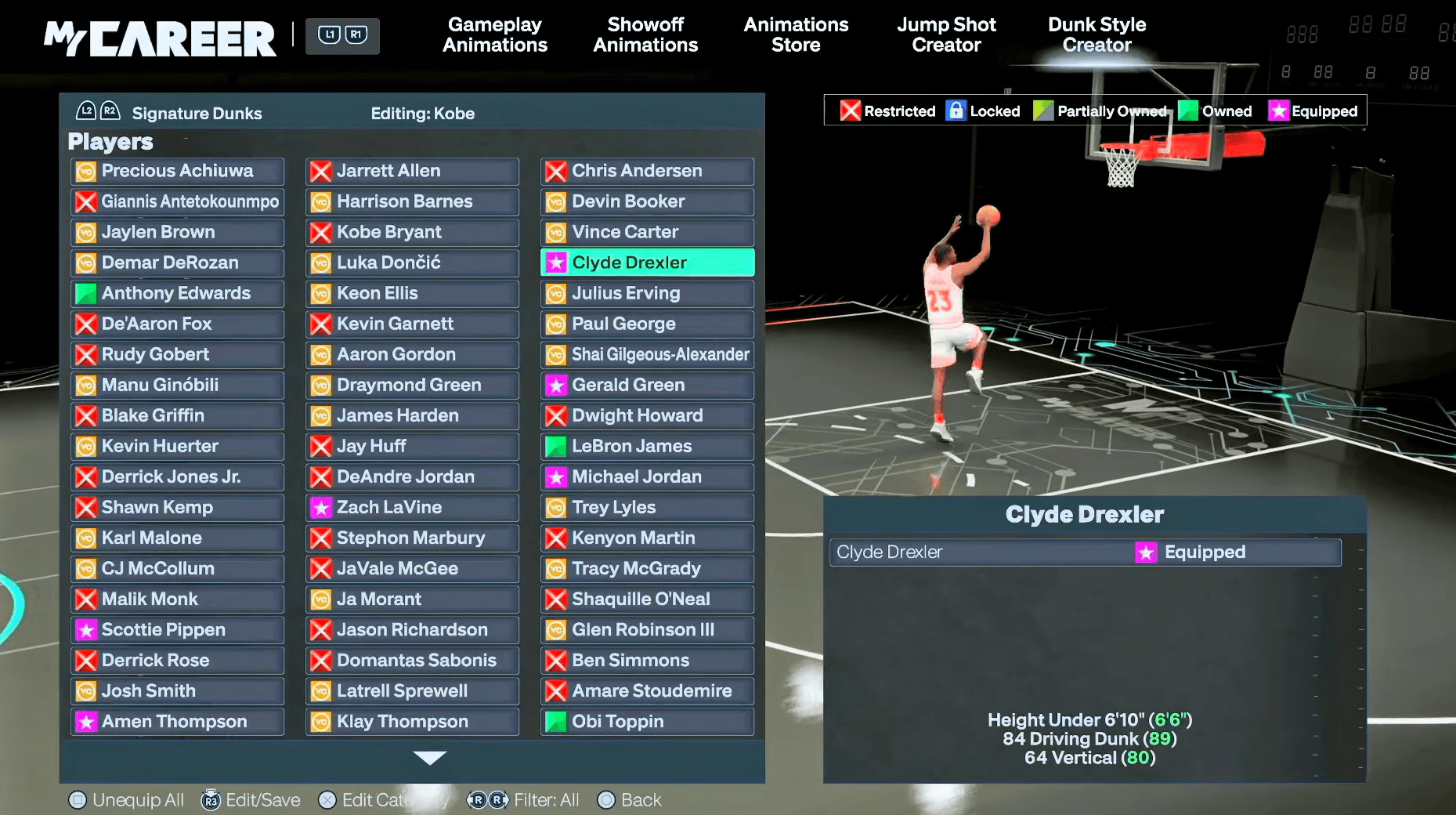
| Ja Morant (signature) | 89 | 68 Vertical | Under 6'10" |
| Karl-Anthony Towns bypass | 70 | 75 Standing / 40 Vertical | 6'10" |
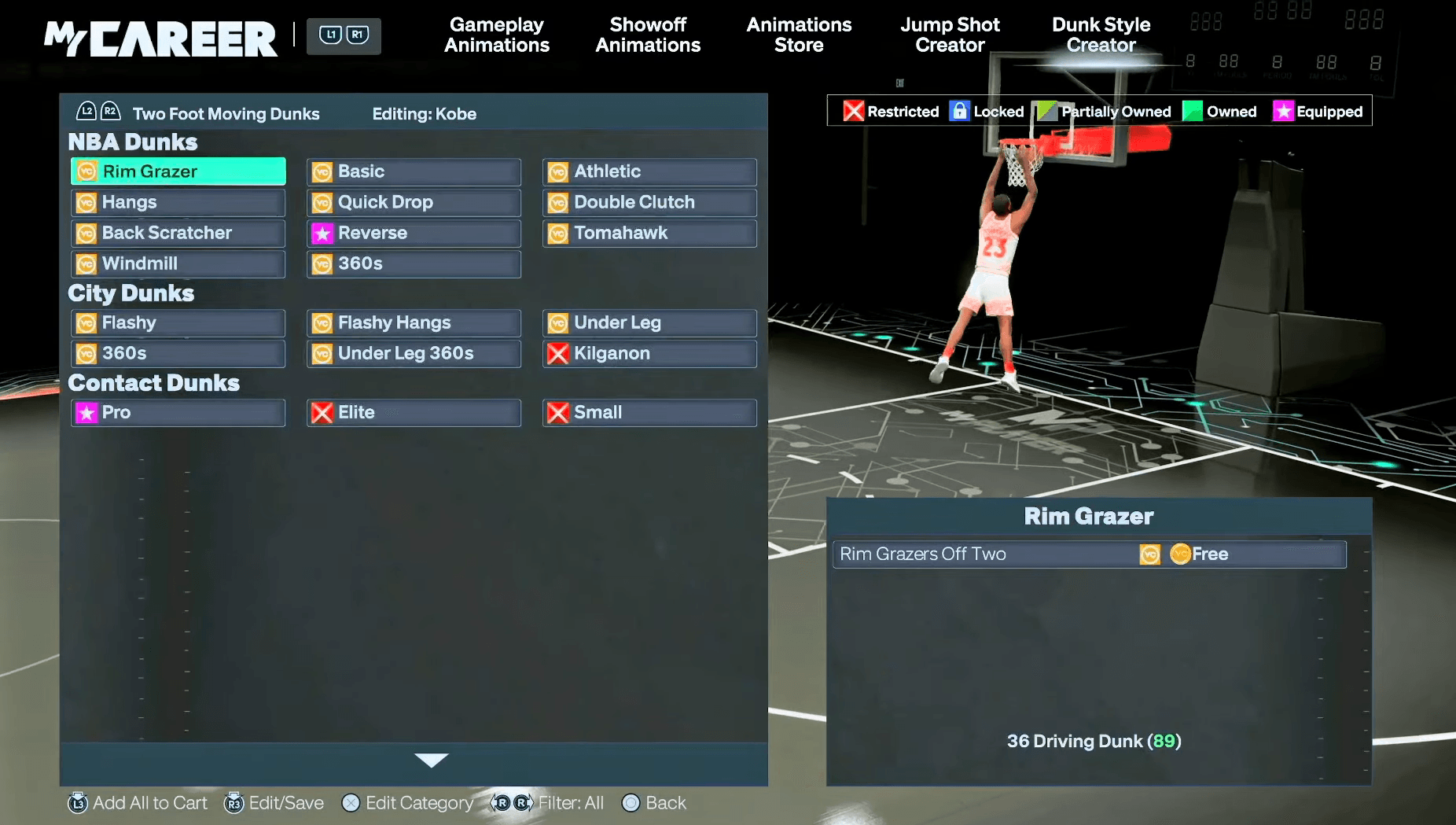
For early builds, the rim grazer off one is free at just a 36 Driving Dunk, making it the default starting point. The flashy off one at 800 VC is the next must-grab for almost any build, requiring only a 70 Driving Dunk and 50 Vertical. The Ja Morant signature is the most demanding guard package at 89 Driving Dunk, and its under-6'10" height cap means bigs can't touch it. One common trap: players cap Driving Dunk at 87 to save attribute points, then discover Ja Morant's package requires 89. That two-point gap quietly locks out the animation entirely.
NBA 2K27 Dunk Packages: How to Unlock & Equip
How to equip your custom dunk style in NBA 2K27
The six-step flow is straightforward, but step six is where most players go wrong.
- Load into MyCAREER or The City to make the animation menus accessible.
- From the MyPLAYER hub, open Animations, then navigate to Gameplay Moves.
- Select Dunk Style Creator to browse every available package category: moving, standing, contact, alley-oop, and signature.
- Spend VC on the packages your Driving Dunk, Vertical, Standing Dunk, and height actually qualify for. Anything below your thresholds stays locked regardless of VC.
- Equip your chosen packages. The game saves your custom style automatically and assigns it a name.
- Return to Animations and manually re-select your named custom style. The game defaults to the first package you purchased, not your full custom setup, so your dunks will not reflect your choices until you complete this step.
NBA 2K27 Dunk Packages: How to Unlock & Equip
How does the Dunk Meter work in NBA 2K27?
The biggest mechanical change this year is that every dunk requires the Dunk Meter, no exceptions. Wide-open slams, contested finishes, and everything in between all demand a timed input. The meter is dynamic: it reads defensive positioning throughout the gather and adjusts the green window in real time. A clear lane expands the window; a defender closing late shrinks it.
Your Driving Dunk rating directly affects how forgiving that window is. On a build in the 65-75 range, metering every attempt is genuinely punishing. An 80 rating is manageable but still tight. The 85-87 range is where the meter starts to feel natural, and 90-plus is where it becomes reliable. The attribute investment described above isn't just about unlocking packages — it's what makes the meter hittable.
Animation length also matters. Shorter, quicker gather animations produce a larger, easier green window than long flashy gathers, especially when a defender is closing. Keeping your equipped dunk list short and weighted toward faster animations is a practical way to improve your meter success rate without touching your attributes.
Building the right foundation
Dunk packages are only as good as the build supporting them. A high Driving Dunk with no Vertical investment leaves alley-oop and flashy tiers locked. A well-rounded finishing build that neglects Badge Tokens will have the animations equipped but no badge power behind them at the rim.
If you're still putting together your MyPLAYER from scratch, the NBA 2K27 best builds for every position covers position-specific attribute targets and VC-saving badge strategies that pair directly with the dunk package thresholds above. For everything else across modes, the full NBA 2K27 strategy guides collection is the fastest way to fill any remaining gaps before tip-off.