
Windrose is perfectly playable solo, but sailing with a crew of friends changes the experience entirely. The game supports co-op for up to 4 players on its dedicated servers, and if you manage your own server, you can push that number even higher. Getting everyone into the same session takes about two minutes once you know the steps.
How do you invite friends to your Windrose game?
Before anything else, make sure all the players you want to invite are on your Steam friends list. Sending them a friend request using their Steam IDs is the simplest way to set this up ahead of time.
When you're ready to host, select a save file from the main menu. You can use an existing save or create a fresh one specifically for your co-op run. Once you've loaded into the host setup screen, the game generates an invite code for your session. Share that code with your friends through whatever channel works for you, whether that's Steam chat, Discord, or a text message.
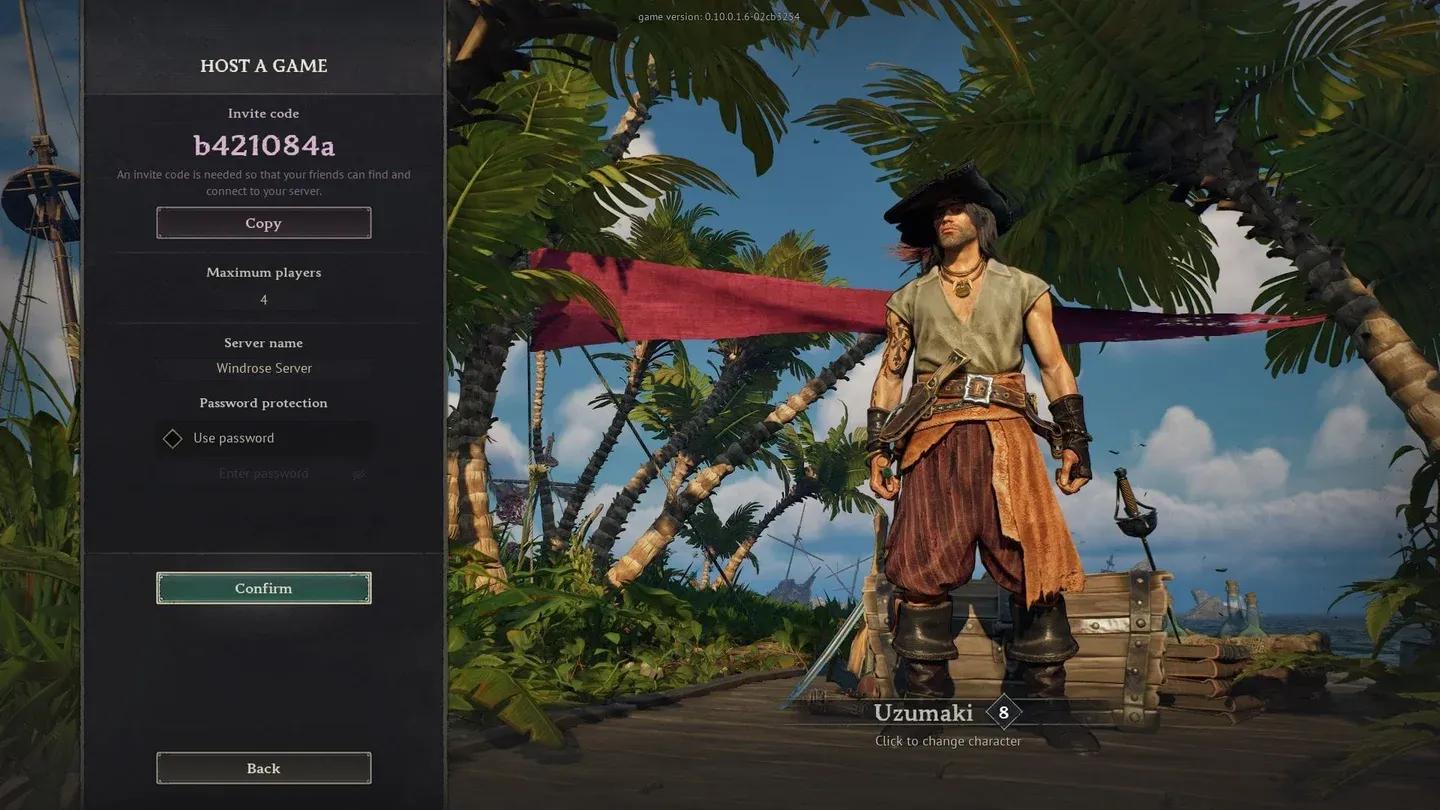
Windrose server creation screen


How do you join a friend's Windrose session?
If someone else is hosting, you don't need to do anything complicated. From the main menu, select the option to join an online game and enter the invite code your friend shared with you. That's the entire process for a standard session.
There's one extra step if the host has added a password to their server. You'll need that password in addition to the invite code before the game lets you in. Ask your host to send both at the same time to avoid the back-and-forth.
For more Windrose tips and other gaming guides, browse more guides on GAMES.GG.