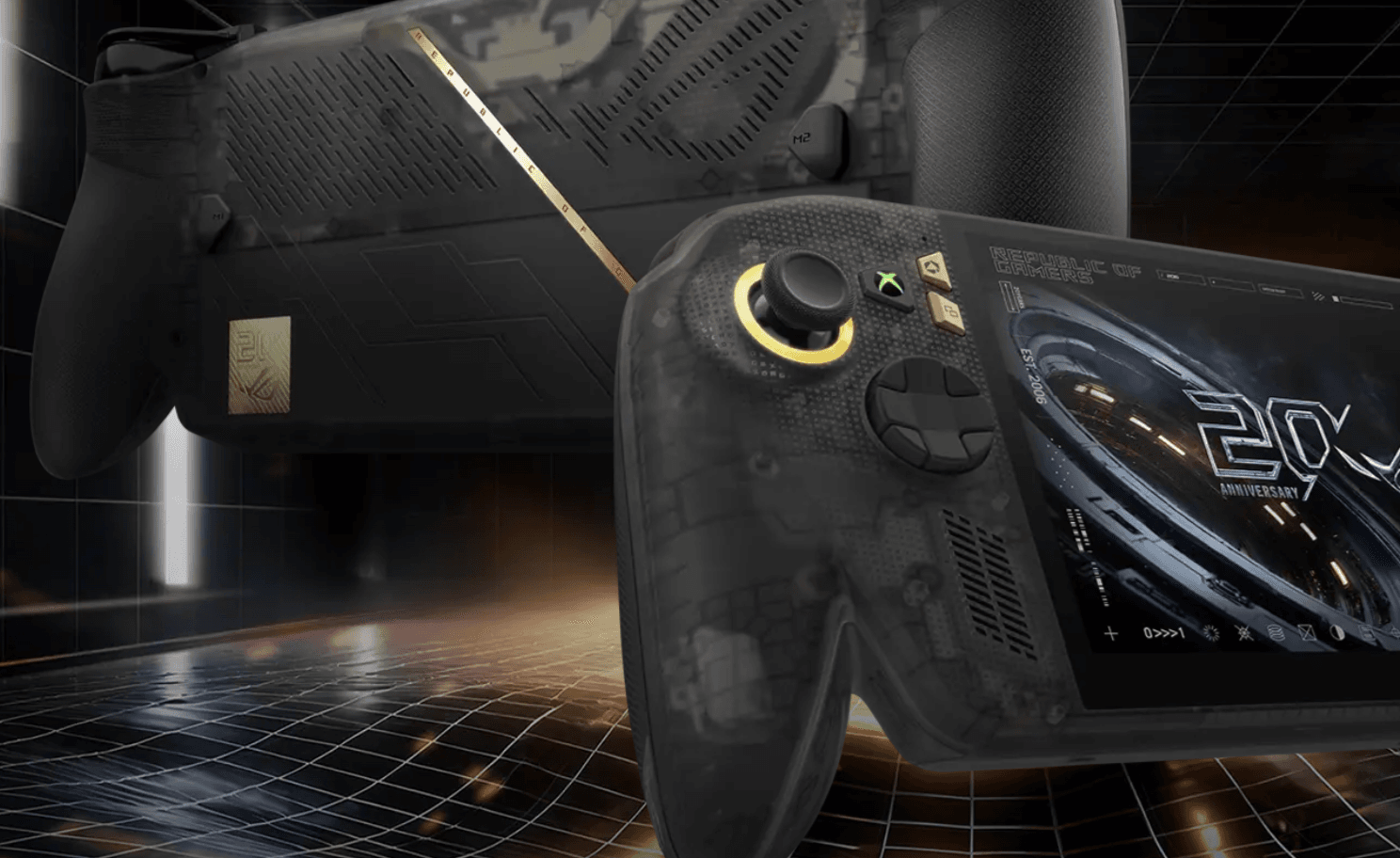

The Asus ROG Xbox Ally X20 just dropped, and the headline upgrade is exactly what the original needed: an OLED display. At $1,300, it costs $300 more than the ROG Xbox Ally X it replaces, and the question is whether that screen alone justifies the jump.
Short answer: mostly yes. Longer answer: it's complicated.
What the X20 actually adds over its predecessor
The screen is the story here. The X20 moves from an IPS panel to a 7.4-inch FHD OLED display with DisplayHDR 1400 certification, and the difference is immediately visible. Colors that looked flat on the original now pop. Dark scenes in games with heavy shadow work look genuinely different, because OLED blacks are real blacks, not backlit grey. The panel runs at 120Hz and bumps the screen size up slightly from the original, which required a marginally larger and heavier chassis to accommodate.
The rest of the hardware spec is unchanged: AMD Ryzen AI Z2 Extreme processor, 24GB RAM, and 1TB SSD. There's only one configuration available, which matches the top-end Ally X spec. Performance lands within about 4% of that device across tested titles, so if you've already seen those numbers, you know what to expect here.
What's new on the physical side is the aesthetic. The X20 is part of Asus ROG's 20th anniversary lineup, which means gold accents, a dark translucent plastic shell that lets you see the internal components, and a redesigned D-pad. That D-pad is a four-way/eight-way transforming design, a concept Microsoft originally introduced for the Xbox 360 back in 2010 before quietly retiring it. The implementation here has a catch: there's no indicator showing which mode it's currently set to, and the two positions feel nearly identical in hand. It's a neat idea that doesn't quite land in practice.
The joysticks have been updated to TMR (Tunnel Magnetoresistance) sensors instead of Hall Effect, which are theoretically more precise. In real-world play the difference isn't perceptible, but TMR should hold up well over time. Buttons and bumpers feel clicky and responsive. The grips are more pronounced than competing designs like the MSI Claw lineup, which some players will prefer and others won't.
One small but annoying detail: the included stand has a rubber pad on the interior that peeled off within the first day of use. At $1,300, that's a quality control miss.
Gaming performance and the chip gap problem
Here's the thing: the Z2 Extreme was already a step behind when the Ally X launched, and the competition has moved further ahead since. The MSI Claw 8 EX AI Plus runs an Intel Arc G3 that completely outpaces the AMD chip in the X20 on demanding titles. If raw performance at the top end is your priority, the X20 isn't the answer right now.
That said, a lot of games run well. A AAA title like Control Resonant, which makes excellent use of the HDR capability, hit around 40 frames per second, which is respectable for the handheld category. Turn-based and lighter games run without issue. The X20 is a solid device for mid-weight games and anything that doesn't demand maximum GPU throughput.
Battery life sits at roughly 3 hours under gaming load, consistent with the Ally X. HDR mode accelerates drain noticeably, so the device's power profiles automatically disable it when not plugged in. That's a sensible default, but worth knowing before you assume you'll always get that OLED experience on battery.
For players running titles that need careful tuning to hit 60 FPS, the X20 responds well to per-game optimization. The ROG Xbox Ally X settings guide for ChainStaff covers two power profiles at 900p and 1080p that transfer directly to the X20 given the identical hardware. Similarly, the Invincible VS performance settings guide was built and tested on this exact hardware family.
The Windows problem hasn't gone away
The X20 runs Windows 11 with the Xbox full-screen mode overlay, and the friction is still real. Initial setup required roughly 30 minutes of updates before the device was ready to use. The Xbox mode works well for titles in the Xbox ecosystem, but anything from the Epic Games launcher or other storefronts drops you back into Windows desktop mode. Bluetooth headset pairing still requires navigating keyboard-focused Windows settings menus.
Microsoft has made incremental improvements to memory management and the gaming layer, but the experience still feels like gaming software bolted onto a general-purpose OS rather than a purpose-built gaming handheld. Players coming from a Steam Deck or Nintendo Switch will feel the difference immediately.
The free month of Game Pass Ultimate included with the X20 is a nice touch, though existing subscribers can't stack it onto an active subscription.
Who the X20 is actually for
The X20 makes the most sense for players with game libraries spread across multiple storefronts. If your collection lives entirely on Steam, the value proposition is harder to justify against competitors. If you're deep into Xbox Game Pass, have purchases across Epic, GOG, and other launchers, and want the flexibility that only a Windows handheld provides, the X20 delivers that with a genuinely excellent screen attached.
The OLED upgrade is real and meaningful. The $300 premium over the Ally X is steep but defensible for the display quality alone. The chip is aging, the Windows experience remains imperfect, and the stand is embarrassingly cheap for a premium device. But the screen is excellent, the controls feel good, and the form factor works.
For players already optimizing their X20 setup, the performance fix guides cover stuttering and FPS drop solutions that apply across the ROG Ally hardware family, including the X20.