
Getting started in NHL 27 can feel overwhelming. Three control schemes, stamina systems, faceoffs, line changes, special teams, and a goalie to manage when you switch ends. The good news: the game gives you real tools to ease in gradually, and the core skills you build in the first few hours carry over to every mode you'll play. This guide covers everything you need to get comfortable on the ice fast.
What control scheme should you start with?
NHL 27 offers three distinct control layouts: Total Control, Skill Stick, and Hybrid. Choosing the wrong one for your experience level is the fastest way to make the game feel harder than it needs to be.
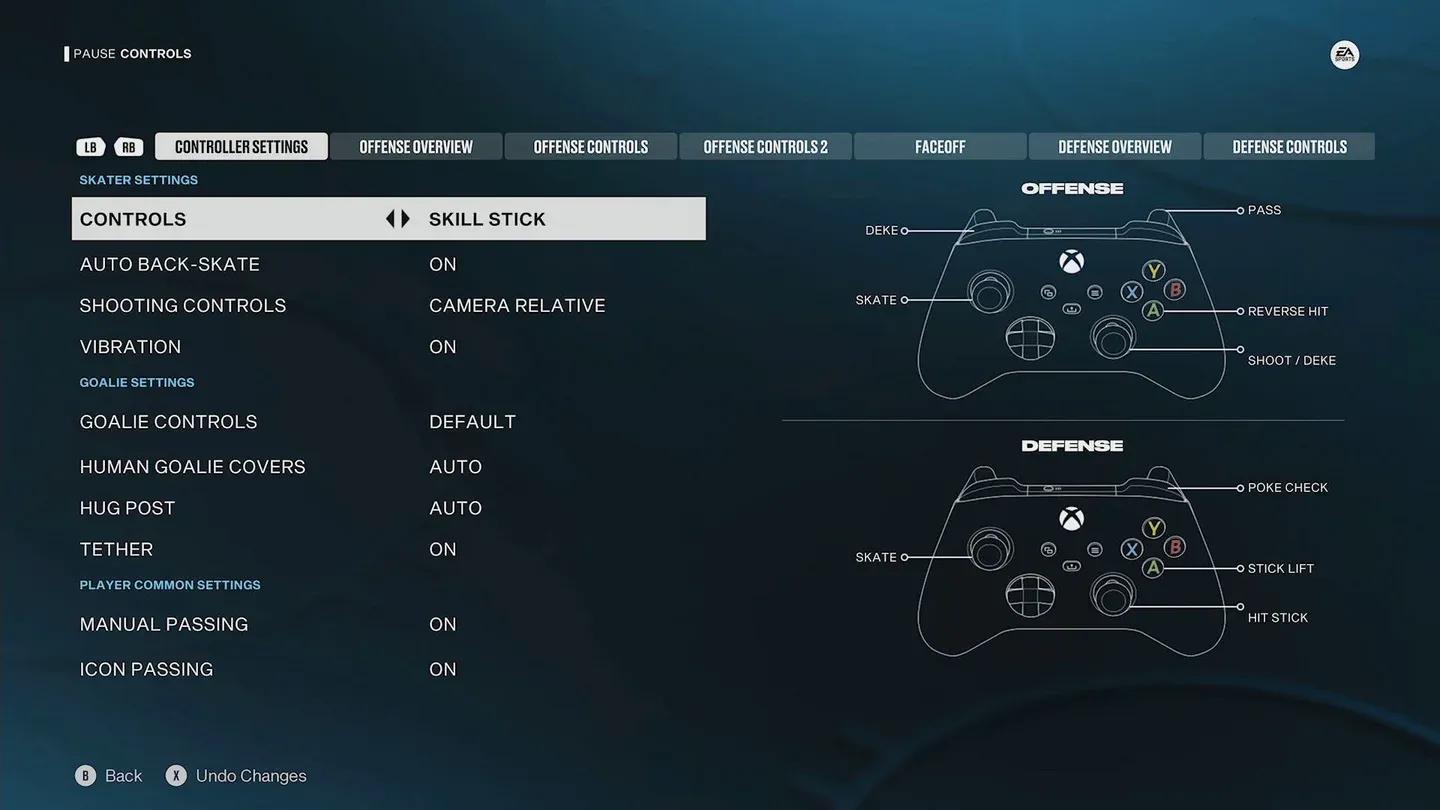
Picking your control scheme
| Scheme | Best For | Skill Move Access | Learning Curve |
|---|---|---|---|
| Total Control | Beginners | Button-based, limited variety | Low |
| Hybrid | Intermediate players | Mixed button and stick | Medium |
| Skill Stick | Veterans | Full stick-based, widest variety | High |
Total Control maps skill and defensive moves to button presses, which keeps things manageable when you're still figuring out where everything is. Skill Stick hands you far more options but requires deliberate stick inputs for nearly every move, so the gap between knowing the command and executing it cleanly is real. Hybrid sits between the two: easier than Skill Stick but with more variety than Total Control. If you've played previous NHL titles, Hybrid is worth trying immediately. If this is your first EA hockey game, start with Total Control and migrate later.
To check or change your layout, go to Settings > Controller Settings > Controls from the main menu.

Which modes are best for learning NHL 27?
Before jumping into competitive play, spend time in modes designed for low-pressure learning.
Free Skate
Free Skate puts you 1v1 against the goalie with no opponents, no clock, and no consequences. Use it to build muscle memory for shooting, passing, and skating pivots. Wristshots for accuracy, slapshots for power, one-timers when a teammate is set up during practice drills. Goalie controls work here too, so if you want to understand saves and positioning from the net's perspective, this is where to do it.
Play Now (offline)
Play Now drops you into a full game against AI. Set the difficulty to Rookie to give yourself room to breathe. On Rookie, the AI leaves more space, reacts slower, and lets you experiment with positioning and timing without getting punished for every mistake. As skills sharpen, bump the difficulty up incrementally rather than jumping straight to All-Star.
Cup Chase in HUT
Cup Chase inside Hockey Ultimate Team runs a shorter offline season against AI-controlled squads. Progress is entirely performance-based with no leaderboard pressure, making it a solid option once you want structure without the stress of online matchmaking.
How should you set up NHL 27 for beginners?
The settings menu does a lot of work here. Two options in particular are worth knowing about immediately.
Quick Settings
From the main menu, go to Settings > Quick Settings. Under Your NHL Experience, select I Am New To Sports Gaming, then set Difficulty to Rookie. This applies a bundle of beginner-friendly adjustments in one step without requiring manual slider work.
Gameplay Sliders
For more precise control, head to Settings > Gameplay Sliders. The adjustments below are worth making when starting out:
- General: Lower Game Speed to give yourself more time to react to plays
- General: Increase Fatigue Recovery so players tire less quickly
- Skating: Increase Player Acceleration and Skating Agility for more responsive movement
- Passing: Increase Pass Assist to reduce errant passes
- Puck Control: Increase Puck Control to hold possession longer after contact
- Goalies: Lower opponent Goal Reaction Time slightly to create more scoring opportunities
For camera setup, Overhead or Zone views give you better ice awareness than the default broadcast angle. The On-Ice Trainer under Visual Settings can be set to Light or Full to display recommended passes, shots, and positioning cues during live play.
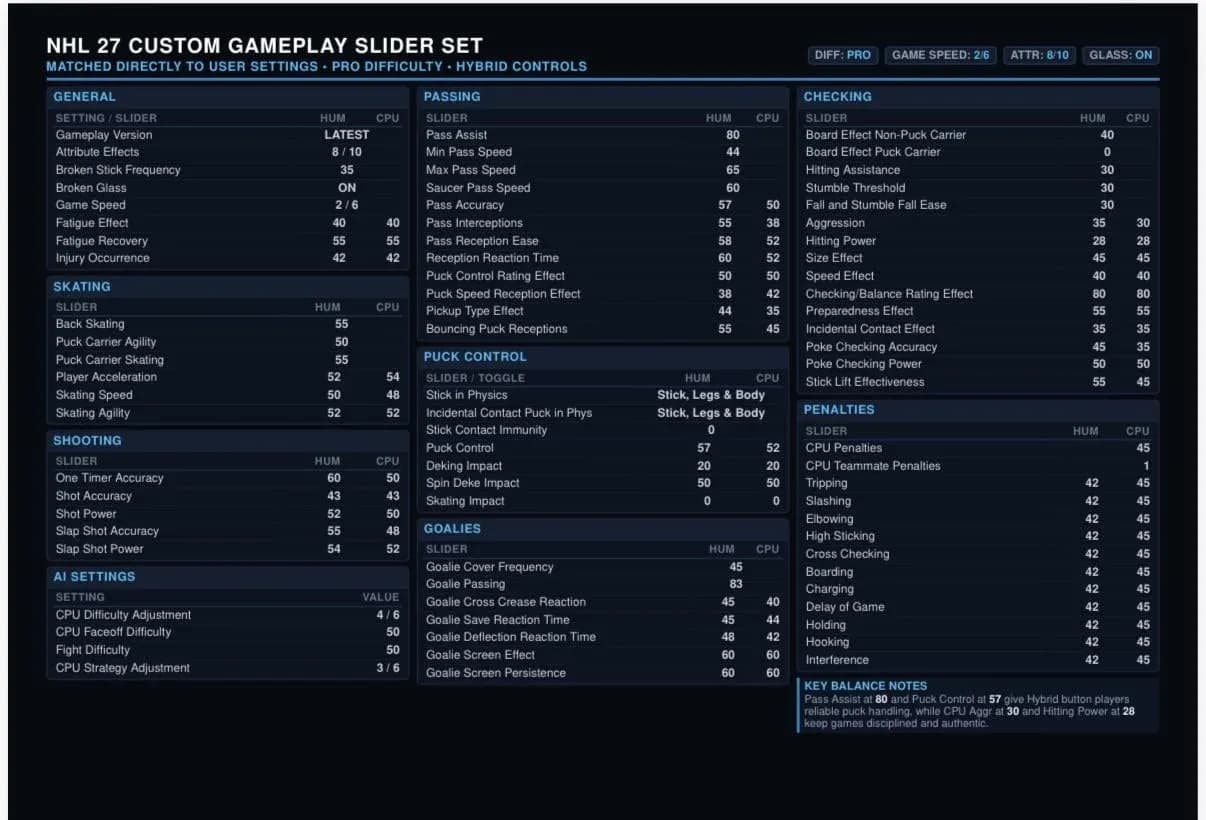
Tuning sliders for new players
Core hockey strategies every beginner needs
Skating and stamina
Every player has a visible stamina bar. When it drains, they skate slower, pass less accurately, and defend poorly. The instinct to hold the hustle button constantly is understandable but counterproductive. Use speed bursts only when they matter: chasing a loose puck, breaking toward the net, or closing a defensive gap. Short bursts preserve stamina far better than sustained sprinting.
Holding the Vision Control button lets you face the play without rotating your skater first, which is particularly useful for quick passes or shots when defenders are closing in.
NHL 27 also makes repeated pivoting more costly this year. Constantly spinning on the spot will leave you slower and more vulnerable to poke checks and body checks. Deliberate, purposeful movement is rewarded; spamming pivots is punished.
Passing and shooting with purpose
Pass to open space, not into traffic. Quick passes keep defenders guessing and create the kind of movement that opens shooting lanes. Three shot types cover most situations:
- Wristshots for accuracy in tight spaces
- Slapshots for power from the blue line
- One-timers when a teammate is already set up in position
Defense without penalties
Poke checks and stick lifts are your primary defensive tools, but spamming either will result in tripping or high-sticking penalties. Use them selectively. Keep a gap between your defender and the puck carrier so you have room to react, and switch to the closest defender early to cut off passing lanes before they develop.
NHL 27 has improved stick-on-stick collision detection this year, meaning a well-timed poke check against an opponent's stick feels more responsive and produces cleaner results than in previous entries.
Faceoffs
Faceoffs restart play after every stoppage. Watch your opponent's stick position for hints about their intended move, time your input as the referee drops the puck (too early or too late loses the draw), and rotate between backhand, forehand, and tie-up strategies to stay unpredictable.
Line management and strategy
Shifts that run too long tire out your players and slow the entire team down. Aim for 30 to 45 second shifts to keep everyone energized. Auto line changes work fine while you're learning; switch to manual once you're comfortable managing the bench yourself.
The strategy system in NHL 27 now includes Contextual Strategy Shifts, meaning AI teams adapt their approach based on score and game state. A team trailing late will pressure harder, crash the crease more, and shorten their bench. You should do the same: switch to a more aggressive forecheck when chasing a deficit, and tighten into a defensive structure when protecting a lead.
What mistakes do beginners make most often?
Three patterns show up constantly in early play:
Overusing speed bursts. Holding hustle continuously drains stamina fast and leaves you slow at the worst moments. Reserve it for situations where the burst actually changes the play.
Taking long shifts. Players who stay on the ice too long become liabilities. Rotating frequently keeps your team sharp and reduces errors in critical moments. The 30 to 45 second target applies across the board.
Ignoring special teams. Power plays and penalty kills require completely different tactics from regular play. On a power play, possession and patience beat rushed shots. On a penalty kill, positioning and clearing matter more than trying to win the puck back aggressively.
NHL 27's new systems and what they mean for beginners
A few changes in NHL 27 directly affect how new players should approach the game.
Cohesive AI means opponents now operate as coordinated units rather than independent players. On dump-and-chase plays, AI skaters retrieve the puck together with one player pressuring and others covering passing lanes. On defense, AI players read and cut off passing lanes more effectively. This makes the game feel more realistic but also means you can't exploit gaps the way older NHL titles allowed.
Difficulty scaling is more meaningful this year. On Rookie, AI leaves space and goalies are more beatable, giving you room to learn. On Superstar, opponents use faster double-teams and aggressive positioning, and goalies anticipate developing plays rather than reacting to shots. Familiar exploits like slow shots and cross-crease passes become less reliable as difficulty rises, so building proper offensive habits early will serve you well.
Goalie fatigue is a bigger factor now too. A fresh goalie is significantly harder to beat than a tired one. Sustained offensive zone pressure and multiple shots in sequence will wear down a netminder over time, though elite goalies can still produce desperation saves even when fatigued.
For a broader look at what NHL 27 adds beyond beginner systems, the full NHL 27 guides collection covers modes, team strategies, and advanced mechanics in detail.
Should you pick a real team you know?
Yes, and for a practical reason. If you follow real-world hockey, starting with a familiar team means you already have context for how individual players perform. You'll anticipate movement better, make smarter passes, and read the ice more naturally because you know the tendencies involved.
NHL 27 also gives every team its own Team-Specific Playbook, built using real NHL EDGE positional data. Some teams favor controlled zone carries, others prefer dump-and-chase. Starting with a team whose style matches how you want to play makes the early learning curve shorter. If a team's default playbook doesn't suit you, it can be changed in the menu.
NHL 27 sits firmly within the simulation games genre, and that identity shapes everything from AI behavior to how stamina and strategy interact. The depth is real, but the tools to ease into it are there if you use them.