
Gangs in Bridger Western are one of those features that look simple on the surface but trip up a surprising number of players. The process runs through Roblox's own Group system before anything happens in-game, and there's one easy-to-miss requirement that silently kills the whole setup if you skip it. This guide walks you through every step, from creating your Roblox Group to getting your Gang name showing up in the server.
What do Gangs actually do in Bridger Western?
Before spending 100 Robux on a Roblox Group, it's worth knowing what you're getting. Gangs are currently purely cosmetic. There are no gang-specific quests, no gang-versus-gang battles, no shared currency or item trading between members, and no ranking system tied to individual contributions.
The real practical value is identification. In chaotic server moments, especially when a Corpse Part spawns and everyone rushes to defend it, knowing which players are your allies can prevent friendly fire that costs you a Stand opportunity. Your Gang name appears as a visible label in the game world, so teammates are easy to spot at a glance.
Gang ID entry in M menu

What do you need before creating a Gang?
The Gang system in Bridger Western is built on top of Roblox's own Group (now called Community) infrastructure. You cannot create or join a Gang without being a member of a Roblox Group first. That means the setup happens in two stages: the Roblox side, then the in-game side.
Here's what you need before touching anything in Bridger Western:
- A Roblox account
- Membership in a Roblox Group (either one you create or one you join)
- The Group's description must contain the exact text bridgerwesterngang (one word, no spaces, no capitals required)
- The Group name must be 50 characters or fewer
- Creating a new Group costs 100 Robux; joining an existing one is free
The bridgerwesterngang keyword in the description is the single most common reason Gang creation fails. The game checks for it silently, so if it's missing, your request just doesn't go through with no clear error message.
How to create a Roblox Group for your Gang
If you don't already belong to a qualifying Group, here's how to set one up on the Roblox side.
- Log in to your Roblox account and navigate to the Communities page. On the website, find it in the left navigation panel. On the Roblox app, tap More at the bottom of the screen or in the left menu.
- Click Create and fill in the Name, Description, and Emblem fields.
- In the Description field, include the keyword bridgerwesterngang somewhere in the text. This is non-negotiable for the game to recognize your Group.
- For entry settings, Manual Approval gives you the most control over who joins.
- Click the purchase button to finalize. The Group costs 100 Robux and goes live immediately.
The Group name has a 50-character limit on the Roblox side, but the in-game Gang name itself has no character limit.
How to find your Roblox Group ID
Your Group ID is the string of numbers in the URL when you visit the Group's page in a browser. For example, in a URL structured like roblox.com/groups/12345678/YourGroupName, the ID is 12345678. Copy only that numerical portion.
How to create or join a Gang in Bridger Western
Once your Roblox Group is set up and you have the Group ID ready, the in-game steps are straightforward.
- Launch Bridger Western and wait until you've fully loaded into the game world.
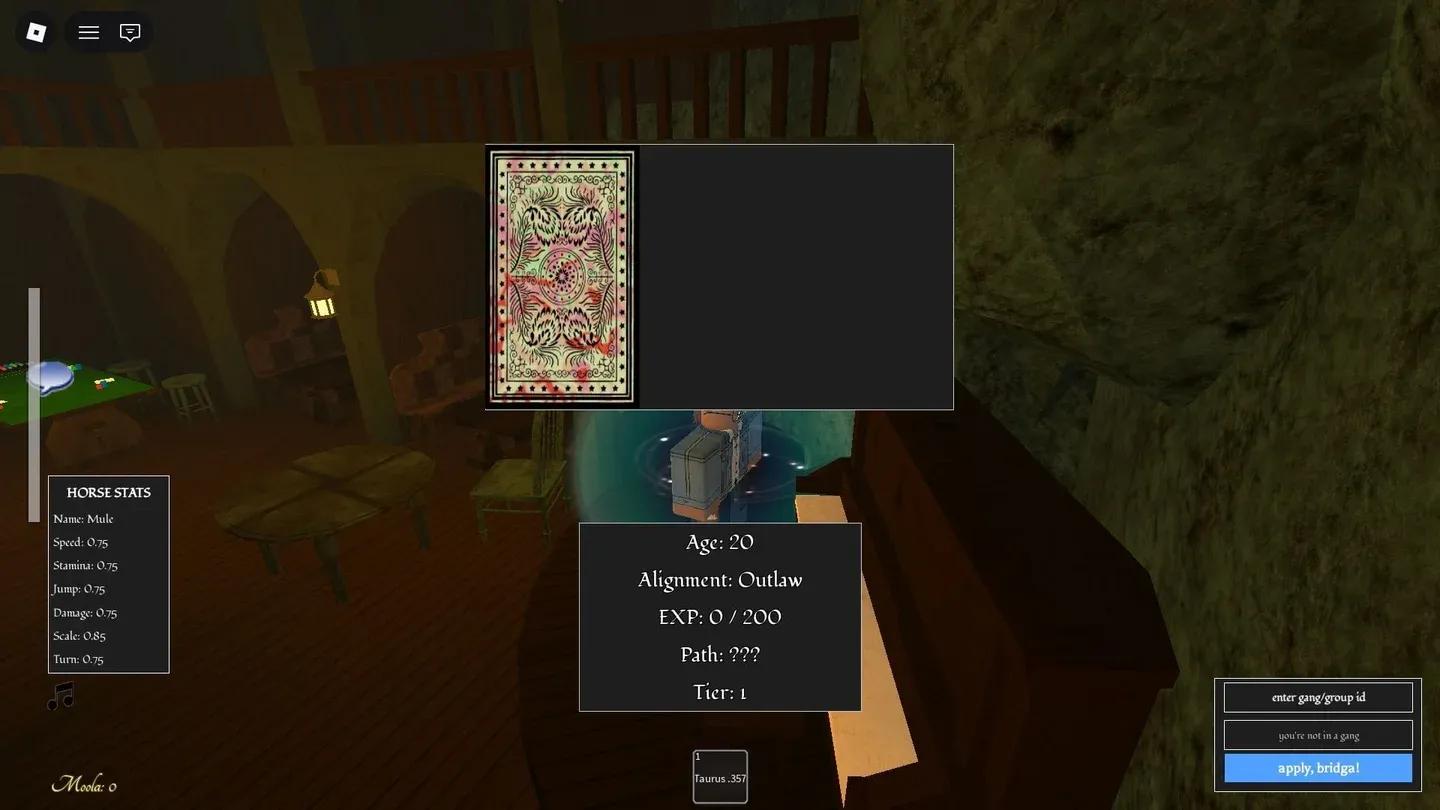
- Press M to open the in-game menu.
- At the bottom-right corner of the screen, find the text field labeled "enter gang/group id."
- Paste your Roblox Group ID into that field.
- Click "apply, bridga!" to confirm.
If no Gang exists for that Group yet, one gets created. If a Gang already exists for that Group, a join request is sent instead. There's no separate invite system; Gang membership flows directly from the Roblox Group roster. Being a member of the Group and entering its ID is all it takes.
For more Roblox guides and tips across every major game, browse the latest guides on GAMES.GG to stay current on what's worth your time.