
Shibuya codes give free Cursed Technique, Clan, Race, and appearance rerolls; start with 2500likes for the largest technique bundle listed below.
Shibuya is a Jujutsu Kaisen-inspired fighting RPG on Roblox, set 1,000 years after the original story. You climb sorcerer grades, complete trials, and practice combat through Tube Simulations. The November 2026 codes below cover several character changes, with separate instructions for redeeming through the in-game menu, chat, and character customization.
Shibuya codes for November 2026
Start with these six codes. Copy each string exactly as shown, and check its reward types before deciding which rerolls to use.
| Code | Rewards |
|---|---|
| 2500likes | 30 Cursed Technique Rerolls, 15 Clan Rerolls, 15 Race Rerolls, 1 Name Change Token, and 10 Cursed Energy Color Rerolls |
| sorryforsd | 3 Cursed Technique Rerolls |
| starseed | 5 Clan Rerolls and 5 Face Rerolls |
| 2000likes | 20 Locked Cursed Technique Rerolls, 10 Locked Clan Rerolls, 10 Locked Race Rerolls, 10 Locked Face Rerolls, 10 Locked Hair Color Rerolls, and 10 Locked Theme Rerolls |
| debuishere | 5 Locked Cursed Technique Rerolls |
| 10kmembers | 10 Locked Cursed Technique Rerolls, 5 Locked Clan Rerolls, and 5 Locked Race Rerolls |
Check the full reward names, including Locked, in the confirmation message after redeeming.

Which code should you redeem first?
Choose 2500likes first if you want technique, clan, and race rerolls from one claim. It also includes the only Name Change Token and Cursed Energy Color Rerolls in this table.
For technique-focused rewards, follow with 2000likes, 10kmembers, debuishere, and sorryforsd. Across the six listed codes, the technique rewards total 68 rerolls: 33 without the Locked label and 35 labeled Locked. These are reroll counts, not guaranteed results for a particular technique.
Use starseed when your next changes concern your clan or face. It does not include technique or race rerolls. For hair color and theme rewards, use 2000likes.
If you collect free rolls in multiple experiences, the Shigaku codes guide covers that game's rerolls and cash separately from Shibuya's rewards.
How to redeem Shibuya codes
Shibuya has code-entry routes in its in-game menu, chat, and character-customization screen. Choose the instructions that match the screen you are using.
Redeem through the in-game menu
The menu route lets you paste the code without adding a chat command prefix.
- Open Shibuya [Beta] in Roblox.
- Press M to open the menu.
- Find the Codes text box near the bottom-left corner.
- Paste a code from the table, such as 2500likes.
- Press Enter to submit it.
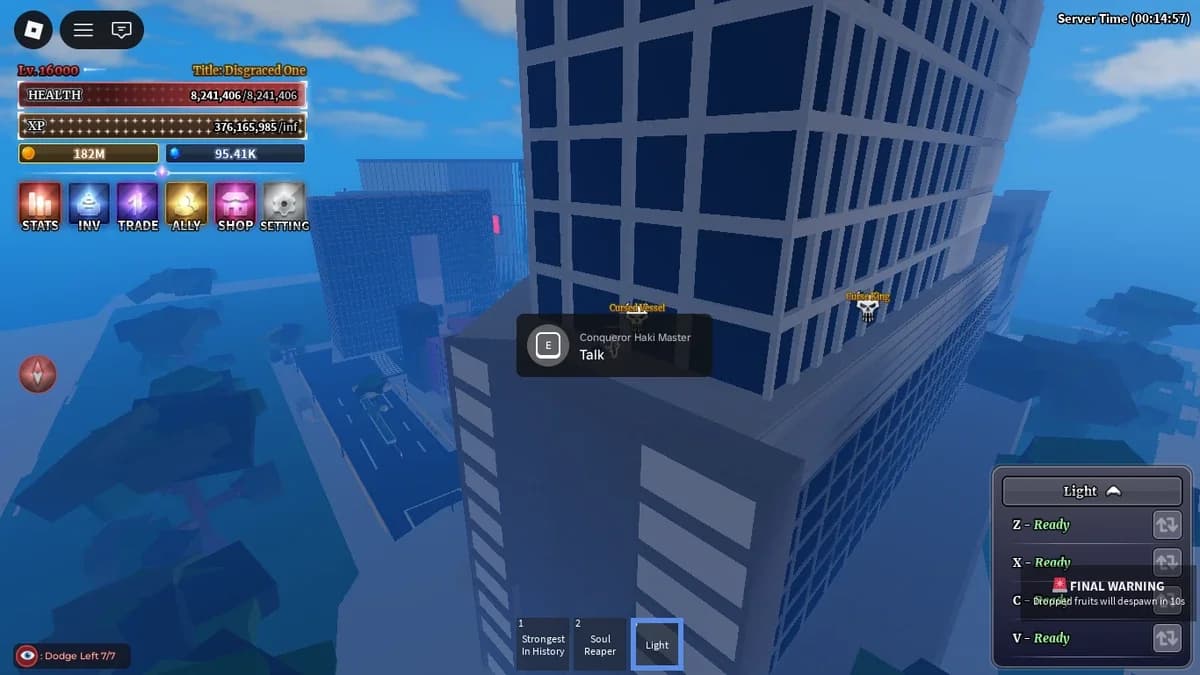
Find the menu code field
Redeem through chat
Chat uses a different input format from the menu. Add an exclamation mark directly before the code, with no space between them.
- Select the chat button in the upper-left corner.
- Type the code with its prefix, such as !sorryforsd.
- Press Enter to submit the message.
The exclamation mark belongs to the chat command, not the code string listed in the rewards table.
Redeem through character customization
The starting screen also provides a code field through the customization route:
- Select SLOTS.
- Open Customize.
- Find Redeem Code in the top-right area.
- Enter the code in the text box.
- Select Redeem to claim its rewards.
A successful redemption displays a message listing what you received. Read that message before moving to the next code so you can track which claims succeeded.
If you also play Jujutsu Shenanigans, the Jujutsu Shenanigans redeem codes guide covers its Cash and emote rewards alongside a separate redemption walkthrough.
Why a Shibuya code may not work
Check the entry format before treating a failed attempt as an expired code. The menu and chat methods do not accept identical inputs.
| Check | What to do |
|---|---|
| Spelling and capitalization | Compare the complete code with the table, including every letter and number. |
| Redemption route | Match your input to the menu or chat example above. |
| Server session | Leave Shibuya, rejoin, and try submitting the code again. |
| Expiration | Check the expired list below. Temporary codes can stop working without warning. |
Check similar-looking code names carefully
Milestone codes contain numbers that are easy to mix up. 2500likes, 2000likes, and 10kmembers are separate strings with different reward bundles. Copy the whole entry instead of changing the number in a code you have already typed.
If a fresh attempt still fails after rejoining, move to another code. Repeatedly submitting the same expired string will not make its rewards available again.
Expired Shibuya codes
These older codes are no longer redeemable for their original rewards:
- thanksforunderstanding
- 500likes
- 5000members
- mobilecontrols
- ctrerolls
- sorryforbugs
- sorryforlag
Changing capitalization or switching redemption routes does not restore an expired code.
For another experience with free reroll rewards, the Gakuran codes guide provides its own code list and redemption steps.
Codes for other Roblox games
All codes
Undertale Adventures X Codes for November 2026
Untitled Wheelie Codes for November 2026

+1 Anime Eyes Codes for November 2026
Ragdoll Playground Codes for November 2026
Fix My Phone Codes for October 2026
Roblox Fireworks Playground Codes for October 2026
Where to find new Shibuya codes
Check the Codes channel in Shibuya's official Discord server and announcements in Project M's Roblox community. New rewards can accompany game updates, bug fixes, and community milestones.
Developer code posts may include an expiration time. Read that deadline before saving a code for later, particularly when it accompanies a temporary event or compensation announcement.